The Products section
- contains information about products and consumables, their sales, and current stock levels;
- lets you view and manage product movements: purchases, sales, write-offs, and transfers between inventories.
Here you can also restrict access to reports:
- by specific transaction types (receipt, sale, services provided, or write-off);
- by management level: transferring items between inventories, creating/editing transactions, deleting transactions;
- to viewing reports only in the web interface or exporting them to Excel spreadsheets.
Setup examples
- A professional works in the company with their own materials, tracks them, and purchases them independently. In this case, they can create/edit receipt and write-off transactions. Give them access to the inventory stock balance report so they can restock materials on time, and allow Excel export if they plan to do custom sorting in these reports.
- If the professional should see only consumables information, you can grant access only to the consumables inventory and not grant access to the inventory with products intended for sale.
Setup
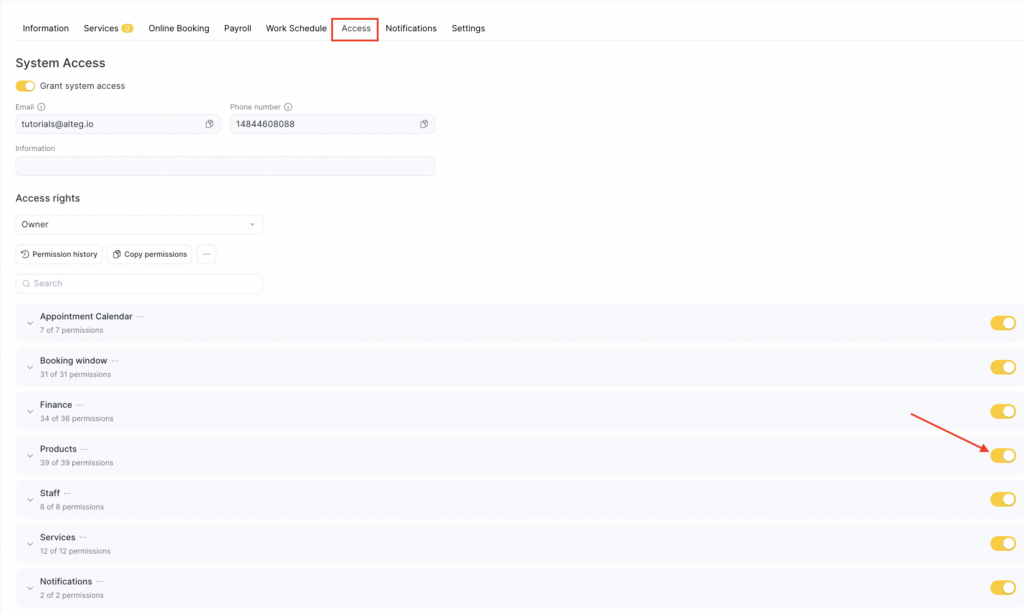
- Go to Team > Team members list (Administration mode), select the required team member, and open the Access tab.
- Find the required permission block and enable it using the toggle, then click the Products section name and turn on the specific permissions you want to grant to the team member.
- To save changes, click Save in the bottom-right corner.
More about each permission
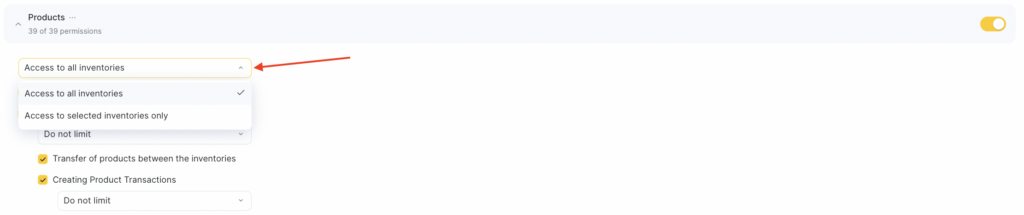
- Access to all inventories / Access only to selected inventories
Allows the team member to view data for all location inventories or only selected ones.
To restrict access, select Access only to selected inventories and choose the required inventories from the dropdown list.
- View product/consumable prime cost
Check this option so the team member can see the prime cost of products and consumables.
If unchecked, cost will be hidden.
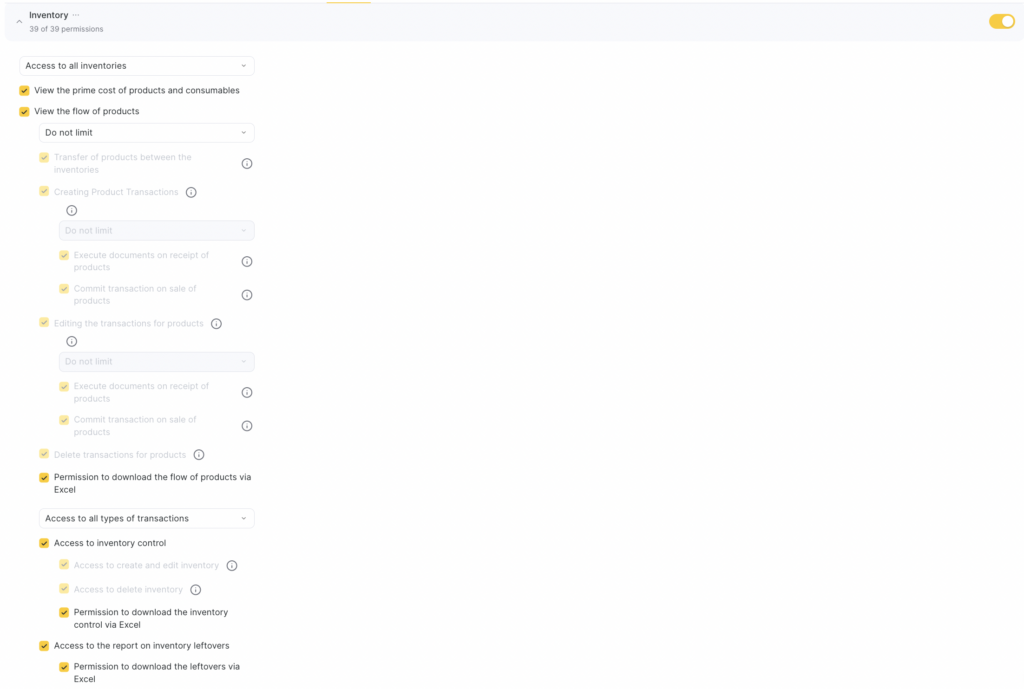
- View the flow of products
This is the core permission that opens access to a large set of inventory operations.
Specify the period for viewing product movements (inventory operations).
You can choose: 1 day to 6 months, no limits, or completely block viewing past days.
Transfer of products between the inventories — allows the team member to process transfers between inventories.
Creating product transactions — allows creating write-off inventory operations (this permission alone is not enough to process product sales and item flow).
Here, choose how far back the team member can create inventory operations (1 day to 6 months, no limits, or restrict past days).
- Record product receipt — allows creating receipt inventory operations.
- Record product sales — allows creating product sale inventory operations.
Editing the transactions for products — allows editing write-off inventory operations (editing sales and receipt operations requires a separate permission). Choose how far back the team member can edit existing operations.
- Execute documents on receipt of products — allows editing goods receipt operations.
- Commit transaction on sale of products — allows editing product sale inventory operations.
Delete transactions for products — allows the team member to delete any inventory operations.
Permission to download the flow of products via Excel
Allows exporting all or selected inventory operations to Excel.
To restrict export, select Access only to selected transaction types and choose the required types.
Access to inventory control
Allows the team member to view existing inventory counts in Products > Inventory count.
Access to create and edit inventory
Allows creating and editing inventory counts.
Access to delete inventor
Allows deleting inventory counts.
Permission to download the inventory control via Excel
Allows exporting inventory counts to Excel.
Access to the report on inventory leftovers — allows viewing the balance report in Products > Analytical Reports > Inventory Balances, or Analytical Reports > All Reports > Inventory > Inventory Balances.
Permission to download the leftovers via Excel — allows exporting balances to Excel.
Access to the sales report — grants access to the sales analysis report in Products > Analytical Reports > Sales Analysis, or Analytical Reports > All Reports > Inventory > Sales Analysis.
Permission to download the sales report via Excel — allows exporting the sales report to Excel.
Access to the report on write-off of the consumables — allows viewing material consumption analysis in Products > Analytical Reports > Consumables Analysis, or Analytical Reports > All Reports > Inventory > Consumables Analysis.
Permission to download the write off of the consumables report via Excel— allows exporting this report to Excel.
Access to the Write-offs Report — grants access to the product write-off analysis report in Products > Analytical Reports > Product Write-off Analysis, or Analytical Reports > All Reports > Inventory > Product Write-off Analysis.
Access to download the write-offs report in Excel — allows exporting the report to Excel.
Access to turnover report — allows viewing the inventory turnover report in Products > Analytical Reports > Turnover Analysis and Analytical Reports > All Reports > Inventory > Turnover Analysis.
Permission to download turnover report via Excel — allows exporting the report toExcel.
Access to product management — grants access to Products > All Products for viewing. Additional permissions are required for full management.
Access to creating products — allows the team members to create new products.
Access to product changes — allows editing products. Access can be limited to specific fields: name, SKU, barcode, category, sale price, cost price, units of measurement, desired and critical stock levels, weight, comment.
Access to archiving and restoring products — allows archiving products and restoring them.
Access to removal of products — allows deleting products from Products > All Products.
Important
Deleted products cannot be restored.