
If you have questions about paying for or renewing your subscription, you can reach your personal manager or the Altegio support team directly from the app. Here’s where to find their contacts and what to send so your request is handled quickly.
Where to find your manager’s contacts
Click the question-mark icon (?) in the bottom-left corner of the screen, under the yellow mode switcher. This opens the Have a question? window (Write to us).
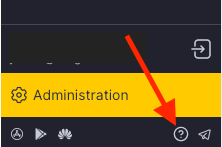
What’s in the window
- Your personal manager’s contact details — name, phone, and email.
- A chat with the support team via Telegram or WhatsApp — switch between the tabs and scan the QR code or open the chat.
- Quick links to the Knowledge base, YouTube tutorials, and Altegio academy.
- Your Location ID, shown at the top of the window.
Include your Location ID
When you write to your manager or support about payment or renewal, include your Location ID so they can find your account quickly. It is shown at the top of the Have a question? window. In the mobile app, open the side menu and go to Support to see the Location ID at the top. You can also find it in other ways — see How to find out your location number (ID) in Altegio.