
Если у вас есть вопросы по оплате или продлению подписки, вы можете связаться со своим персональным менеджером или командой поддержки Altegio прямо из приложения. Ниже — где найти их контакты и что приложить к обращению, чтобы его обработали быстрее.
Где найти контакты менеджера
Нажмите на иконку со знаком вопроса (?) в левом нижнем углу экрана, под жёлтым переключателем режима. Откроется окно «Есть вопрос?» («Напишите нам»).
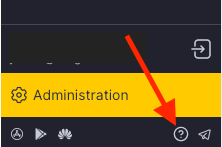
Что есть в этом окне
- Контакты вашего персонального менеджера — имя, телефон и email.
- Чат с командой поддержки через Telegram или WhatsApp — переключайтесь между вкладками и отсканируйте QR-код или откройте чат.
- Быстрые ссылки на Базу знаний, видео на YouTube и Altegio academy.
- Ваш Location ID — показан вверху окна.
Укажите свой Location ID
Когда пишете менеджеру или в поддержку по оплате или продлению, укажите свой Location ID, чтобы ваш аккаунт нашли быстрее. Он показан вверху окна «Есть вопрос?». В мобильном приложении откройте боковое меню и перейдите в раздел Support (Поддержка) — Location ID показан вверху. Найти его можно и другими способами — см. Как узнать номер (ID) своей локации в Altegio.