

ChatRex is an AI chatbot builder and virtual manager. It answers clients in messengers, advises them on services and prices, books, reschedules and cancels visits in Altegio, and brings in a team member only when live help is needed.
Website: chatrex.pro
Account: app.chatrex.pro
What ChatRex can do
- replies to clients in 3–10 seconds, 24/7 or on your own schedule
- works on WhatsApp / Telegram / MAX / Avito and in the online chat on your website
- knows your Altegio schedule, services and staff, and takes over the booking
- advises on services, prices, specialists and promotions
- qualifies the enquiry and carries the conversation through to a result
- hands complex cases over to a manager, with the context
- assembles the bot from a ready-made scenario: greeting, FAQ, objection handling
- connects to CRMs and other systems: amoCRM, RetailCRM, MoySklad and others
- shows chats and conversation analytics
How it works with Altegio
- Install ChatRex from the Altegio marketplace, or connect Altegio from inside ChatRex.
- Add actions for services, the schedule and appointments.
- Connect the channels you need and assign them to the bot.
- Clients write in a messenger, the bot replies and creates the visit in Altegio.
A separate user may appear in Altegio: ChatRex — an AI-based chatbot.
See how the bot works
On the website and in the service you can:
- sign up and get 7 days of full access with a test balance
- launch a demo chat and check the bot’s answers
- download the PDF guide and take the “Is an AI bot right for you” test
- book a demo of the service
Useful links:
- website: chatrex.pro
- sign-up: app.chatrex.pro/signup
- Telegram: t.me/ChatRexAi_bot
- WhatsApp: wa.me/79100002668
Important note about WhatsApp
WhatsApp is connected in ChatRex by QR code through Linked devices. This is the regular WhatsApp / WhatsApp Business app, not the official WhatsApp Business API (WABA).
Once connected, do not log out of the linked device. If the connection drops, scan a new QR code in the integration settings.
Instructions: docs.chatrex.pro/integrations/channels/whatsapp
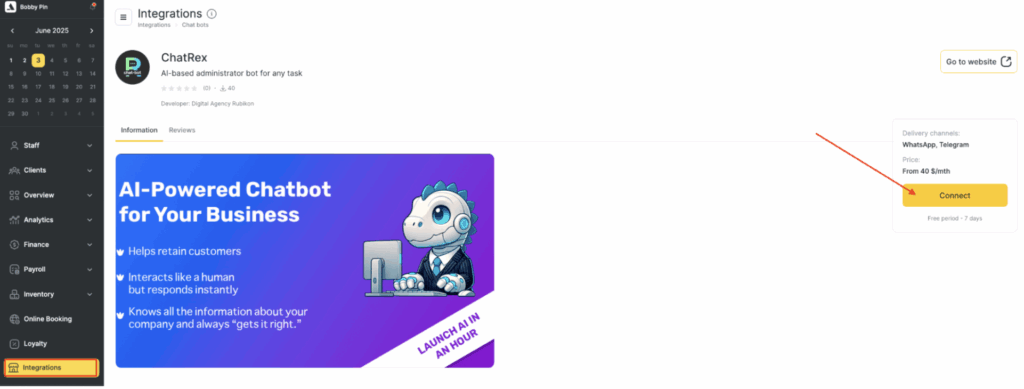
How to connect in Altegio
- In Altegio, switch to Administration mode.
- Open Integrations and find ChatRex in the AI Apps & Assistants category or through the search.
- You can also open the app card via the direct link.
- Click Connect.
- In ChatRex, connect Altegio and the channels, then check a test appointment.
More about Altegio: docs.chatrex.pro/integrations/records-systems/altegio
Availability
ChatRex is available in all countries except Ukraine.
Pricing
Trial period: 7 days, no card required, with a test balance.
- AI bot — from $40/month + Integration — from $12/month
There are discounted 3 / 6 / 12-month payment options.
Check the current prices on the website and in your account before paying.
Frequently asked questions
What is ChatRex?
An AI chatbot builder: it answers clients, draws on what it knows about your company, and performs actions in external services — including booking in Altegio.
Which channels does it work with?
WhatsApp / Telegram / Avito / online chat on your website.
Is Altegio required?
To book into the salon calendar you need an integration with Altegio or another booking system. ChatRex also works with CRMs and other data sources.
Is this WhatsApp WABA?
No. The connection is made by QR code through Linked devices.
How long does it take to launch?
About 10–15 minutes to get started on the website. The bot is first assembled from questions about your business, then the channels and the CRM are connected.
Where can I find the instructions?
In the documentation: docs.chatrex.pro, in the quick-start and integrations sections.
Contacts and support
WhatsApp: wa.me/79100002668
website: chatrex.pro
support: chatrex.pro/support
email: [email protected]
phone: +7 (812) 389-63-00
Telegram: t.me/ChatRexAi_bot