
Monobot.ai connects a voice and chat AI agent to a selected Altegio location. The agent replies to clients 24/7 in chat and by voice, answers questions about services, prices and staff, checks available slots, then creates, reschedules or cancels appointments directly in the Altegio journal.
Service promo video: YouTube
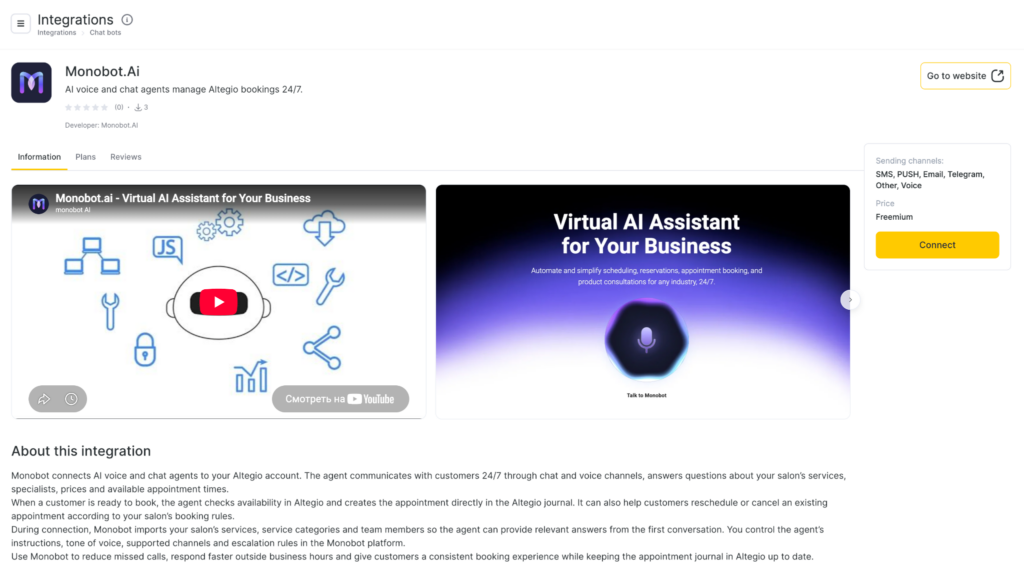
Developer: TRING, Inc. (USA). Website: monobot.ai.
The integration is built for one location: one monobot.ai agent connects to only one Altegio location. Dialogues then use the services, staff and schedule of that branch.
What monobot.ai can do
Every Altegio booking function is available on every monobot.ai plan. The plan changes usage volume and per-operation rates, not whether the agent can write to the journal.
With Altegio booking the agent can:
- answer questions about services, service categories, prices, duration, staff and open slots of the connected location;
- pick a service, specialist, date and time from the live Altegio schedule;
- create a new appointment in the Altegio journal: service, staff, time, client name and phone;
- reschedule an existing visit to another time or specialist;
- cancel a visit at the client’s request, following the location’s booking rules;
- find existing appointments so the client can check, move or cancel them;
- pass a comment to the Altegio visit when the client leaves a note;
- pass data for Altegio SMS or email notifications when those alerts are already enabled at the location.
In the conversation the agent can:
- take requests 24/7, including nights, weekends and hours when the receptionist is offline;
- chat on the website, in Telegram and in Instagram;
- speak on a browser call, a phone call or SIP;
- follow the tone and instructions you set in monobot.ai: how to introduce itself, what it may promise, when to escalate;
- hand the conversation to a person when the client asks or the request is outside the scenario;
- talk in the client’s language. The agent can be configured for more than 20 languages.
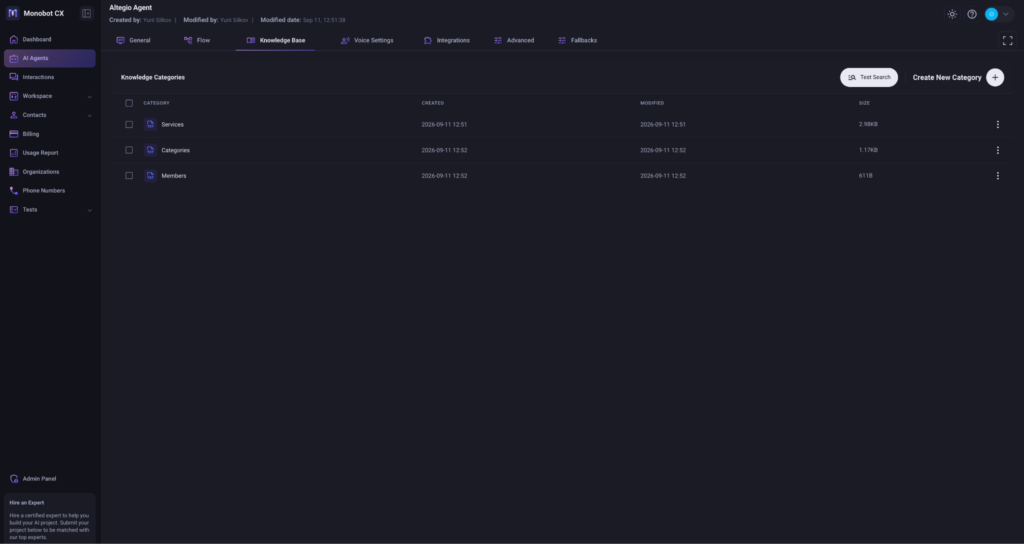
After connection, three knowledge categories are created automatically:
- Services: services, prices, duration and available staff. Used for advice and booking;
- Categories: service categories of the location. Used to understand the request;
- Members: staff, specializations and internal IDs. Used to pick a specialist and create the visit.
You can also add your own location facts: address, directions, contacts, cancellation rules, promotions and answers that are not stored in Altegio. That extra text does not replace the journal data.
How it works with Altegio
- You connect monobot.ai from the Altegio Integration Hub to the right location and approve access.
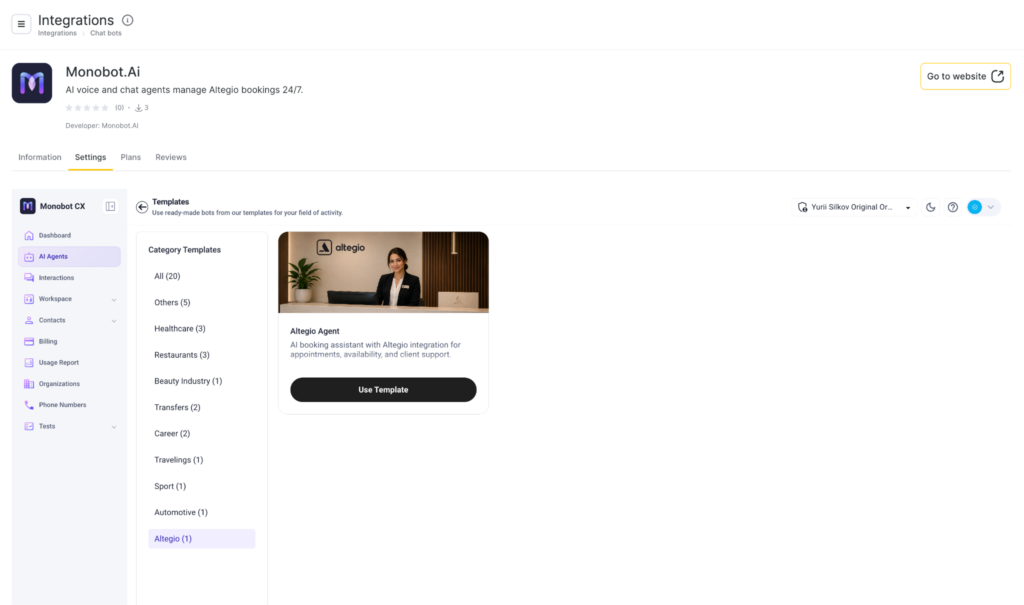
- In Monobot.ai you pick an existing agent or create one from the Altegio Agent template.
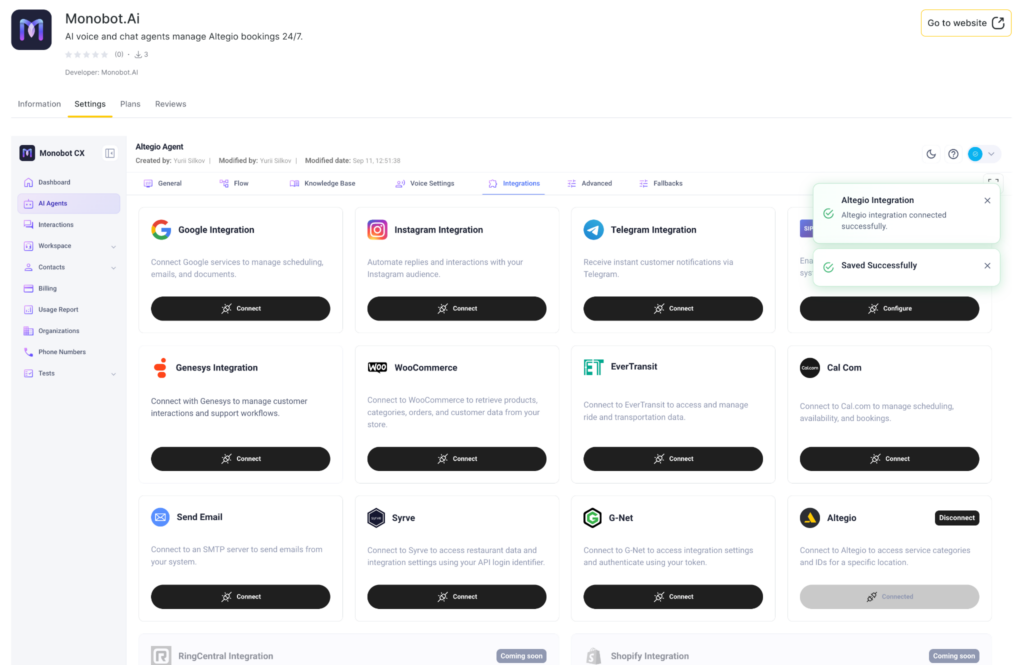
- On the agent’s Integrations tab you click Connect next to Altegio and wait for the sync to finish.
- monobot.ai imports services, categories and staff into the agent knowledge base.
- The client writes in chat, Telegram, Instagram or calls. The agent classifies the request: a question, a new booking, a reschedule or a cancellation.
- For a new visit the agent reads open slots from Altegio and offers available times.
- The client confirms the service, specialist and slot. The appointment appears in the Altegio journal.
- If the case is complex or the client asks for a person, the conversation can be handed to a staff member.
Open slots come from the Altegio schedule. Staff hours, service duration and online booking settings at the location must be up to date. If a slot is taken, the agent should offer other times instead of a busy one.
One agent, one location
One Monobot.ai agent works with only one Altegio location. For another branch, create another agent and connect that location. This keeps services, prices, staff and schedules from mixing
Start the connection from the Altegio location the bot should serve. If you have several branches, repeat the setup in each one with its own agent.
How location data is refreshed
Monobot.ai syncs services, categories and staff once a day. If you changed the price list, added a specialist or a category and need the update sooner, request a resync from monobot.ai support or click Connect again on the Integrations tab. You do not need a new bot or a new scenario.
If you connect Altegio again, the agent updates the existing Services, Categories and Members categories. It does not create duplicates.
Who it is for
- beauty salons, barbershops, studios and other businesses that book in Altegio;
- clinics and services that book clients to a specialist;
- teams with many repeat questions about services, prices and availability;
- locations that miss calls and messages in the evening, at night and on weekends;
- branches that want both chat and voice in one agent.
How to connect
Integration Hub card: app.alteg.io/e/mp_1508_monobotai/
1. In Altegio switch to Administration.
2. Open Integrations and find monobot.ai under AI Apps & Assistants or via search.
3. Click Connect.
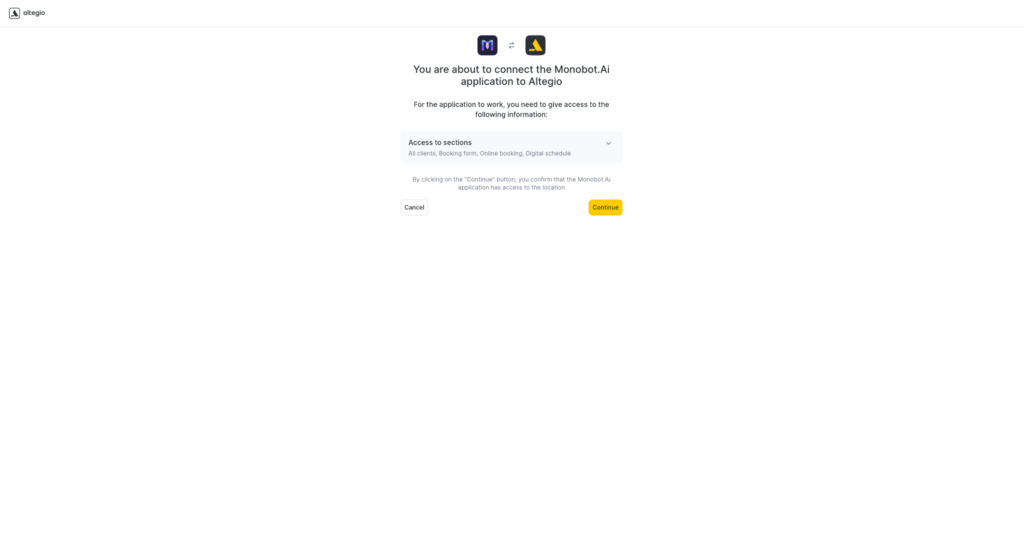
4. Altegio will show the sections the app needs. Click Continue to allow access for the selected location.
5. After you confirm, monobot.ai opens inside Altegio. If you are already signed in to monobot.ai in this browser, your account opens. If not, sign in or create an account and confirm the email.
6. If you already have a suitable agent, open AI Agents and select it. If not, open the Altegio Agent template and click Use Template. This creates an agent with basic salon booking flows.
Then add your own location facts: address, phone, directions, cancellation rules and how the agent should introduce itself. For advanced flows contact monobot.ai support. Plans include partner specialist onboarding hours.
7. Open the agent, go to Integrations, find Altegio and click Connect. Wait for the success message. Do not close the page until sync finishes.
8. Check the agent Knowledge Base. You should see Services, Categories and Members for the selected location.
9. Connect client channels: website widget, Telegram, Instagram, phone or SIP.
10. Test the agent in monobot.ai: chat and a voice test call. Free test units work inside the dashboard only.
11. When booking flows are verified, choose a plan on monobot.ai and put the widget or phone number live for clients.
Channels
For Altegio clients the partner lists:
- website chat: embed a script, then set colors, position, auto-open and logo;
- browser voice call: a button or voice widget on the site, no phone number required for the client;
- phone: a monobot.ai number or calls through the partner telephony;
- SIP: connect the agent to your PBX;
- Telegram: client chats and staff alerts to a connected account;
- Instagram: Direct replies. A Business or Creator account is required; a personal profile usually will not work.
Monobot.ai also has SMS, SMTP email and an operator workspace with live suggestions, call summaries and human handoff. Those are configured in the partner cabinet, not on the Altegio app card.
How to put the agent in front of clients:
- chat and voice widgets: in AI Agents open the agent menu, then Widget Configuration, copy the script and paste it on the site before the closing body tag;
- you can build a demo page in the same section and share it before publishing on the main site;
- Telegram and Instagram are connected on the agent Integrations tab;
- phone and SIP are set in monobot.ai telephony. Ask monobot.ai support how to point your current salon number to the agent: it depends on your PBX.
Languages
The agent can be set up for more than 20 languages: English, Russian, Spanish, Ukrainian, French, Italian, German, Greek, Bulgarian, Korean, Dutch, Hindi, Japanese and Portuguese. The agent voice is chosen in the voice settings.
Pricing
From $29 per month. See current plans, package limits and chat or voice rates on monobot.ai/pricing.
The monobot.ai dashboard includes free test units: 100 chat replies and 10 voice minutes, no credit card, inside the admin only. The public website widget and phone line do not run without a paid plan.
The plan affects included usage and per-operation rates, not whether the agent can write to the Altegio journal. Chat is billed per agent reply; voice is billed per minute of conversation.
FAQ
How do I connect monobot.ai?
Open the card in the Altegio Integration Hub, click Connect, approve location access, sign in to monobot.ai, pick or create an Altegio Agent, then click Connect next to Altegio on the Integrations tab. Wait for the sync and check Services, Categories and Members.
Do I need technical skills?
No. The base flow comes from the Altegio Agent template. You do not write code. The widget script is copied from the cabinet. Custom branches, SIP and unusual rules are easier with monobot.ai support.
Does the agent book into Altegio?
Yes. A new visit appears in the journal of the connected location: service, staff, time, client name and phone. Reschedule and cancel also change the Altegio journal, not a separate monobot.ai calendar.
Can the agent reschedule or cancel?
Yes. That is part of the integration. The agent finds the existing visit and changes the time, the specialist or cancels it. The client usually needs to give a name and phone so the visit can be found. If data is missing or the location rule blocks cancellation, the agent asks again or hands over to a person.
Can I connect several locations?
Yes. Use a separate monobot.ai agent for each Altegio location. One bot does not serve several branches at once.
Do I have to create a new agent?
No, if you already have a suitable agent: select it in AI Agents and connect Altegio. If you do not, use the Altegio Agent template.
Who configures the agent?
You set instructions, tone, channels and escalation rules in monobot.ai. The template already knows how to advise and book. monobot.ai support helps with complex flows. Paid packages include those specialist hours.
When does the agent get services and staff?
Right after Connect on the Integrations tab. After that, data refreshes once a day. You can ask the agent to pull a fresh copy sooner.
What if prices or staff changed today?
Ask the agent to refresh data from Altegio, or wait for the daily sync. You do not need to reinstall the app.
Why should I keep the page open during Connect?
The first sync imports services, categories and staff. If you close the window too early, the knowledge base may be incomplete. Wait for the success message and check the Knowledge Base.
What if Knowledge Base categories are empty or missing?
Check that Connect was clicked on this agent and that you approved the correct location. Connect again and keep the page open. If the categories still do not appear, contact monobot.ai support.
Where is the service available?
The Integration Hub card is available in every country where the Altegio Integration Hub works. monobot.ai may still have regional limits. If connection or payment fails, ask the partner.
Where do I pay?
In monobot.ai. The Altegio Integration Hub is used to connect the integration. Plans and rates: monobot.ai/pricing.
Is there an Altegio Integration Hub trial?
The Altegio card has no trial days. monobot.ai gives free test units in the cabinet: 100 chat replies and 10 voice minutes, no card, admin panel only. A public widget and a phone number need a package.
Does the agent replace a receptionist?
Partly or fully, depending on volume. Typical questions, booking, reschedule and cancel can stay with the agent. Complaints and special requests are better for a person. monobot.ai can hand the conversation over and has a workspace with live suggestions.
Can a person take over the chat or call?
Yes. A conversation or call can be transferred to a staff member. In the workspace the operator sees the context and can continue.
Which languages does the agent speak?
More than 20, if you enable them in the agent settings. Russian and English are in the partner list. Set the language for your audience and test it.
Does the agent work in WhatsApp?
The current Altegio integration materials list website chat, Telegram, Instagram and voice. WhatsApp is not listed. Ask monobot.ai support if that channel is required.
How do I put chat or voice on the website?
Open Widget Configuration for the agent, copy the chat or voice script and paste it on the site. You can set colors, position, auto-open and logo. Test on the monobot.ai demo page first.
Can we keep our current salon number?
Yes, the salon number stays yours. The agent is connected through a monobot.ai number, call forwarding or SIP. Ask monobot.ai support for the scheme that matches your PBX. Do not change live telephony until the booking test works.
What do Instagram and Telegram need?
Instagram: a Business or Creator account and messaging access. Telegram: connect it on the Integrations tab. After that, send a test message and confirm the visit still lands in the same Altegio location.
Which client data is required to book?
Minimum: name, phone, service, a specialist or an “any available staff” rule, date and time. Email helps if the location sends email alerts. A visit in Altegio usually cannot be created without a phone number.
Is an Altegio client card created?
The agent sends the name and phone to the journal. Altegio then handles the client by its own rules. If the client already exists with that phone, the visit should appear in their history. If it does not attach, check the phone format and contact support.
Can the client book with “any specialist”?
Yes, if the scenario is set that way and Altegio has a free staff member for the service. The agent can first list staff for the service, then offer slots.
Can one visit include several services?
The base integration description covers one service, specialist and slot. Test a multi-service visit on a trial location or ask monobot.ai support how the Altegio Agent template handles it.
Does the agent see resources, rooms or products?
The sync includes services, service categories and staff. Resources, stock and memberships are not described in the integration materials. Do not promise certificate write-off through the bot until you have tested it on your location.
Where do prices and duration come from?
From Altegio services stored in the Services category. If the chat price does not match the journal, refresh the data and check that Altegio is using the correct service, not an old hidden one.
Will the agent offer services that should not be booked online?
The agent uses the services imported from the location. If some items must stay internal, hide them in Altegio or ask monobot.ai support to exclude them from the scenario.
How does the agent know opening hours?
Open slots come from the Altegio schedule. Also add address, days off, directions and late-arrival rules to the knowledge base so advice and booking stay consistent.
Does monobot.ai send visit reminders?
The integration does not advertise a separate monobot.ai reminder at 24 and 2 hours. Reminders can still go out from Altegio if SMS or email notifications are enabled and the agent passed those flags when creating the visit. Check your Altegio notification templates.
Is there prepayment or no-show protection?
Prepayment is not part of the described Altegio integration. If you need a pay-before-visit link, ask monobot.ai. Do not treat it as part of the default template.
What does the receptionist see in Altegio?
A normal visit in the location journal: service, staff, client, time. The team can then mark it, move it manually or message the client like any other appointment.
What does the team see in monobot.ai?
Chat and call history, integration status, the knowledge base, voice and channel settings. The workspace shows live conversations, suggestions and summaries.
How are conversations billed?
Chat is billed per agent reply. Voice is billed per minute. Rates depend on the plan. On Starter, $200 is about 1,600 chat replies or 741 voice minutes if you spend the package on only one type of usage.
What if the package runs out mid-month?
Usage may continue as overage at the plan rates, or you may need to top up. Confirm the exact behavior with monobot.ai support before you put a live number on the agent.
Do I need a card to test?
Not for free units in the cabinet. You need a plan for a public widget, a phone number and live traffic.
Can I change the plan?
Yes, inside monobot.ai. Higher plans have lower chat and voice rates. You do not change a tariff in Altegio: the card is only for connection.
Is it safe to grant location access?
You approve only the sections Altegio shows on the permission screen. The agent uses them to read services, staff and slots and to write visits. The partner privacy policy is on the monobot.ai website. You can disconnect the app on the app card and on the agent Integrations tab.
What if the visit does not appear in the journal?
Check that the agent is connected to the right location, the sync finished, the staff member and service exist, the slot was free and the client phone was sent. Open the conversation in monobot.ai for an error or a confirmation. If data was sent and the visit is still missing, contact monobot.ai support with the time of the request and the location.
What if the agent offers the wrong time?
Check the staff schedule and online booking in Altegio, refresh the agent data and verify the location time zone. Do not hard-code times in the prompt if those times should come from the journal.
How do I disconnect the integration?
On the agent Integrations tab click Disconnect next to Altegio. You can also disable the app on the Altegio card. New visits from that agent will stop. Existing Altegio visits stay in the journal.
Where is the partner documentation?
Start here: docs.monobot.ai. Webinars: monobot.ai/library/webinars. Channel: YouTube @monobot-ai.
Support
- website: monobot.ai
- pricing: monobot.ai/pricing
- docs: docs.monobot.ai
- webinars: monobot.ai/library/webinars
- YouTube: @monobot-ai
- email: [email protected]
- phone: +1 (415) 269-4586
- contact page: monobot.ai/company/contact
- privacy policy: monobot.ai/privacy-policy
- LinkedIn: monobot.ai
- Instagram: monobot.ai
- X: @monobotai