
The fastest way to run a multi-location salon chain without losing your mind is to centralise appointments and client data on one platform, then give each location manager clear ownership and a weekly check-in. Everything else in this guide is detail on those two moves.
The logic is simple. A manager who owns a site and reports on it every week doesn’t need you to approve every decision, and one shared client base, one booking calendar and one set of reports replace five disconnected systems held together with spreadsheets and hope.
Your next move today: audit how fragmented your booking and client records already are across locations. If two sites can’t see the same client history, you’re not managing a chain. You’re managing two salons that happen to share a bank account.
- Centralise booking and client records before you open location two, not after.
- Delegate real authority to a trained manager at each site.
- Make a 30-minute weekly check-in with each manager your main control mechanism.
Key Takeaways
Salon chains scale when owners keep booking, client and reporting data on one platform and hand daily operations to trained, accountable location managers.
| Point | Details |
|---|---|
| Centralise before you expand | Put booking, client records and reporting on one platform before opening a second location. |
| Use a weekly cadence | Hold a 30-minute weekly check-in with each location manager to review revenue and staffing. |
| Document and enforce SOPs | Keep SOPs to one page each and ask for acknowledgement within 24 hours of any update. |
| Track five KPIs consistently | Measure rebooking rate, revenue per chair, average ticket, new client conversion and retail attach every week, the same way at every site. |
| Plan the runway to break-even | Build a break-even projection before you sign, and set a revenue floor and a review date that trigger action if you miss them. |
| Consider an integrated platform | Altegio runs online booking, the client base, payroll, inventory and analytics in one system, with a Chain interface for several Locations. |
Salon chain management systems you need to centralise first
A chain that scales cleanly runs on five shared systems: booking and client records, point of sale and payments, inventory, team scheduling and payroll, and reporting. Miss one, and you’ll spend your growth phase patching gaps instead of opening new sites.
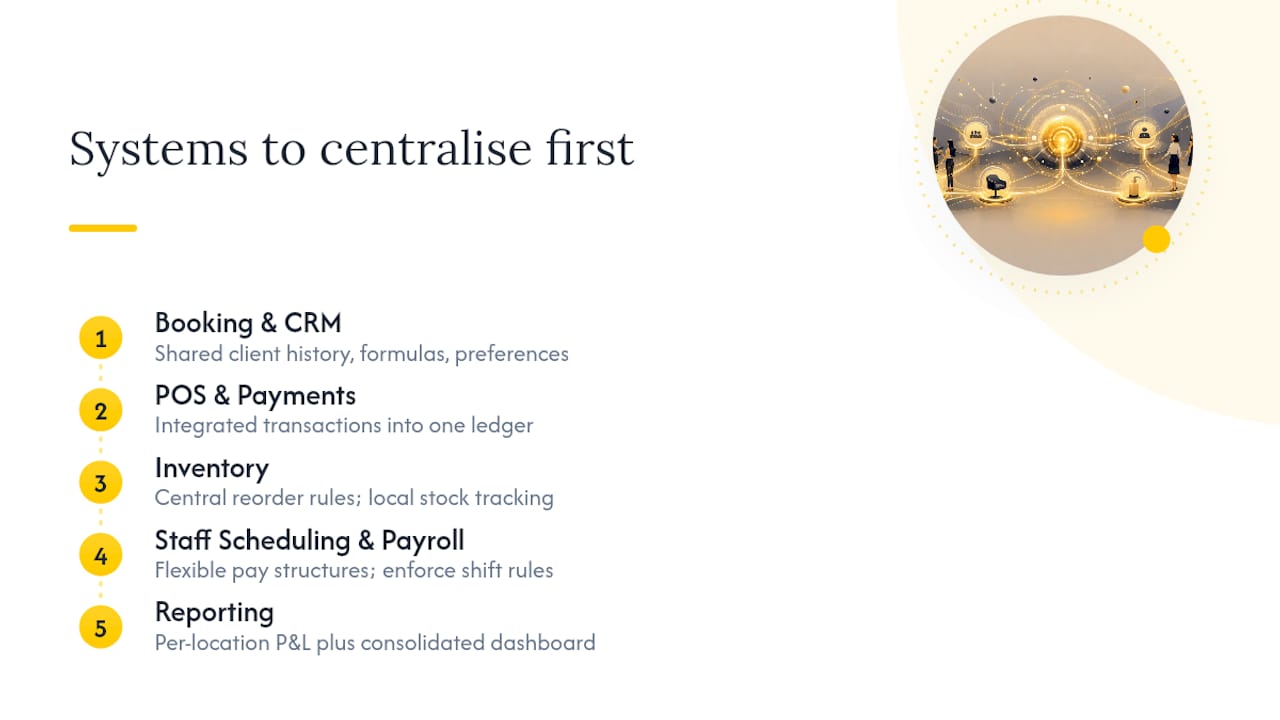
Booking and client records need to travel with the client, not the location. If someone has a colour done at your Porto site and walks into your Braga site six months later, the stylist should see what was used, what they paid and what they didn’t like last time. That means shared access to client history, formulas, preferences, allergies and contact details across every chair in the group, limited to the people who need it.
POS and payments matter more than most owners expect, right up until reconciliation becomes a monthly nightmare. When every location runs its own till system, closing the books means chasing several sets of numbers that don’t talk to each other. Taking payments in the same system that holds the appointments cuts manual entry and shows you sooner which site is actually making money.
Inventory needs central rules with local execution. Each site holds its own stock, but the product list, minimum levels and write-off rules should be set in one place. Otherwise you’ll discover, usually the hard way, that one manager has been over-ordering retail product for months while another has been quietly out of developer for three weeks.

Team scheduling and payroll get complicated fast in a chain because pay structures rarely stay uniform. You may run commission at one site, hourly pay at another and a hybrid at a third. Past two locations, payroll that handles all of these without side spreadsheets becomes essential, and shift swap rules and minimum cover need to work without you personally approving every change.

Reporting is where owners either gain control or lose it. You need a profit and loss view for each location alongside a group view that shows the whole chain’s health at a glance.
Pro Tip: Set up your group reports before you sign the lease on location two. Retrofitting reporting onto a chain that’s already running is far harder than building it in from day one.
Who runs what: building a structure that scales
Many single-site owners try to manage a second location the same way they managed the first: personally. This breaks almost immediately, because you can’t be in two places at once checking rotas, reviewing till reports and calming down an upset client.
The structure that works is simple and has four layers:
- Owner sets strategy, reviews group numbers and makes expansion decisions.
- Area or operations manager (once you have three or more sites) oversees location managers and standardises practice across the group.
- Location manager runs daily operations, staffing and client escalations at their site.
- Floor lead covers day-to-day supervision on shift when the manager isn’t there.
This hierarchy only works if you actually use it. The cadence that keeps it running is a 30-minute weekly check-in between you and each location manager, covering revenue, staffing gaps and anything that needs escalating. Pair that with a monthly group review across all sites where you look at trends rather than single-week noise.
You also need an escalation matrix before you need it, not after a crisis proves you didn’t have one. Decide in advance who handles HR complaints, who handles operational failures like a broken till or a stylist who doesn’t turn up, and who deals with a serious client complaint. Write it down. Share it. Otherwise every problem lands on your phone at 9 pm, whatever its severity.
Pro Tip: Hire or promote a strong manager before you sign for location two, not after. A manager who can run daily operations independently is what frees you to scale; without one, you’re just opening a second job for yourself.
The order matters. Owners who open first and hire a manager later tend to spend the first year firefighting instead of building. Owners who invest in the right manager first can open with a functioning site from week one.
SOPs and onboarding that stop quality drift
Every location will drift from your standards unless you document the standard and check against it. Drift isn’t usually dramatic. It’s a stylist who quietly stops offering the retail add-on, a receptionist who starts booking appointments five minutes shorter than the protocol, a manager who lets closing checklists slide on a busy Friday.
Your standard operating procedures need to cover, at minimum:
- Opening and closing routines, step by step.
- Client consultation scripts and required questions.
- Price lists and who can authorise a discount.
- Retail restock triggers and display standards.
Keep each SOP to one page. Nobody reads a 12-page manual during a Tuesday morning rush, but a one-pager pinned by the till gets glanced at constantly. Store the master versions centrally so every location manager works from the same source, and ask for real acknowledgement when something changes. A signed confirmation or a simple digital tick within 24 hours of a policy update, with a follow-up if it doesn’t happen, is what turns a memo into an enforced standard rather than a forgotten email.
New hires and new managers both need a structured runway rather than a sink-or-swim start. A 90-day onboarding plan works well:
- Weeks 1 to 2: shadow shifts, SOP walkthrough, system logins and training.
- Weeks 3 to 6: supervised independent work with daily manager check-ins.
- Weeks 7 to 12: full independence with a weekly performance review against KPIs.
Back this with routine audits. Unannounced walkthroughs, mystery client visits and till checks catch drift before it becomes a pattern, and every audit should end with a documented corrective action and a follow-up date, not just a quiet word.
The KPIs that tell you what’s actually happening
You can’t be in five locations at once, but you can read five sets of numbers in fifteen minutes if you’re tracking the right ones. A short list of KPIs measured the same way at every site beats a sprawling dashboard nobody checks.
Track these weekly, at every site, the same way:
- Rebooking rate: the percentage of clients who book their next visit before leaving.
- Revenue per chair: total revenue divided by working stations, your clearest efficiency signal.
- Average ticket value: whether upselling and retail are actually happening.
- New client conversion: how many first visits turn into second appointments.
- Retail attach rate: the percentage of service appointments that include a product sale.
Write down one definition for each KPI. Some of them, such as rebooking rate and retail attach rate, may not be ready-made metrics in your reporting tool, so decide how you calculate them and use the same method at every location.
Structure your reporting in two layers. Each location gets its own weekly profit and loss view that its manager owns and explains. You get a group report that rolls all sites together, reviewed monthly, so you can spot which location is dragging the group average down.
Give location managers their site-level numbers daily or weekly. Give yourself the group view monthly, with spot checks whenever a weekly number looks off.
When a KPI drops below your threshold, whatever that threshold is for your business, the playbook should be automatic rather than improvised: flag it in the next weekly check-in, ask the manager for a cause and a one-week correction plan, then follow up on the agreed date. Numbers that drift without a documented response are the clearest early sign a location is heading for trouble.
How to open your second location without the first year going sideways
Opening location two is where operational habits either lock in or fall apart. A staged plan takes most of the guesswork out of it.
- Pre-opening groundwork. Finalise your SOPs before recruitment starts, confirm your manager candidate is ready to run daily operations independently, and choose your platform before you sign the lease, not after.
- Set up the new location on the same platform. Add it to your existing account, give team members their logins and access rights, connect payments and load the product list, so day one runs on the same system as your original site.
- Bring client data into one base. If the new site takes over an existing business, import its client records into the shared client base rather than starting from zero. Clients who already visit your first site keep the record they have.
- Run the first 90 days on structure. Follow your onboarding schedule, launch local marketing the week you open, set minimum stock levels based on expected volume, and track your five weekly KPIs from day one rather than “once things settle down”.
- Set financial milestones. Before you sign, build a break-even projection: fixed costs, variable costs per booked hour and the number of appointments per week the site needs. Then set a contingency trigger, a revenue floor and a review date (for example, month nine) that prompt a review of pricing, staffing or marketing spend if you haven’t reached it. A salon business plan template helps with the numbers.
Local visibility matters too. A new site needs its own Google Business Profile and its own local marketing push in the week it opens. If you run on Altegio, Reserve with Google is free to connect (Integrations > Client acquisition > Google Maps), so clients book in your Altegio booking form right inside Google Maps.
How Altegio puts these systems into practice
Altegio is built for appointment-based businesses – beauty, wellness, clinics, auto services, fitness and more – and runs online booking, the client base, payroll, inventory and analytics in one system. Your client base stays yours under Altegio’s Zero-Competition Policy: there is no marketplace listing rival businesses next to yours, clients book through your own links, and client data is never resold. For several Locations there is a separate Chain interface, where settings and reports cover the whole group.
- Chain client base. The Clients section of the Chain lists everyone who has visited any of its Locations, with contact details, total spend, the date of the last visit and the number of Locations visited. You can search by name, phone number, email or card number and download the list to Excel; the file arrives as a link by email. A client who visits several Locations keeps one client card with the combined visit history, visible to users you give the “Access to client data throughout the chain” right. See client base.
- Chain team members. Create a team member once in the Chain interface (Team > Team) and tick every Location where they work, or move an existing team member into the Chain through Team > Merge Into Chain. Merging two profiles of the same person can’t be undone.
- Chain services and prices. Create a service once and add it to the Locations that need it, with a Chain price or a price range that you either lock for every Location or let each Location set. This is the system side of your “price lists and discounts” SOP.
- Chain loyalty. Memberships, gift cards, bonus programmes and discount cards are set up centrally and can work at every Location, so a client can buy a membership at one Location and use it at another. A referral programme also works at Chain level. See loyalty program.
- Chain widget. One booking form for the whole Chain: the client picks the Location, service, team member and time, and the Appointment goes into that Location’s schedule.
- Chain analytics. The Summary Report shows revenue, average ticket, occupancy and new, returning and lost clients for the whole Chain, with a breakdown by Location. The Services report adds earnings, profit, consumables cost and payroll for each service or category, with export to Excel. Each Location also has its own P&L report. See statistics and analytics.
- Roles and access rights. Access rights are set for each user, section by section, so a location manager can run their Location without seeing everything the owner sees.
- Payroll. Payroll rules can combine a percentage or a fixed amount per service or category, a salary per hour, day or month and a guaranteed minimum, which covers commission, hourly and hybrid pay. See calculation of salaries.
- Inventory. Products and categories are created at Chain level and added to Locations. Each Location tracks its own stock with critical and optimal levels and Stock Audit, and consumables can be written off automatically through bills of materials linked to services. There are no automatic reorders or low-stock alerts, so give one person a fixed day to check levels. See inventory control.
- Adding a Location. A new Location is created and then added to the Chain in the chain settings. It is billed the same way as the first: the price depends on the number of team members and the billing period, as shown on the pricing page.
Two limits are worth knowing before you plan the finance side. Revenue in analytics counts Arrived visits, not payments received, so check it against Finance and your payment provider’s payouts when you close the month. And Altegio doesn’t forecast cash flow or sync with accounting software: financial transactions export to Excel for your accountant.
One tip before you merge anything: combining services and turning a Location’s service into a chain service can’t be undone, so agree on the shared service list first.
For a closer look at shared records and Chain reports, read how chains keep one client record and one set of analytics. Migration and support are free, and you can test the Chain set-up during a 7-day free trial before you open the next site.
The habit that separates chains that scale from chains that stall
The most damaging pattern usually isn’t a bad location or a weak hire. It’s owners who keep bypassing their own managers, jumping straight to the front desk instead of routing problems through the person meant to own that site. Pace your expansion to your management bench, not your ambition, and hire the manager before you need them, not during the crisis that proves you needed them. Test your systems properly on your existing site before you commit capital to a second lease.
FAQ
How much does a salon manager get?
Salon manager pay varies widely by country, city, experience and whether the role includes a bonus tied to site performance, so there’s no single European figure. Many chains pay a base salary plus a performance component linked to KPIs such as rebooking rate and revenue per chair, within the employment rules of their country.
Which salon franchise is best?
There’s no single “best” salon franchise, since fit depends on your budget, target market and how much operational control you want to keep. What matters more than the brand is whether the operational systems behind it, booking, reporting and payroll, are centralised and consistent across sites. Our guide to beauty franchises covers when one pays off.
What is the failure rate of hair salons?
Figures vary by source, country and definition, and there’s no reliable Europe-wide statistic to quote. For a chain, the more useful question is your own runway: build a break-even projection for each new location and keep enough cash to cover the months before it gets there.
What is the best software to manage all salon operations?
Look for one system that holds booking, client records, inventory, payroll and reporting for every location, with access rights by role and reports for each site and for the group. Altegio covers these for appointment-based businesses and adds a Chain interface for several Locations; you can test it in a 7-day free trial.
How is a new Location billed in Altegio?
The same way as the first: the price depends on the number of team members and the billing period. See the pricing page for the current price in your country.
Read next
- Altegio for multi-location chains: unified records, chain analytics and centralised controls.
- Beauty franchise: when it pays off.
- A hairdressing salon business plan: a template with numbers.
- End of day reconciliation: 6 checks to keep salon records audit ready.
General information, not legal or HR advice; employment and pay rules differ between EU countries.