
Clinic inventory management is the process of tracking, controlling and replenishing every physical item your clinic uses or sells, from injectables and consumables to retail products and equipment, so that nothing runs out, expires unnoticed or disappears without a record. Get it right and you protect patient safety, cut waste and free up cash. Get it wrong and you write off expired stock, pay extra for emergency orders and keep finding gaps nobody can explain.
Three things you can do this week:
- Check your units of measure. If you receive syringes in boxes of 100 but your team uses them one at a time, and the system doesn’t know the ratio, every count is off by a factor of 100. Set the unit you buy, the unit you use and the ratio between them before anything else.
- Rotate stock expiry-first (FEFO). Walk the storeroom and put the shortest-dated items at the front. If your software can’t enforce first-expired, first-out, make it a shelf rule and check it weekly.
- Count your 20 highest-value items every week. You don’t need a full stocktake. Weekly counts on those lines for four weeks will surface miscounts, receiving errors and missing stock much sooner than an annual audit.
Quick-start checklist:
- [ ] Check the units of measure for every medicine and consumable line.
- [ ] Rotate storeroom stock to FEFO order.
- [ ] List your top 20 high-value items and schedule weekly counts.
- [ ] Make sure lot numbers and expiry dates are recorded at every delivery, in the system or in a receiving log.
- [ ] Check that your appointment system writes off consumables when a treatment is done.
Key takeaways
Clinic inventory runs on four habits: correct units, lot and expiry records at receiving, regular counts and consumables written off from the appointment itself.
| Point | Details |
|---|---|
| Fix configuration first | Wrong units of measure, guessed reorder levels and vague storage locations are common causes of persistent mismatches between the system and the shelf. |
| Pilot on 40–50 items | Start with high-value and high-risk items and measure your baseline before you go live, so you can see what changed. |
| Record lots and expiry dates | A recall is manageable only if you know which batch went where. If your software has no field for it, keep a receiving log. |
| Connect appointments and stock | Write-offs triggered by the treatment remove double entry. Regular counts then show where real use differs from the plan. |
| Altegio for clinic workflows | Altegio links appointments to stock through bills of materials, with storages, product arrival, Stock Audit with a barcode scanner, critical and desired stock levels and the Product orders report. Lot and expiry tracking, purchase orders and automatic reordering are not part of it. |
What clinic inventory management covers and who should own it
The scope is wider than most managers expect. A clinic usually tracks five categories of stock, each with its own handling rules.
- Consumables: gloves, dressings, syringes, needles, cannulas. High volume and low unit cost, but a stockout stops treatments.
- Medicines and injectables: for example botulinum toxin products, topical preparations and diluents. They need lot and expiry records and FEFO picking.
- Medical devices and equipment: dermal fillers, lasers, IPL handpieces, microneedling pens. Equipment is tracked by serial number, service date and location rather than by quantity.
- Retail products: skincare ranges, supplements, aftercare. Margin matters here and items go missing, so count them regularly.
- Controlled substances: the records you keep for receipt, use and disposal are set by national rules. Give them their own category and restrict who can touch them.
In the EU, medical devices fall under Regulation (EU) 2017/745 (MDR). Article 1(2) and Annex XVI extend it to some products without a medical purpose, including dermal fillers injected into the skin. Device labels must carry a lot or serial number (Annex I, Section 23.2), which is why you record it at receiving. Health institutions must store the UDI of class III implantable devices they are supplied with, preferably electronically, and member states may require the same for other devices (Article 27(9)). Rules for medicines and controlled substances are national and differ between EU countries, so check with your national competent authority or professional body.
Pro Tip: Set up a separate category for controlled substances from day one. Mixed into a general medicines category, they make compliance reporting much harder than it needs to be.
Location map: stock doesn’t sit in one place. A clinic may have a main storeroom, treatment-room trolleys, a fridge for injectables and, in a group, stock moving between sites. Give each place its own storage location in your system, or transfers become invisible and counts stop meaning anything.
Ownership matters as much as software. Assign clear roles:
- Clinic manager or inventory admin: owns the product catalogue, reorder levels, suppliers and monthly reporting.
- Whoever receives deliveries: checks the delivery against the order, records lot numbers and expiry dates and reports damage.
- Clinicians and therapists: make sure what they use matches the treatment record and flag discrepancies straight away rather than at the next count.
- Finance lead: reviews write-offs, emergency orders and stock losses every month.
A simple five-step model (plan demand, purchase, receive and store, track and control, dispense at the point of care) lets you give each step a named owner.
Why poor stock control costs clinics more than they realise
Excess stock ties up cash and raises the chance of expiry write-offs. Losses from miscounting, unrecorded use or theft rarely show up until a full count reveals a gap that is already months old. The costs add up quietly: if you write off €150 of expired injectables a month, that is €1,800 a year before you count rush delivery charges or cancelled appointments.
The clinical risk is the one that keeps managers up at night. Running out of a critical injectable mid-treatment is a patient safety event, not an inconvenience. Using an expired product because nobody rotated the stock creates liability for the clinic. And lot-level records are what make a product recall manageable: without them, you can’t tell which patients received which batch.
There is a reputational side too. Clinics that run out mid-appointment, substitute products without telling the client, or can’t produce batch records during an inspection lose trust that takes a long time to rebuild.
Not every item deserves the same attention. ABC analysis ranks lines by annual spend: A items are the small share of lines that account for most of the spend, B and C items need proportionally less control. VED analysis adds clinical criticality: Vital (a stockout stops treatment), Essential (significant disruption) and Desirable (inconvenient but manageable). A high-value injectable that is also Vital sits at the top of every control list, whatever its volume.
Essential features every clinic inventory system must have
Stock software built for retail or hospitality usually misses what clinics need. Know what to ask for before the demo.
- Units of measure with a fixed ratio: one product, bought in one unit and used in another (vials and ml, boxes and pieces), so counts stay right from receiving to treatment.
- Lot and expiry tracking: lot number and expiry date captured at receiving, FEFO at picking, a warning before stock expires. Not every system has it (Altegio doesn’t), so decide up front where these records will live.
- Storage locations: stock known by shelf, fridge or trolley, not just by site.
- Scanning: barcodes or QR codes read by a scanner instead of typed counts.
- Audit trail: every movement and adjustment recorded with a date and the person who made it.
- Roles and permissions: the people who receive, use and approve stock see and do different things. A clinician shouldn’t be able to delete a write-off.
- Reorder planning from real consumption: the system shows what has dropped below its critical level so you can plan purchases, instead of relying on a number someone set years ago.
- Bills of materials per treatment: you define which consumables each treatment uses, and the system writes them off automatically.
Connecting stock to appointments is where most of the gain is. When consumables are written off from the treatment itself, supplies can’t leave the shelf without a record, and you see what each service costs in consumables. If you also need accounting or EMR integration, ask exactly how it works: some systems sync, others, Altegio among them, export financial transactions to Excel for your accountant.
Pro Tip: Start with three things for the fastest return: lot and expiry capture at receiving, barcode scanning for counts and consumable write-off from the treatment. Together they surface most of your losses and expiry risk within the first month.
Barcode, QR or RFID: which tracking technology suits your clinic?
For most clinics the answer is barcodes or QR codes, with RFID only if you run a large central warehouse.
Barcodes and QR codes are cheap and accurate enough for a typical clinic. Labels cost very little to print, and you need little more than a scanner and a label printer. For a few hundred to a few thousand active items, this is the right starting point.
RFID reads a whole shelf or trolley at once, without line of sight. That matters when you count tens of thousands of items, but hardware, tags and integration cost far more. For most clinic storerooms the speed doesn’t justify the investment.
Manual counts only work for a small single-site clinic with a few dozen items and one person in charge. Add a second site, a second clinician or a controlled substance register, and paper creates gaps that grow.
A rough rule of thumb:
- Single site, a few hundred items: barcode or QR labels and one scanner.
- Several sites or a few thousand items: labels, a scanner at each site and software that links stock to treatments.
- Central warehouse with tens of thousands of items: evaluate RFID, but only once barcode scanning is fully embedded.
| Technology | Cost to start | Scanning method | Best for |
|---|---|---|---|
| Barcode / QR | Low | Line of sight, one item at a time | Storerooms, trolleys, retail shelves |
| RFID | High | Bulk, no line of sight needed | Large warehouses, high-volume stock |
| Manual | None | Paper or spreadsheet | Very small single-site clinics |

In Altegio, each product card has a barcode field, and Altegio can generate a barcode for you. During a sale, scanning the product finds it and adds it to the sale. For a stock count, you scan every item into a .txt file and upload it to Stock Audit.
Standard workflows that close the most common accuracy gaps
Consistent workflows are what separate a clinic that counts accurately from one that counts hopefully. Four of them close most gaps.
Receiving
- Check the delivery note against what you ordered before you unpack.
- Count and inspect the items, and note damage or short delivery on the carrier’s paperwork.
- Record the lot number and expiry date for each line. No lot, no put-away.
- Enter the delivery in the system. In Altegio this is a Product arrival: supplier, storage, quantities and cost price, with the payment recorded if you paid on delivery. Altegio doesn’t create purchase orders, so keep your orders in your own template and compare them by hand.
- Label any unlabelled items before they leave the receiving area.
Put-away and storage locations
Every item goes to a defined place, and the system knows which one. Items put on the wrong shelf or in the wrong fridge are later counted as missing. Altegio starts with two storages, Consumables and Products, and you can add your own, for example one for the injectables fridge.
Using stock at the point of care
Pro Tip: Make FEFO a rule at the shelf, not a suggestion. If anyone can take the newest box because it’s closer, your expiry write-offs won’t improve.
Stock should be written off when it is used, not at the end of the week. In Altegio, you create a bill of materials for a service and link it through the team member who performs it, so the same service can use different quantities with different team members. Consumables are then written off automatically after the visit, and you can correct the quantities in the visit window if a treatment used more or less. Opened-but-unused items should go through a write-off with a comment, not straight back to the shelf.
For replenishment, set the reorder level from actual consumption plus your supplier’s lead time, not a round number someone guessed at go-live. In Altegio, each product card holds a critical stock level (the point at which you need to reorder) and a desired stock level. The Product orders report lists stock on hand against the critical and optimal levels and shows the shortfall, and you can filter by supplier. Altegio doesn’t send notifications at the critical level, so put a weekly check of that report in someone’s calendar.
Transfers between storages
A good transfer has two steps: one person sends, another confirms what arrived. Until it is confirmed, the stock is in transit. In Altegio, moving stock from one storage to another is a single Relocate products operation (Products > Inventories), so agree who checks the items on arrival and who corrects a discrepancy.
A pilot plan: 40–50 items, measured against a baseline
A pilot that isn’t measured is just a trial run. Follow these steps and you’ll know what works before you roll out to the whole catalogue.
- Select 40–50 items: your highest-value injectables, most-used consumables and any controlled substances. They give you the clearest before-and-after picture.
- Measure the baseline: expiry write-offs, stockouts, count accuracy and hours spent on stock each week.
- Label: put a barcode on every unit in the storeroom and on trolleys, and label the shelves too.
- Configure: storage locations, units of measure, reorder levels based on the last 90 days of consumption, and existing lot numbers and expiry dates in your system or log.
- Choose scanning hardware: for Altegio’s Stock Audit, a barcode scanner connected to a computer that types the codes into a text file is enough.
- Connect stock to appointments: set up bills of materials for the pilot treatments. This step usually shows the biggest gap between what the team thinks it uses and what the records say.
- Train: a short hands-on session per role, a quick-reference card at each storage point and one inventory champion per site who owns discrepancies.
- Run and review: track the KPIs weekly, change nothing else during the pilot, then fix the top three gaps before you expand.
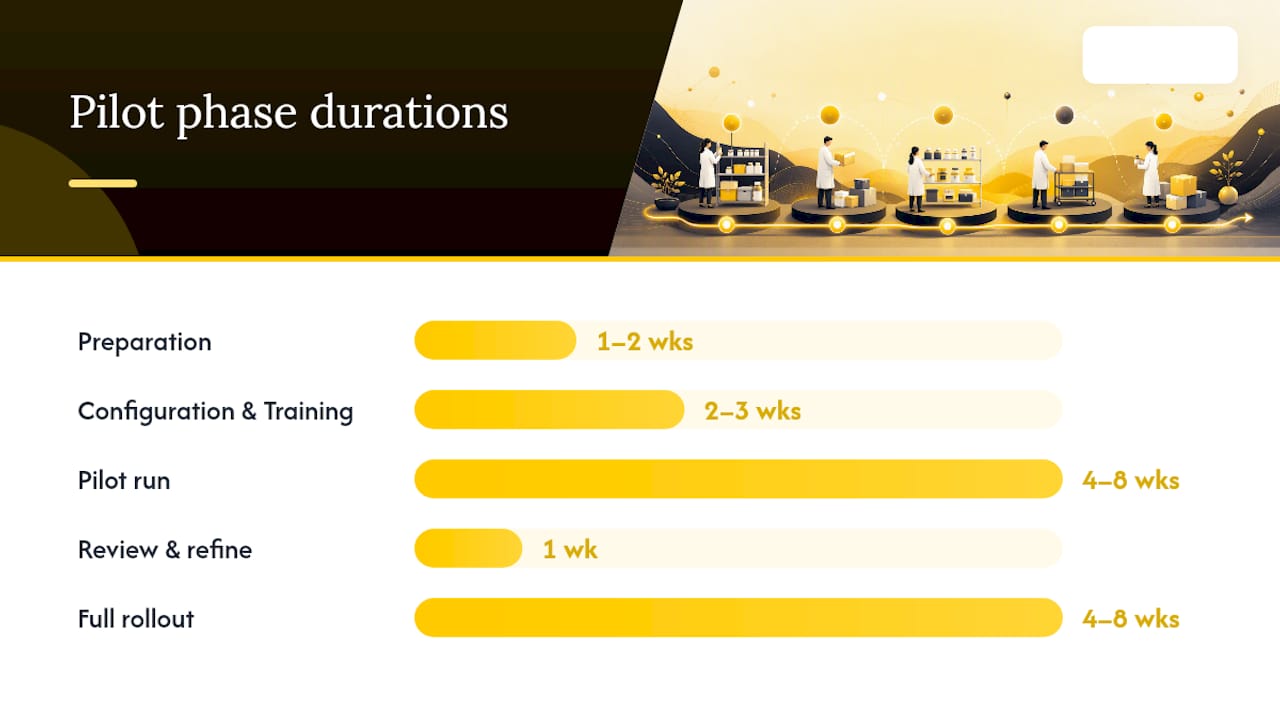
| Phase | Duration | Key activities |
|---|---|---|
| Preparation | 1–2 weeks | Item selection, baseline measurement, hardware |
| Configuration and training | 2–3 weeks | System setup, labels, storage locations, bills of materials, role-specific sessions |
| Pilot run | 4–8 weeks | Live scanning, weekly KPI review, discrepancy follow-up |
| Review and refine | 1 week | Results analysis, configuration changes, go/no-go for full rollout |
| Full rollout | 4–8 weeks | All locations, full catalogue, ongoing KPI monitoring |
KPIs to track from week one:
- Expiry waste rate: value of expired stock written off as a percentage of total stock value.
- Stockouts: number of treatment-stopping stockouts per week.
- Stock loss: difference between the system count and the physical count as a percentage of total value.
- Count accuracy: share of counted lines that match the system within tolerance.
- Hours on inventory: time per week spent on counts, receiving and reconciliation.
- Emergency orders: unplanned rush orders per month.
Things that break pilots:
- FEFO only works if lot and expiry data are recorded at every delivery. One rushed receiving session breaks the chain.
- Escalation rules must be written down: who investigates a discrepancy, by when, and who signs it off.
- Buy-in comes from data. Share the first four weeks of results with the whole team.
How to choose the right system: questions to ask vendors and red flags to avoid
You will sit through a lot of polished demos. These questions cut through them.
- How are lots and expiry dates handled? Can the system enforce FEFO, or only record it?
- Can one product have a unit for buying and a unit for use, with a fixed ratio?
- How do transfers work, and who confirms receipt?
- Which EMR, POS and accounting systems do you integrate with, and which need a third-party connector or a manual export?
- Can we export the product catalogue and transaction history in a standard format if we leave?
- How does the price change when we add a site or a team member?
- What does the audit trail record, and can we export it for an inspection?
Red flags:
- Reorder levels that can’t be reviewed against real consumption.
- No storage locations: the system only knows stock is “at site X”.
- An audit trail you can’t export.
- Pricing that jumps sharply when you open a second site.
- No documented way to connect your other systems.
- A demo that avoids the features you asked about.
What to budget for: the software subscription, scanners and label printers, labels for the initial catalogue, internal time for setup and training, and any integration work. Get each figure in writing before you sign.
How to estimate the return on your own numbers
Published savings figures rarely match a specific clinic, so use your own baseline. The return comes from four sources: fewer expiry write-offs, fewer emergency orders, lower stock losses and less time spent counting. The first three come straight from the KPIs above.
A worked example: if your baseline shows €400 a month in expired stock and the pilot halves it, you save €200 a month, or €2,400 a year. Add the rush delivery charges you no longer pay and the hours you no longer spend on manual counts, then compare the total with what the system and hardware cost you each year.
The part most guides skip: technology without process is just expensive chaos
Clinics that fail at inventory automation rarely chose the wrong software. They installed a system, skipped the process redesign and expected technology to fix habits built over years.
A scan-based count only works if people actually scan. FEFO only prevents expiry waste if lot data is captured at every delivery. Reorder levels only prevent stockouts if someone checks them and orders. None of that is a software problem. It is training, culture and accountability.
The pilot-first approach limits the damage. You find out which workflows your team will follow, which checks they skip and which settings you got wrong, on 40–50 items rather than your entire catalogue. Then you fix it before you scale.
Involve frontline clinicians early and share the results with them. When a clinician sees that the count caught a shortage that would have cancelled their afternoon, they become an advocate rather than a reluctant participant.
What Altegio covers for clinic inventory, and what it doesn’t
The gap between a completed treatment and a written-off supply is where most clinic stock control falls apart. Inventory in Altegio closes it with bills of materials: when the visit is done, the consumables linked to the service are written off automatically, in the same system that runs your appointments, client records and finances. For aesthetic and medical clinics, that is what Altegio covers:
| Task | In Altegio |
|---|---|
| Storage locations | Consumables and Products storages by default, plus your own. |
| Product setup | SKU, barcode, cost price, units for sale and for write-off with a ratio, critical and desired stock levels. |
| Receiving | Product arrival with supplier, storage, quantities and cost price. |
| Use in treatments | Bills of materials per service and team member, written off after the visit. |
| Counts | Stock Audit: enter actual quantities or upload a .txt file from a barcode scanner. Shortages are written off and surpluses added automatically. |
| Reorder planning | The Product orders report and the Inventory balance report, filtered by critical stock, with Excel export. No purchase orders, no automatic reordering, no low-stock notifications. |
| Audit trail and losses | The Inventory operations report shows every movement, and the operations log shows when and by whom an item was written off. The Product write-off analysis report can be filtered by period, storage and product category. |
| Access | Per team member, in the Products section of the Access tab: how far back they can see stock movements, whether they can transfer items, create, edit or delete transactions, and export reports to Excel. |
| Cost per service | The Sales by Services report shows consumables cost, payroll and profit for each service. |
| Lots and expiry dates | Not tracked. Keep them in a receiving log and write off expired items with a Product write-off. |
To read more on the module itself, see how inventory management works in Altegio, and use Altegio analytics for the reports behind your KPIs.
When you test it, run three workflows on your pilot items: a bill of materials written off from a completed appointment, a Stock Audit from a scanner file and the Product orders report you would plan your next order from. Start a 7-day free trial and you’ll know within a week whether it fits your clinic. The price depends on the number of team members and the billing period (see Pricing).
FAQ
What is inventory management in healthcare?
It is the process of tracking, ordering, storing and controlling the physical supplies a clinic uses, from consumables and medicines to devices and retail products, to prevent stockouts, expiry waste and losses while keeping the records you need for inspections and recalls.
What is the 80/20 rule in clinic inventory?
It is a rule of thumb: a small share of your product lines accounts for most of your spend. Clinics give those A items tighter controls, more frequent counts and closer reorder management than lower-value B and C lines.
What are the five steps of inventory management?
Plan demand, purchase from suppliers, receive and store with lot and expiry records, track and control through counts and an audit trail, and dispense at the point of care. Each step should have a named owner and a written workflow.
How often should clinic medicine inventory be checked?
There is no single EU rule: national rules and the manufacturer’s instructions apply. A practical routine is a weekly expiry check on medicines and injectables with immediate removal of expired items, closer checks on controlled substances as your national rules require, and rolling counts for low-risk consumables.
Can Altegio track lot numbers and expiry dates?
No. Altegio tracks quantities by storage, not by batch. Record lot numbers and expiry dates in a receiving log, write off expired items with a Product write-off and review them in the Product write-off analysis report.
Does Altegio reorder stock automatically?
No. Altegio doesn’t create purchase orders or send low-stock notifications. Set critical and desired stock levels in each product card, check the Product orders report regularly and place the order with your supplier yourself.
Read next
- Altegio Inventory Management: storages, operations, BOM, barcodes, and one-click reports.
- End of Day Reconciliation: 6 Checks to Keep Salon Records Audit Ready.
- Cross-selling and upselling in a salon: how to raise the average check.
- Salon chart of accounts: a template for VAT, card fees and tips.
This article is general information, not legal or regulatory advice. Rules differ between EU countries.