
Registration in Altegio
Only a registered Altegio user can obtain an API key (bearer token).
If you are not yet registered — please sign up.
If you want to become our partner, register on the website https://alteg.io/en.
In the Location name field, indicate the name of your service. An Altegio Partner Program manager will contact you.
If you are developing an integration on behalf of our client, ask the client to invite you to their location via phone number or email.
Obtaining the API Key
To get an API key (bearer token), you need to:
- Register in the Marketplace.
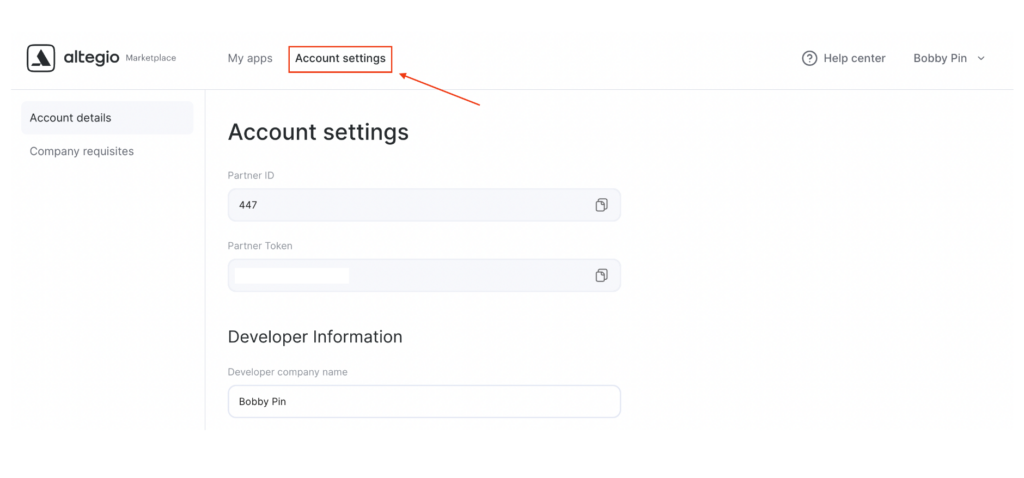
- After registration, the API key will automatically appear in the Account settings section of the Marketplace.
For some API requests, in addition to the bearer token, a user token is also required.
You can obtain the user token yourself using the User Authorization method.
API documentation is available here: https://developer.alteg.io/api
Getting Help with API Requests
If you have any questions related to API requests, please contact us at [email protected].
For analysis, please include a screenshot of your API request in Postman showing:
- Request URL
- Method
- Headers
- Response
Additionally, send the request body and both bearer and user tokens separately in text or as a JSON file.