
An open booking API is the integration layer that links your calendar, client records, payments and back-office tools, so appointments move between systems without anyone retyping them. Built well, it ends double bookings. Built badly, it causes them, and it moves client data – sometimes health data – between vendors who each need a contract with you. This guide is for developers and managers at salons, clinics, spas and other appointment-based businesses in Europe: the technical patterns that keep one calendar consistent, the GDPR and PSD2 points to settle before go-live, and how Altegio’s API, webhooks, Integrations Hub and MCP connections fit in.
TL;DR:
- Double bookings usually come from two systems acting on the same slot: hold the slot, confirm it once and make every write safe to retry.
- Webhooks beat polling, but design for duplicates and out-of-order delivery: Altegio’s webhooks are delivered at least once, with an X-Hook-Id header to deduplicate on.
- Most businesses need the standard booking widget plus a few API hooks, not a bespoke rebuild.
- Before connecting client data, put a written processor contract in place (GDPR Article 28), check for health data (Article 9), confirm a transfer basis for anything leaving the EEA and publish a privacy notice.
- PSD2 matters only where money moves: strong customer authentication is applied by payment service providers, so leave card handling to a regulated provider.
What an open booking API actually exposes
Strip away the marketing language and a booking API is a handful of endpoints doing predictable jobs. Know what you are calling and why before you wire anything together.
- Calendar operations: create, read, update and cancel appointments, plus availability queries that check team members’ schedules in real time.
- Appointment lifecycle events: confirmations, reschedules, no-shows and cancellations, ideally pushed as webhooks rather than polled.
- Client records: contact details and, in many salons and clinics, treatment notes that can count as data concerning health under the GDPR.
- Payments: payment status passed back from a payment provider, while the card or bank part of the transaction stays with a regulated payment service provider.
- Back-office hooks: stock write-offs, payroll inputs, reporting exports and the event plumbing that keeps all of it in sync.
Miss one and you get a booking flow that looks fine in a demo but falls over the moment stock, schedules or payment status disagree with the calendar.
Altegio splits these jobs across separate APIs. The Online Booking API has public endpoints for booking widgets and client portals and needs no user login. The Business Management API covers scheduling, clients, inventory, finances and loyalty: version 2 is recommended for new integrations, and version 1 is maintained for backward compatibility. Developer Tools holds webhooks, VoIP integration, reference dictionaries and the methods for apps published in the Integrations Hub. All requests are encrypted with TLS 1.2 or higher.
How authentication and testing work in the Altegio API
Before you plan endpoints, be clear about the credentials, because they decide whose data an integration can see.
- Access key (the partner token in the API documentation): issued in the Altegio Developer Hub and passed as a Bearer token. Registration is free and starts from Settings > Integrations and access > Keys > Register in Developer Hub.
- User key (the user token): returned by the API’s authorization method for an Altegio user’s login and password, or taken from the system user of an installed app. It decides on whose behalf the integration works, and that user’s Location access and permissions apply.
- Request header: public Online Booking calls need only the access key. Calls to Location data carry both keys, in the form
Authorization: Bearer <partner_token>, User <user_token>.
Treat the access key as a secret and keep it out of front-end code and public repositories. Give the integration its own user and tick only the rights it needs when you set up the app: an app’s system user has access rights much like a regular user, with some restrictions in the client base and user management. For testing, the documentation describes installing a draft app on a Location you control and making authenticated calls there before moderation, rather than a separate sandbox. Integrations built for other companies are reviewed before they appear in the Integrations Hub.
Widget vs bespoke API: which route fits your build?
Most teams face this decision early, and it is worth settling before a single line of code gets written.
- Widget integration: a ready booking form that gets online booking live on a website quickly, with limited scope to customise the flow.
- Bespoke API integration: full control over the booking journey, built to your data model, but it demands ongoing engineering time and a maintenance budget.
The common trap is budgeting for the build and forgetting the upkeep. A widget is configured once, while a bespoke flow has to be tested, monitored and updated whenever an API version or a business rule changes, and that work keeps going long after launch.
For most appointment-based businesses, the standard widget handles public booking and a few API hooks cover the parts that need custom logic, such as a stock check across Locations or a loyalty rule your platform doesn’t cover.
In Altegio, online booking comes with the platform. The same Appointment Calendar also takes appointments from Reserve with Google, which is free and connected under Integrations > Client acquisition > Google Maps, and from the Book now button on Instagram and Facebook, connected through an app in the Integrations Hub. Each extra channel feeds the same calendar, so it doesn’t add another copy of your availability to keep in sync.
Technical patterns that keep bookings consistent
Two systems both think they hold the last free slot at 15:00. One of them is wrong, and if your architecture can’t handle that, you get a double booking and an unhappy client at reception.
- Keep one calendar as the source of truth and let other systems read from it and write to it through the API, instead of keeping their own copies of availability.
- Use webhooks, not polling, so changes reach other systems soon after they happen rather than on a fixed schedule.
- Hold the slot before you confirm it, with optimistic or pessimistic locking or a short-lived hold that expires if payment doesn’t follow.
- Make every write idempotent, so a retried request can’t create a duplicate appointment, and back it with a durable queue rather than a fire-and-forget call.
- Test concurrency deliberately: simulate two clients booking the same slot in the same second, and monitor sync delay on every connected channel.
Shared equipment is a common blind spot. In Altegio, rooms, chairs and devices can be set up as Resources and linked to services. When a service with a Resource is booked, the Resource is reserved automatically, and an online appointment takes one free instance of each Resource, so two clients can’t book the only massage room for the same time.
For webhooks, Altegio sends notifications to the address you set under Settings > Integrations and access > Webhooks, for the events you choose: changes to Location settings, team members, products, services, service categories, clients, appointments in the Appointment Calendar, and inventory and financial operations. Each notification is a POST request with a JSON body that describes the change, including the object type and a link to the changed object. Webhooks don’t carry a traffic source or click ID, so they tell you what changed, not where a client came from.
Handling error responses and retries in booking APIs
A booking integration needs to fail predictably, because it will fail sometimes: a payment provider times out, a webhook is delayed, a network blip drops a request halfway through. What matters is what happens next.
Return clear, structured error codes rather than a generic failure message, so the calling system knows whether to retry, alert a human or roll back a partial booking. A 409 conflict for a slot that has just been taken is a different problem from a 500 error on your own server, and the client application should treat them differently.
Retries for transient failures should be automatic but bounded: exponential backoff with a sensible cap stops a struggling downstream service from being hammered by a queue of retries. Idempotency keys make retries safe in the first place, since a retried request with the same key should never create a second appointment. Pair that with a durable queue, so a failed delivery is retried later rather than lost, and a reconciliation job that finds bookings stuck in a pending state and resolves them one way or the other.
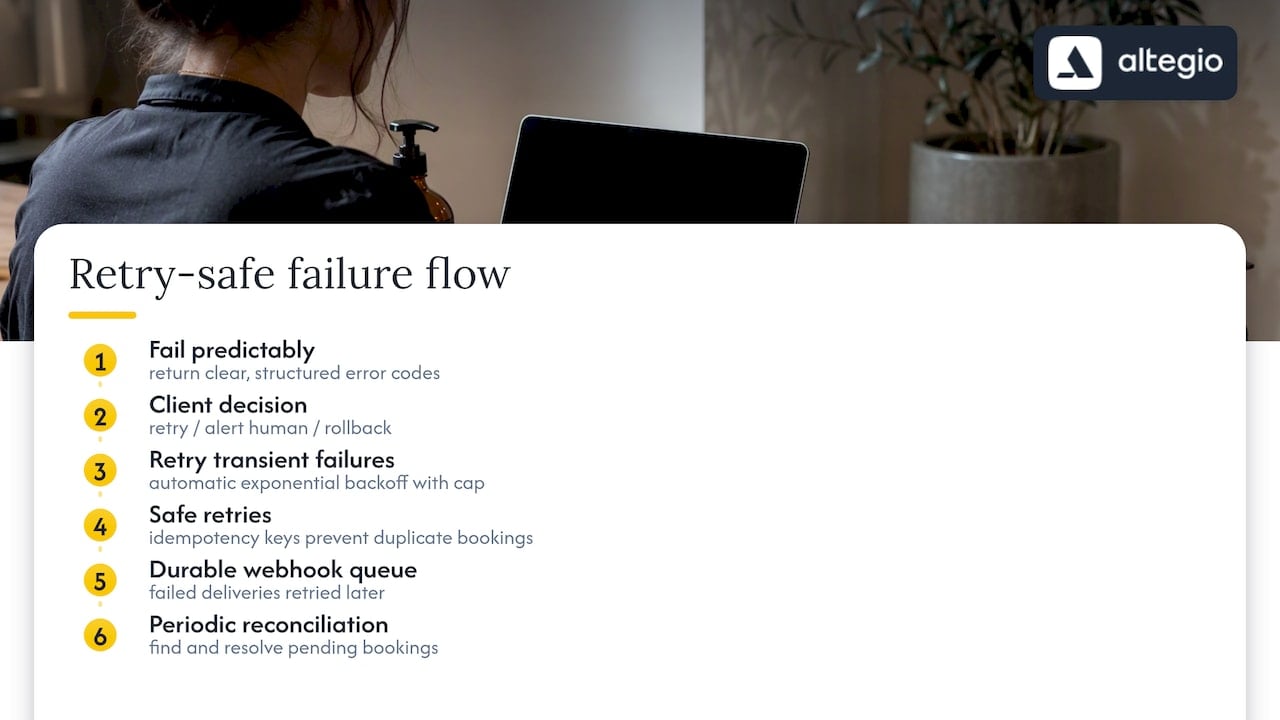
On the receiving side, design around how Altegio delivers webhooks:
- Delivery is at least once, so the same event can arrive twice. Each request carries an X-Hook-Id header that stays the same across retries, so deduplicate on it.
- Each attempt has a 10-second total timeout. Answer with a 2xx status straight away and do the heavy work from your own queue.
- Connection failures, HTTP 429 and 5xx responses are retried up to twice, 5 and then 30 seconds after the previous attempt. Other 4xx responses, and timeouts after the request was sent, are not retried.
- A retry carries the current state of the object, so its data can differ from the first attempt, and notifications for different events are not guaranteed to arrive in order. Re-read the object before you overwrite newer data.
- There is no partner-facing delivery log or replay, so a scheduled job that re-reads recent appointments through the API is your safety net.
- Requests carry the shared Bearer token configured for the integration, not a secret unique to your webhook address, so check the header and don’t rely on a hidden URL alone.
Strategies for scalability and performance in booking APIs
Booking traffic is spiky. An integration can sit quiet for hours, then take a burst of requests when a promotion goes out or a popular slot opens. Design for the spike, not the average.
Altegio’s API allows 200 requests per minute or 5 requests per second per IP address, so plan calls around that limit rather than around your peak demand. Cache availability queries, since a calendar check doesn’t need a live call every time, but invalidate the cache as soon as a webhook says a slot has changed. Batch background syncs, spread them out and back off when you reach the limit, so public booking never waits behind a nightly export.
For multi-location businesses, partition work by Location so a busy branch doesn’t slow down the others. Monitor latency per endpoint rather than as a single average, because a slow payment step hidden inside a fast overall response time only shows up once a client is already annoyed.
GDPR checklist before you connect anything
Before any calendar talks to any client database, get the legal groundwork right. The GDPR (Regulation 2016/679) treats data concerning health as a special category: personal data about a person’s physical or mental health that reveals information about their health status. Treatment notes, allergy flags and contraindications in a client card fit that description, and even an appointment for a specific treatment can reveal something about health.
- Identify special category data in appointment and client records. Processing it is prohibited unless an exception in Article 9(2) applies, such as the client’s explicit consent for specified purposes.
- Sign a contract with every vendor that processes client data on your behalf, for example your booking platform or a messaging provider. Article 28(3) says what it must cover, including the subject matter, duration, nature and purpose of the processing and the processor’s obligations, and Article 28(9) requires it in writing, which includes electronic form.
- Check where each vendor stores and accesses data. Transfers outside the EEA need a basis under Chapter V of the GDPR, such as an adequacy decision (Article 45) or standard data protection clauses adopted by the Commission (Article 46).
- Collect only what each integration needs (data minimisation, Article 5(1)(c)) and protect what you keep with measures such as encryption (Article 32).
- Tell clients how their data is used at the moment you collect it (Article 13), and run a data protection impact assessment where processing is likely to result in a high risk: Article 35(3)(b) names large-scale processing of special category data as one such case.
- For country-specific questions, check the guidance of your national data protection authority, because details differ between EU countries.
A written processor contract under Article 28 is a legal requirement, not a nice-to-have. Every vendor that handles client or appointment data on your behalf needs one, and it is far easier to sign before the first API call than to explain its absence later.
Check what your booking flow collects, too. Altegio’s booking widget has a mandatory checkbox for consent to personal data processing but no separate marketing-consent checkbox, so collect marketing consent another way if you need it. For visitors from the EU, the booking form blocks analytics and advertising cookies until the visitor consents.
Where PSD2 comes in
PSD2 (Directive 2015/2366) governs payment services, not bookings, so it only matters where your booking flow takes money.
- Online payments: payment service providers must apply strong customer authentication when a payer initiates an electronic payment (Article 97), using at least two independent elements from knowledge, possession and inherence. That is the job of the payment providers involved, not of your booking code.
- Pay by bank: if you add payment initiation, the payment initiation service provider must not request from the payer any data other than what it needs to provide the service (Article 66(3)(f)).
- Your part: use a regulated provider, pass the payment status into the appointment and keep card details out of your own database and logs.
In Altegio, online payments go through a connected provider – Stripe, or Adyen in EU countries – and Altegio charges no commission of its own on them. Payment policies let you take a deposit with any provider available in your region, while a card guarantee works only with Adyen in EU countries. If you are weighing bank payments, read Pay by bank in Europe: open banking for appointment businesses.
AI agents and MCP: a new kind of integration
Not every integration needs code any more. Altegio runs on the Model Context Protocol (MCP), so Claude, ChatGPT, Cursor or Gemini can work with a business account directly. The MCP and agentic management page lists the connections:
- Altegio Pro MCP: appointments, team members, services, work schedules, clients and Location settings, with separate read, write and delete permissions.
- Altegio Pro MCP (read-only): analytics and answers without any writes, for people who should look but not change anything.
- Altegio Integrations Hub MCP: for developers who want to plan, create, configure and test their own Integrations Hub app from an AI assistant.
- Altegio.me MCP: clients find a free time and book, reschedule or cancel their own appointments in a chat.
An AI assistant connects without an access key: you add the MCP address to the assistant, sign in with your Altegio account and authorise access to the relevant Location. The data rules still apply. The assistant works with the same calendar, so it sees the same free slots, but it processes the data needed for each request under its AI provider’s own terms, so review those data controls and connect only the access your team needs.
Developer and product-owner implementation checklist
Before you write a line of integration code, lock down the business and legal decisions. Retrofitting compliance after launch costs far more than building it in from the start.
- Agree which calendar is the single source of truth and map every system that reads from or writes to it.
- Sign processor contracts with every vendor and confirm in writing where data is stored and accessed.
- Create a dedicated user for the integration with only the rights it needs, and keep keys in a secrets store.
- Build against a current API version, validate payloads against the schema and pin the version you tested, so a change elsewhere doesn’t silently break your client.
- Add webhook deduplication, idempotency keys and concurrency controls, then automate tests that try to break them with race conditions.
- Plan monitoring, reconciliation jobs and incident response, sort out consent flows and publish a privacy notice before go-live, not after.
Treat the processor contract and data location questions as blocking tasks, not paperwork for after launch. A missing contract found six months in costs far more than one agreed before the first API call.
How an integrated platform reduces the risk and effort
Building all of this from scratch is a serious project, which is why many businesses choose an integrated platform and use the API only for what is left. Altegio is built for appointment-based businesses – beauty, wellness, clinics, auto services, fitness and more – and keeps online booking, the Appointment Calendar, the client base, payments, inventory, payroll and finances in one system. Appointments from the widget, Reserve with Google, the Instagram and Facebook Book now button and the Altegio.me client app land in the same Appointment Calendar, so there is one version of your availability rather than several that disagree.
Back-office data stays connected as well. For example, inventory control writes off consumables automatically through bills of materials linked to services, so stock moves with the appointments instead of through a separate sync.
It also shortens the compliance list. Every separate tool that touches client data is another processor to vet, another contract to sign and another place where data may leave the EEA. Fewer moving parts means fewer of those checks, though you still need to do them for every vendor you keep.
Why the compliance work matters more than the code
Most guidance on open API booking spends its energy on the technical build and treats compliance as a box to tick near the end. That ordering is backwards. The businesses that get into trouble are rarely the ones with clumsy webhook retries. They are the ones that connected a booking system to a client database without a processor contract or without noticing that treatment notes count as health data.

The usual advice to “pick an API and start building” skips the part that decides whether the integration survives an audit. Settle processor contracts, data locations and consent flows first. The engineering patterns – webhooks, idempotency, locking – are important, but they are well understood and are not where most businesses come unstuck. Prioritise the paperwork before the pull request: a technically elegant integration built on the wrong legal foundation is still the wrong integration.
Next steps with Altegio
If you want the booking widget, the API and the back-office modules already working together instead of building that yourself, here is where to start.
- Start the 7-day free trial and test online booking against your own schedule. There is no free plan: the price depends on the number of team members and the billing period, see pricing.
- Register in the Developer Hub for free from Settings > Integrations and access > Keys, and read the public API documentation, linked from the Resources menu on alteg.io.
- Connect an AI assistant from the MCP and agentic management page.
- Contact the Altegio team about moving your data or a specific integration scenario. Migration and support are free.
FAQ
What does “open API booking” mean for a salon or clinic?
It means an API that exposes calendar, client, payment and back-office data, so a booking system can connect to other software without manual re-entry. For salons, spas and clinics that usually covers availability checks, appointment confirmations, client contact details and treatment data, and payment status.
Is a widget or a bespoke API integration better for a small business?
A widget gets online booking live quickly and suits most single-location businesses, while a bespoke API integration gives full control but needs ongoing development time to maintain. Many businesses use the widget for public booking and add specific API hooks only for flows that need custom logic.
Do I need a data processing agreement to use a booking API?
Yes, for every vendor that processes client or appointment data on your behalf. Article 28(3) of the GDPR requires a contract that sets out the subject matter, duration, nature and purpose of the processing and the processor’s obligations, and Article 28(9) requires it in writing, including electronic form.
How do booking APIs prevent double bookings?
Reliable systems hold a slot with server-side locking or a short-lived reservation before confirming it, and make writes idempotent so a retried request can’t create a duplicate. On the webhook side, deduplicating events and re-reading the current state of an appointment stops a repeated or late notification from overwriting newer data. Testing concurrent booking attempts on purpose is the standard way to catch race conditions before clients do.
Does Altegio offer an open API alongside its booking widget?
Yes. There is a public Online Booking API, a Business Management API in versions 1 and 2, and Developer Tools with webhooks. Requests to Location data carry an access key from the free Developer Hub, passed as a Bearer token, and a user key for the Altegio user the integration acts as. AI assistants connect through Altegio’s MCP servers by signing in with an Altegio account, with no key.
What are the Altegio API rate limits?
The API allows 200 requests per minute or 5 requests per second per IP address. Cache availability reads, batch background syncs and use webhooks instead of polling to stay within it.
Read next
- Altegio Open API and Marketplace: Integrations, Multi-Branch Apps, Webhooks, and Analytics Events
- “Your own system in three days, for next to nothing”: what you’re really buying from a vibe coder
- Protect your most expensive slots: payment policies, card guarantee and Adyen
- A salon booking system: how to choose
This article is general information, not legal or tax advice. Rules differ between EU countries, so check your national law or ask a lawyer before acting.