
Locations in Poland and Czechia can send SMS notifications to clients and team members through Altegio’s own SMS service. You don’t connect an integration, register with an SMS provider, or sign a separate contract. You top up your balance in Altegio, choose which notifications go by SMS, and the cost of each SMS is deducted from the balance.
When to use
- You want to send SMS reminders and booking notifications without connecting a third-party SMS provider.
- You want to pay for SMS in the same place as your Altegio subscription.
- You need to check how much one SMS costs and how much is left on your balance.
Before you start
- This option is available for locations in Poland and Czechia. The SMS channel with the Altegio service is already listed in your delivery channels. You don’t need to connect anything in Integrations.
- SMS are sent only to phone numbers in the location’s country: a Polish location sends SMS to Polish numbers, a Czech location to Czech numbers.
- SMS are sent with Altegio as the sender name. You can’t set your own sender name.
- To top up the balance, you need access to the Billing section. The account Owner has it. Other team members need the Access to the Billing section permission. See Billing and SMS mailings access rights.
SMS prices
You pay for each SMS part you send. Prices exclude VAT.
| Country | Price per SMS part |
|---|---|
| Poland | 0.09 PLN |
| Czechia | 0.99 CZK |
How long one SMS part is
The length of one part depends on the characters in the message. If the text contains at least one Polish or Czech letter with a diacritic (for example, ą, ł, ř, č) or a Cyrillic letter, the whole message counts as Unicode.
| Message text | Fits in one part | Longer message, per part |
|---|---|---|
| Plain Latin letters, digits, and standard symbols (GSM-7) | Up to 160 characters | 153 characters |
| Unicode: ą, ł, ř, č, Cyrillic | Up to 70 characters | 67 characters |
For example, a 200-character reminder in plain Latin letters takes 2 parts, and the same reminder with Polish letters takes 3 parts.
100 free SMS
Altegio credits your SMS balance once with an amount equal to the cost of 100 SMS: 9 PLN in Poland or 99 CZK in Czechia.
- New locations receive this credit after they complete onboarding.
- Existing locations receive the credit once.
How to set up
Step 1. Find the SMS channel
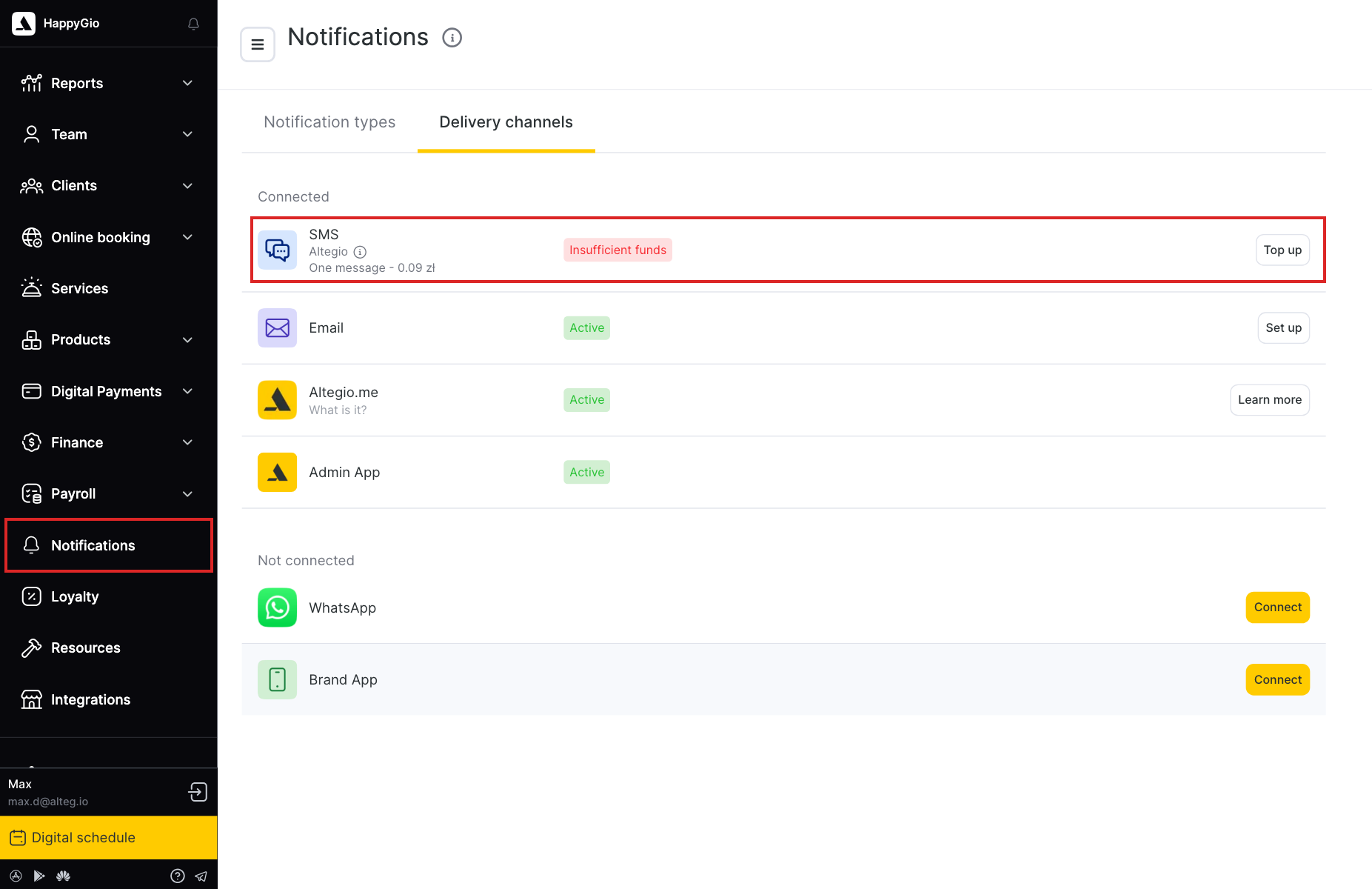
- Go to Notifications and open the Delivery channels tab.
- Find SMS in the Connected list. Under it you see Altegio and the price of one message, for example One message – 0.09 zł.
While your balance is empty, the channel shows the Insufficient funds status, and SMS are not sent.
Step 2. Top up your balance
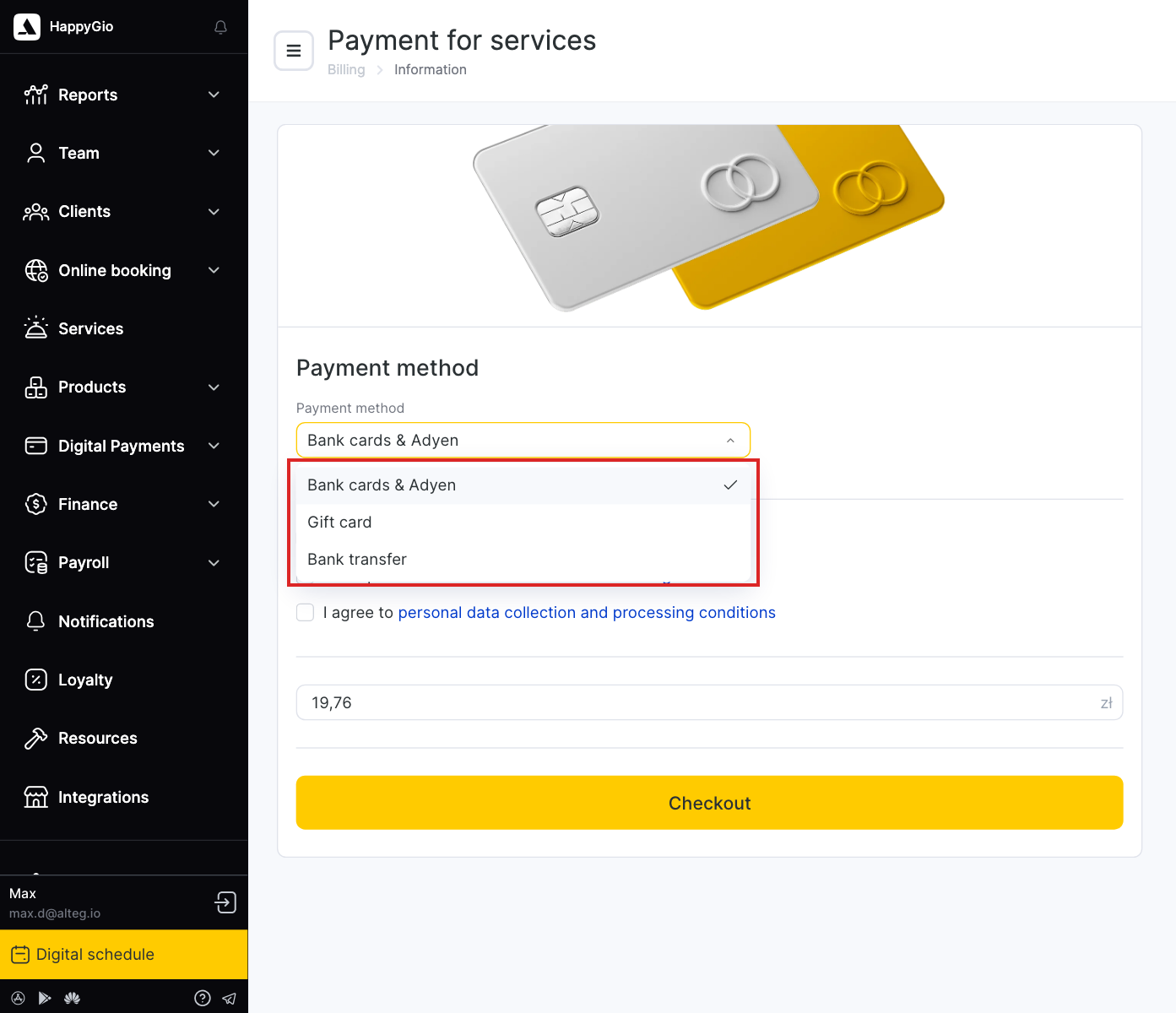
- In the SMS row, click Top up. The Payment for services page opens in a new browser tab.
- In Payment method, select how you want to pay:
- Bank cards & Adyen
- Gift card
- Bank transfer
- Select the three checkboxes to accept the user agreement, the license agreement, and the personal data collection and processing conditions.
- Enter the top-up amount.
- Click Checkout and complete the payment.
You can also open the same page from Billing > Breakdown: click Top up in the top right corner.
Altegio doesn’t issue invoices for balance top-ups automatically. If you need an invoice, contact Altegio support.
Step 3. Turn on SMS for notification types
The balance alone doesn’t start SMS sending. Choose which notifications go by SMS.
- Go to Notifications and open the Notification types tab.
- Turn on the toggle next to the notification you need, for example Appointment reminder.
- Click the notification name to open its settings.
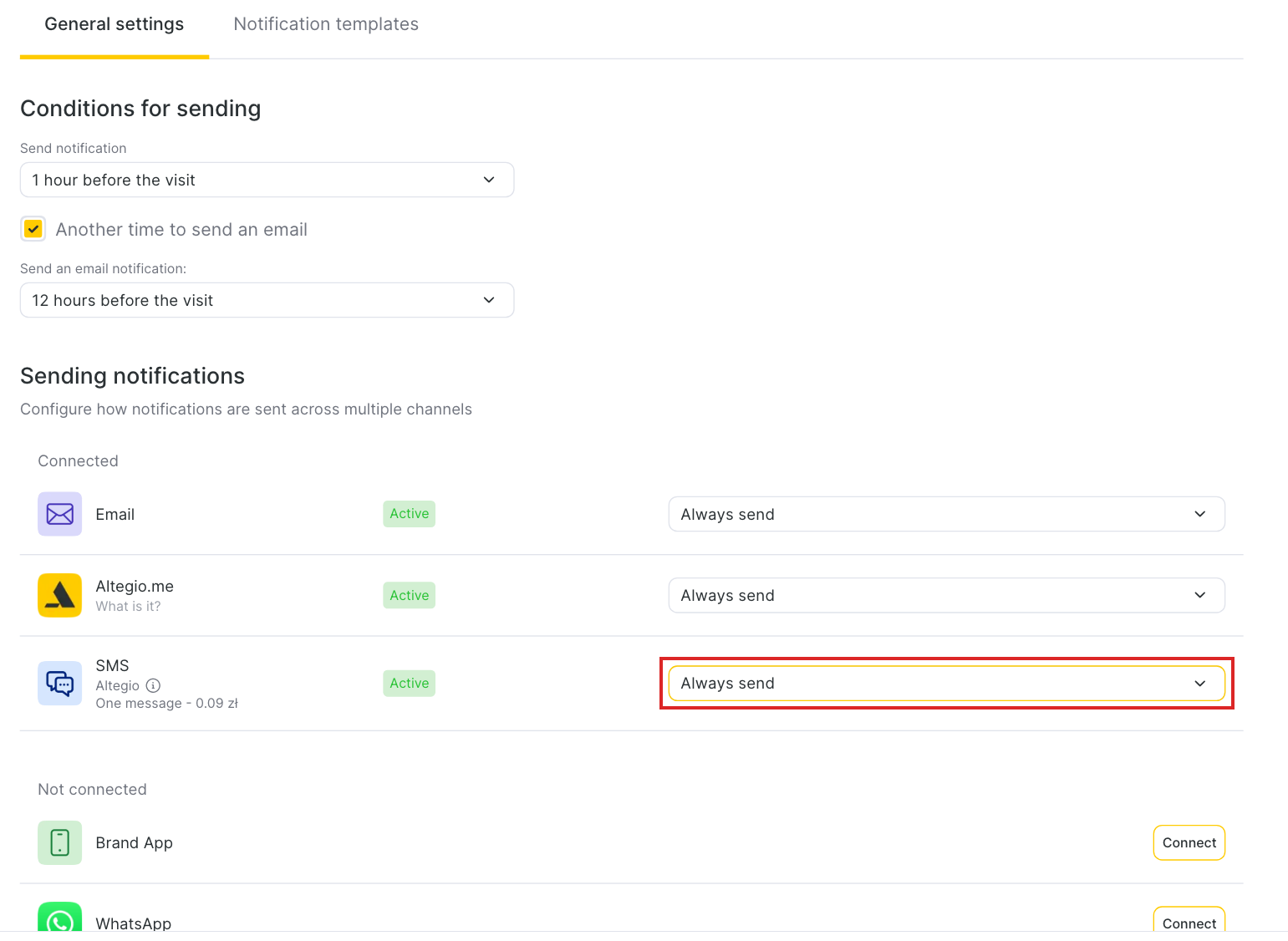
- On the General settings tab, find the Sending notifications block. In the SMS row, select a sending rule:
- Always send: the notification goes by SMS every time.
- Send if delivery failed to previous channel: SMS is sent only if the notification wasn’t delivered through the channels listed above SMS.
- Do not send: this notification never goes by SMS.
- Click Save.
Repeat for each notification you want to send by SMS. To change the message text, see Notification types: configuring templates.
Result
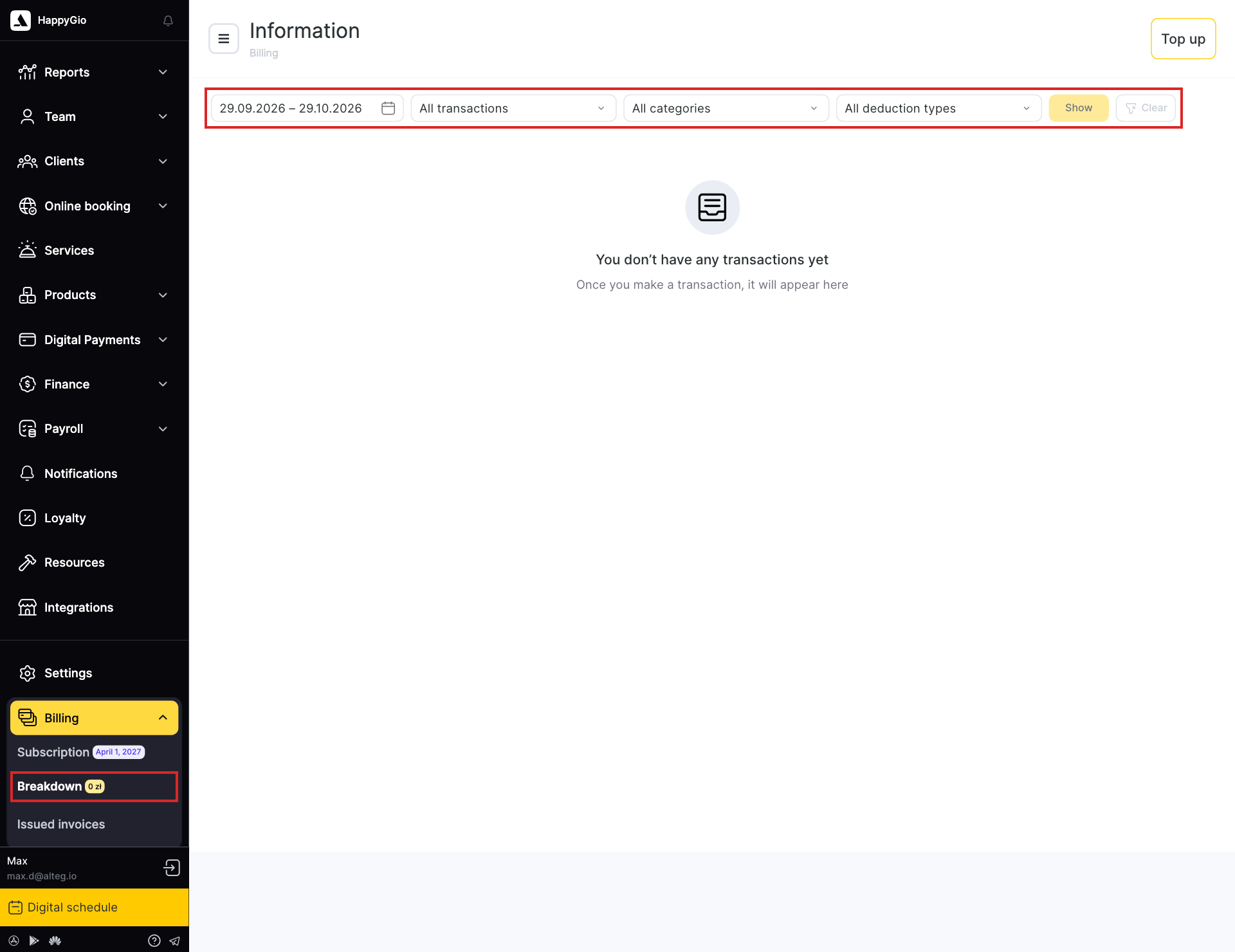
Altegio sends SMS for the notifications you turned on and deducts the cost of each SMS part from your balance. The current balance is shown next to Breakdown in the Billing menu.
Open Billing > Breakdown to see your top-ups and deductions. Filter them by period, transaction type, category, and deduction type, then click Show.
When the balance reaches 0, SMS stop being sent until you top it up again.
FAQ
No. The SMS channel with the Altegio service is already in Notifications > Delivery channels. Top up your balance and turn on SMS in the notification types you need.
The balance only pays for SMS. You also need to turn on SMS for each notification: open Notifications > Notification types, click the notification, and in the Sending notifications block set the SMS row to Always send or Send if delivery failed to previous channel. Then click Save.
One SMS part costs 0.09 PLN in Poland and 0.99 CZK in Czechia, excluding VAT.
A long message is split into parts, and each part is charged. A message in plain Latin letters fits 160 characters in one part. If it contains Polish or Czech letters with diacritics (ą, ł, ř, č) or Cyrillic, one part fits only 70 characters.
Yes. Altegio credits your balance once with the cost of 100 SMS: 9 PLN in Poland or 99 CZK in Czechia. New locations receive it after onboarding, and existing locations receive it once.
Your SMS balance is empty, so SMS are not sent. Click Top up in the SMS row and pay for a top-up.
No. SMS are sent only to phone numbers in the location’s country. A Polish location sends SMS to Polish numbers, and a Czech location to Czech numbers.
No. SMS are sent with Altegio as the sender name.
By bank card, gift card, or bank transfer. Choose Bank cards & Adyen, Gift card, or Bank transfer in the Payment method field on the Payment for services page.
Invoices for top-ups aren’t issued automatically. Contact Altegio support and request one.
In the Billing menu, next to Breakdown. The full history of top-ups and deductions is on the Billing > Breakdown page.
Contact Altegio support. You don’t need to contact the SMS provider.
The account Owner and any team member with the Access to the Billing section permission. See Billing and SMS mailings access rights.