
The Notification Center in the Altegio Business Management mobile app is a centralized hub that stores all your notifications in one place. It ensures you never miss important updates about appointments, or data activity — all accessible directly from your phone.
Accessing the Notification Center
In the mobile app, the Notifications section in the tab bar below.
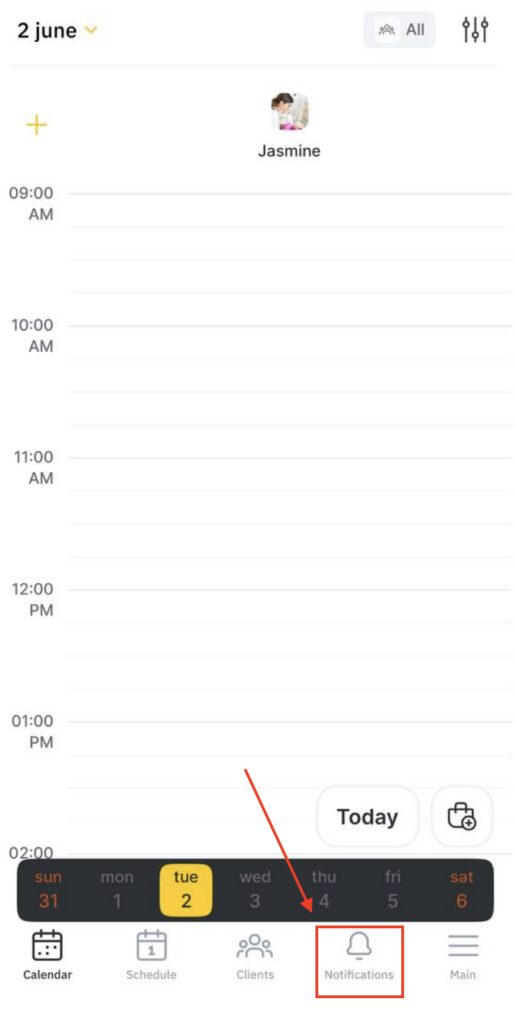
All notification types enabled for your account are automatically saved here as they arrive.
Notification Types
Appointments
Stay on top of your schedule with real-time appointment alerts:
- All – All appointment-related notifications
- New – A new appointment has been created
- Removed – An appointment has been cancelled or removed
- Checkout via QR code – An appointment was paid using a QR code
- Rescheduled – An appointment time or date has been changed
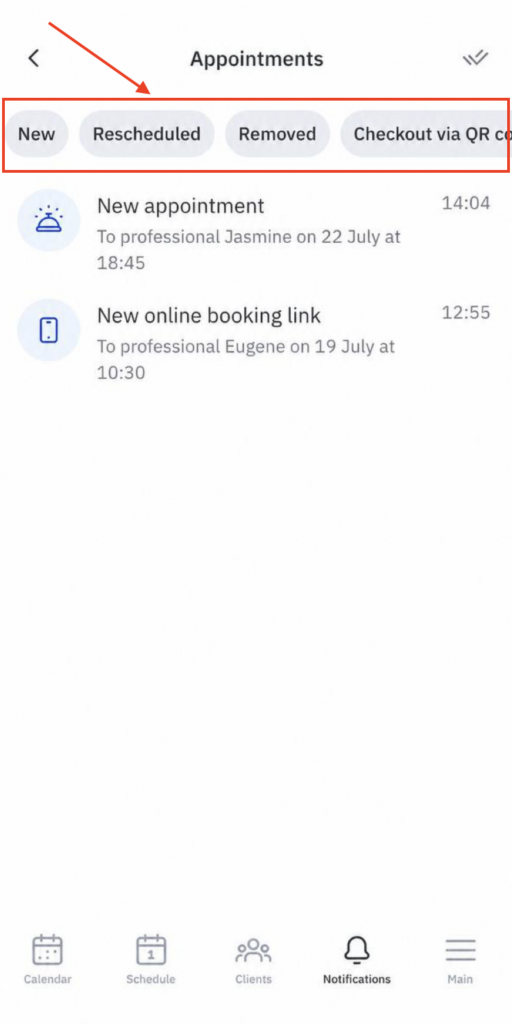
Tip: Tap any appointment notification to open the full appointment details directly.
Calls
Receive alerts for incoming calls so you never miss an important client communication, even when you’re away from your desk.
Using the Notification Center in the Altegio Business Management mobile app
Users can tap appointment notifications to be redirected to the detailed view of the appointment.
The Notification Center allows users to keep track of all notifications in one place, making it easier to manage and respond to various activities and updates within Altegio.
The Notification Center in Altegio is an essential tool for users to stay informed about appointments, incoming calls, and data upload statuses. By centralizing all notifications, it ensures that users can efficiently manage their tasks and keep track of important updates, enhancing overall productivity and user experience.