
A prepaid package only pays off when clients actually use the sessions they bought. When nobody tracks how many visits are left and when the package ends, sessions expire unused, clients feel short-changed and the front desk ends up arguing about balances. Package bookings management – selling, tracking and redeeming prepaid sessions – comes down to two numbers on every package: sessions left and the end date. This guide covers which package structure to choose, a realistic one-week setup, reminders before expiry, the front-desk routine and the numbers to watch, with Altegio memberships as the worked example.
TL;DR:
- Every package needs a holder, a list of services, sessions left, an end date and a unique number, visible to anyone at the front desk.
- Choose the structure by how clients buy: a fixed course of one service, a shared pool of visits across services, or prepaid credit in money.
- The setup fits into one week; the effect on unused sessions only shows once your first packages have run their full validity period.
- Remind clients before a package ends and after each visit, and give one person the right to edit balances and dates.
- In Altegio, prepaid packages are memberships: a balance of visits, a validity period, optional freezing, payment with the membership in the appointment window, notifications and a Memberships report with export to Excel.
What do you need before setting up package management?
Before touching any software settings, get your records in order. Most package disputes start here, not in the calendar.
For every package you sell, you need five things recorded without exception: who holds it, which services it covers, how many sessions are left, when it ends and a unique number. Miss one and you are back to guesswork the moment a client calls to ask how many facials they have left.
- List every package type you sell today and every client who still holds one, with sessions left and the end date.
- Decide who owns exceptions: refunds, goodwill sessions, extensions and disputed visits.
- Agree your rules in advance: validity, whether a package can be paused, what happens after a late cancellation.
- Move off spreadsheets once more than one person sells or redeems packages, because the sheet and the calendar drift apart.
In Altegio, each sold membership has a number, a type, a balance, a status and a validity period, and it sits in the Loyalty tab of the client card, where it can also be viewed from the client’s appointment.
Which package type fits your business?
Not every package should work the same way, and forcing all of them into one structure costs flexibility you may need later. Three structures cover most cases:
- A course of one service – a fixed number of a specific service, such as six laser sessions or four physiotherapy appointments. Simple to explain and simple to redeem, ideal for defined treatment courses. In Altegio this is a membership with a split balance: each visit is deducted from the service that was provided.
- A shared pool of visits – a number of visits the client can spend across several services, for example ten visits for any massage on the list. In Altegio this is a membership with an overall balance: one visit is deducted whatever the service, so put services of a similar price into the same pool.
- Prepaid credit in money – the client pays a sum up front and spends it on anything. In Altegio the closer fit is a gift card or a client account deposit rather than a membership.
Not to be confused with package services. In Altegio, a “package service” is something else: two to ten services combined into a single appointment, performed in parallel or in a row by one or several team members – a four-hands manicure and pedicure, for example. A package service bundles work inside one visit; a membership is a balance of prepaid visits used over weeks or months. Package services are still being rolled out, so not every account has them yet.
Design around the outcome, not the treatment count. A “three-month skin reset” sells better than “six facials” because it promises a result, not a quantity. Keep the pitch to one to three perks, such as priority time slots or a free add-on, rather than listing everything the package includes. Price it as a clear saving against single visits without undercutting your margins: if one session costs €90, six sessions for €450 is “six for the price of five” and works out at €75 a session.
Set the validity to match a realistic visit rhythm. Six sessions two weeks apart take about ten weeks from the first visit to the last, so a three-month validity leaves room for a missed appointment or two. Too short and clients lose sessions they meant to use; open-ended and packages drift for years.
How do you set up packages in one week?
A week is enough to have packages running in the software if you prepare the list from the first section. Here is a plan that works with Altegio memberships; the same steps apply to any system.
- Day 1: inventory. Finish the list of package types and current holders. If you want SMS reminders and have no SMS provider connected yet, start that today, because signing up with a provider can take longer than a week.
- Day 2: create the types. In the chain interface, go to Loyalty > Membership types. For each type, choose the services, a split or overall balance and the number of visits, the price, the validity period (in days, weeks, months or years, counted from the first visit or from the sale), whether freezing is allowed and in which Locations the membership is valid.
- Day 3: move existing packages. Enter the balances clients already hold (the help centre also has a guide to importing memberships) and spot-check a few client cards against your old records.
- Day 4: reminders and rules. Switch on membership notifications for each type and decide whether to use automatic debiting for late cancellations (both are covered below).
- Day 5: permissions and training. Decide who can edit balances and validity, and walk the front desk through selling a membership, paying for a visit with it and freezing it.
- Day 6: online sale (optional). Mark the types you want to sell online as available for online sale, connect a payment integration and set up the online sales widget.
- Day 7: baseline. Open the Memberships report, export it to Excel and record how many sessions currently expire unused. This is the number you will compare against later.
Be realistic about results: the setup takes a week, but unused sessions only show up when packages expire. Judge the change after your first packages have run their full validity period, not after seven days.
Once a membership is sold, it becomes a payment method. In the appointment window a Membership №… button appears for a client who holds one, and one visit is deducted when the visit is paid. A membership the client doesn’t hold yet, such as a gifted one, can be found by its code at payment. An expired membership can’t be used to pay, so the system won’t quietly redeem a package that has already ended. This works together with Altegio online booking and the client base, so the appointment, the payment and the balance live in one record.
Pro Tip: Test your exception flow before you need it. Sell a test membership to a test client card, pay for a visit with it, freeze it, edit the balance and find it in the report. If any step takes your team more than a couple of minutes, simplify it before a busy Saturday.
What stops packages from going unused before expiry?
The unused-session rate is the number to watch, because every expired session is money you have already taken for a service you never delivered, and a client who now feels short-changed.
Two kinds of reminders do most of the work: one before the package ends and one after each visit. In Altegio both are set per membership type on the Notifications tab (Loyalty > Membership types) and are switched off by default:
- End of membership notification – sent when a set number of days remains before the end date, when a set number of visits remains, or on both triggers. Templates can include the visits left and the end date, or you can write your own text of up to 255 characters.
- Membership cancellation notification – despite the name, a write-off message: sent after each visit paid with the membership or debited automatically, with the visits written off, the visits left and the end date. It isn’t sent when a balance is changed by hand.
These notifications go out by SMS or messenger, so you need an SMS provider or chat-bot connected from the Integrations Hub (Integrations > Notifications), and the provider bills the messages. The end-of-membership message is sent a day after the trigger, between 9:00 and 21:00 Location time.
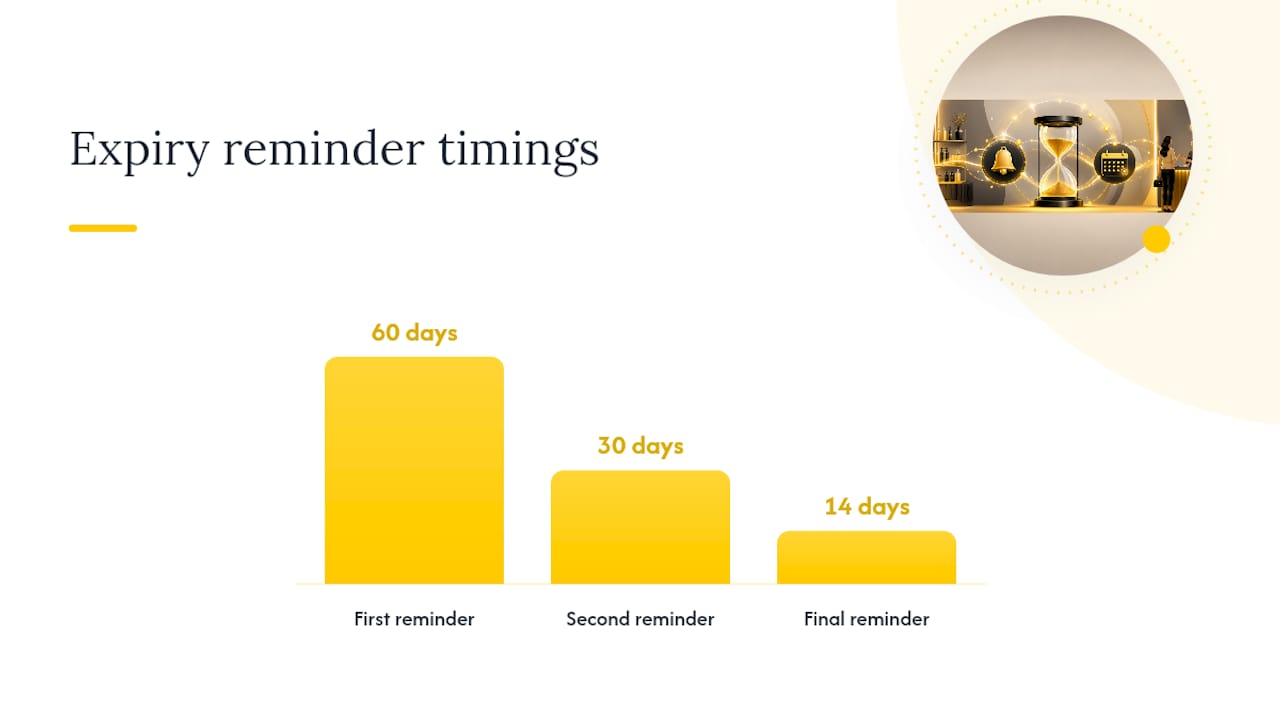
A three-step schedule like the one above suits longer packages. The automatic notification covers one point in time per membership type, so handle the other steps with a short weekly routine:
- Filter the Memberships report by end date and visits left to get a call list of clients whose package ends soon and who still have sessions.
- Contact those clients with the exact number of sessions left and the exact end date, not a vague “your package is expiring soon”.
- Offer the next appointment there and then, while the client is on the phone or in the chair.
- Review the list for patterns, such as one service or one team member whose packages keep expiring unused.
Two settings stop sessions from being lost through no fault of the client. Freezing pauses a membership, for example when a client is ill, and the frozen days are added to the validity period once it is unfrozen; the membership card shows who froze it and when. If validity counts from the first visit, automatic activation after a long absence starts the clock a set time after the sale, so a package that is bought and never used doesn’t stay open forever.
The mechanism isn’t complicated. Manual tracking depends on someone remembering to compare a spreadsheet with the calendar. A fixed routine plus automatic messages reaches every client with a package ending soon, every time, whether or not they have booked.
How should the team sell and redeem packages day to day?
Software solves the tracking. People still have to sell the package and check the balance at the desk, and that is where training pays off.
A good moment to offer a package is during the consultation, when you are already talking about the client’s goals and the number of sessions they will need, rather than only when the bill arrives.
- Check the client’s membership on screen before every appointment, not just at payment.
- Give the team one short line per package type: “You have three sessions left until 14 March. Shall we book the next one now?”
- Limit who can change balances and dates. In Altegio, editing the membership balance and editing its validity are separate access rights, and the membership type decides whether editing is allowed in all Locations or only where it was sold.
- Resolve disputed visits the same day, not the same week, while everyone still remembers what happened.
If you charge a session for late cancellations, Altegio can do it automatically: in the service settings (Services > Advanced settings) you set how many hours before the appointment a client can cancel free of charge, and after that a visit is debited from the membership when the appointment begins (automatic debiting also has to be allowed in the membership settings). If the client holds several memberships, the one that ends first is used. Put the rule in your terms and tell clients when they buy, so it never comes as a surprise.
Pro Tip: Keep the end dates of active packages in front of the team during the weekly routine. A script only works if the person delivering it knows how many sessions are left before they start talking.
A client who buys and uses a session in the same visit should see the balance drop before they leave. Clear packages like this also give clients a reason to come back on a regular rhythm, which is the point of selling them.
Which metrics prove package management is working?
Four numbers tell you whether packages are making money or leaking it. All of them can be calculated from an Excel export of the Altegio Memberships report, which lists each membership’s number, type, balance, status, validity, buyer, date and place of sale, cost and write-offs.
- Redemption rate before expiry – the share of sold sessions used before the end date.
- Unused-session rate – the share of sold sessions left on packages that have already expired; the clearest sign of leakage.
- Average revenue per package – shows whether your pricing and perks are pulling their weight.
- Repeat purchase – how many clients buy a new package after the previous one ends.
Record a baseline before you change anything, even from rough records, then compare once your first packages have run their full validity period. Check the numbers monthly, or weekly while you are still tuning reminders and the front-desk routine.
How should you treat prepaid packages in your accounts?
Money for a package arrives before the services are delivered, so many businesses treat it as received in advance and count it as earned as the sessions are used. How you record it, when VAT is due and what happens to sessions that expire unused depends on your country’s accounting, tax and consumer rules, so check with your accountant before you set up the categories.
One setting matters for pay as well as the books. Altegio can recalculate the service cost from the membership price: the price divided by the number of services in the membership. With the example above, €450 for six sessions gives a service cost of €75 instead of €90, which matters if team members are paid a percentage of the service cost. For the wider financial picture, see finances and accounting in Altegio.
Why does an integrated platform beat piecing tools together?
Package leakage rarely comes from a lack of data. It comes from having no standing process that checks sessions left and end dates before it is too late, and that gap grows with every separate tool you use for appointments, payments and messages.
When the package, the appointment and the payment sit in one system, the balance changes when the visit is paid, the team sees the same number as the client, and the reminder uses the same data. Fewer copies of the truth mean fewer disputes at the desk.
How Altegio handles the whole package workflow
Altegio is booking and management software for appointment-based businesses: beauty, wellness, clinics, fitness and more. Your client base stays yours under Altegio’s Zero-Competition Policy: there is no marketplace listing rival businesses next to yours, clients book through your own links, and client data is never resold. Prepaid packages are memberships, part of the loyalty program tools alongside discount programs, bonus cards and gift cards:
- membership types with a split or overall balance of visits, a validity period counted from the sale or the first visit, optional freezing and the Locations where they are valid;
- sale at the desk and online through the online sales widget with a connected payment integration;
- payment with the membership in the appointment window, by the client’s linked membership or by code;
- automatic debiting for late cancellations, set per service;
- end-of-membership and cancellation (write-off) notifications through a connected SMS provider or chat-bot;
- a Memberships report with filters by sale, use, status, end date and visits left, and export to Excel.
Automatic renewal of memberships is available only in Brazil, so elsewhere clients buy a new membership when the old one ends. For a tour of how memberships fit with the other loyalty tools, read Altegio loyalty architecture.
If you track packages by hand today, or across several disconnected tools, set up one membership type on the 7-day free trial and run a test client through it. Pricing depends on the number of team members and the billing period, see pricing.
FAQ
What is package bookings management?
It is the process of selling, scheduling, tracking and redeeming prepaid multi-session packages, with software that keeps the sessions left and the end date on every package instead of relying on manual records.
How long should a service package stay valid?
Long enough for a realistic visit rhythm plus a little slack. Count the sessions, multiply by the recommended interval and add a few weeks: six sessions every two weeks fit comfortably into three months.
What’s the biggest cause of unused-package revenue loss?
Usually not a lack of data but the absence of a routine that checks sessions left and end dates before it is too late to act.
Can a spreadsheet handle package tracking?
Only while one person sells and redeems every package and updates the sheet straight away. Once several people work the desk, the sheet and the calendar drift apart and sessions get lost.
Is a membership the same as a package service in Altegio?
No. A membership is a prepaid balance of visits used over time. A package service combines two to ten services into a single appointment, done in parallel or in a row by one or several team members.
Can clients pause a package?
In Altegio, yes, if freezing is allowed in the membership type. The frozen days are added to the validity period after the membership is unfrozen.
Read next
- Altegio Loyalty Architecture: programs, cards, memberships, and reporting
- A salon loyalty card: paper, digital or in the app
- How to set up recurring appointments in your booking system
- Salon chart of accounts: a template for VAT, card fees and tips
This article is general information, not legal or tax advice. Rules differ between EU countries, so check your national law or ask a lawyer or accountant before acting.