Decide what your gift cards are worth, how long they stay valid and what they can pay for, create them in your booking system, test one sale and one partial redemption from start to finish, then switch on online sales and start promoting. That is the whole programme in one sentence. Done well, gift cards bring money in before the visit takes place, and every card that is redeemed brings someone through your door – often a person who has never visited before.
This week’s TL;DR checklist:
- Set your policy: two or three values, a validity period, single-use or multiple-use cards, and what each card can pay for.
- Create the gift card types, then sell a test card at the desk and use part of it on a real service.
- Turn on online sales, add the sales button to your online booking link and tell clients the cards exist.
Why a gift card programme pays for itself year-round
Gift cards do three things at once. They bring cash in before any service is delivered, they lead to a visit when the recipient books, and they put your business in front of someone who has never been through your door. The person buying the card is doing your marketing for you.
The card also doesn’t cap the bill. A client with a €50 card who books a €65 service pays the €15 difference by card or in cash, so the sale isn’t lost. Not every card is spent in full, either: accountants call the unredeemed value breakage. How breakage is taxed depends on the type of voucher and on national rules, which the VAT section below covers.
Pro Tip: Start with gift cards sold at the desk and through your online sales form. There is no print run and no minimum order, and you can start selling as soon as the first gift card type is set up.
Value gift cards or service gift cards?
Before you touch any settings, decide what kind of card you are selling. In Altegio every gift card type has a denomination – the starting balance, in the currency of the Locations where the card is valid – and one of two usage types:
- Single-use: the card becomes invalid after the first payment. If it is worth more than the bill, the rest of the balance can’t be used later.
- Multiple-use: the card can be used until its balance reaches zero, so whatever is left stays on it for the next visit.
You also choose what the card can pay for: no restrictions, any services without products, some services and any products, some services without products, or any products without services. To limit a card to certain services, those categories and services have to be chain-wide. You can’t add specific products to a gift card type.
This gives you two practical formats:
| Format | How to set it up | Good for |
|---|---|---|
| Value gift card | Multiple-use, a round denomination (€25, €50, €100), no restrictions or services only | Gifts where the recipient chooses the treatment and may spend the balance over several visits |
| Service gift card | Single-use, denomination equal to the service price, limited to that service or category | A gift visit: one haircut, one massage, one consultation |
Denominations, validity and partial redemption
Three values are enough to start: €25 lowers the barrier for casual gifters, €50 covers most single treatments and €100 catches the premium end. You don’t need more than four.
For validity, Altegio offers three options: no expiration date, a fixed date for all cards of the type, or a fixed period counted from the date of sale. Rules on how long gift vouchers must stay valid, and how expiry has to be disclosed, are set nationally and differ between EU countries, so check your national rules before you pick a period. Whatever you choose, state it clearly before the client pays.
Partial redemption is where the usage type matters. A client with a €50 card who books a €35 treatment keeps a €15 balance only if the card is multiple-use. On a single-use card those €15 are gone after the first payment, so value cards should almost always be multiple-use.
If you run several Locations, you choose where each gift card type is valid when you create it. Say on the sales page whether the card works at every Location or only at one – an unclear answer here is an easy way to start an argument at the front desk.
Finally, decide on codes. A gift card with a code can be used by anyone who knows the code, which is what you want for presents; after payment, the card moves to the Loyalty tab of the client who used it. You can also allow selling a gift card without a code: it is then linked to the buyer’s phone number and can only be used by that client, which suits personal prepaid purchases rather than gifts.
| Policy area | Starting position |
|---|---|
| Denominations | €25, €50, €100 |
| Usage type | Multiple-use for value cards, single-use for one-service cards |
| Validity | Stated before purchase and in line with your national rules |
| Partial redemption | Always possible on value cards (multiple-use) |
| Locations | Chosen per gift card type and stated on the sales page |
| Codes | With a code for gifts; without a code only for personal purchases |
How to set up salon gift cards: the step-by-step checklist
Work through these steps in order. Spread over a week, they leave time for testing and for briefing the team.
Pre-checks (Day 1)
- Agree with your accountant how unspent gift card value will be recorded and which VAT treatment applies (see the VAT section below).
- Fill in the policy table above, including which Locations each card is valid at.
- If you plan to sell online, choose your payment provider. Online payments in Altegio go through a connected provider – Stripe, or Adyen for EU countries – and Altegio doesn’t charge its own commission on payments.
Configuration (Days 2–3)
- In the chain interface, go to Loyalty > Gift card types and create a type for each card: name, denomination, usage type, category, usage restrictions, validity period and the Locations where it is valid.
- Each type then appears in your Locations under Products > All products, in a Gift cards category. Record a product arrival before the first desk sale so that stock doesn’t go negative.
- For online sales, open the gift card type and enable Available for online sale. Add the online sales name, a horizontal image (at least 288 × 184 px, up to 12 MB), a description and the price. If the price is lower than the face value, the online sales widget shows the discount.
- In the Location, open Digital Payments > Checkout, set up Online sale of memberships and gift cards, connect the payment system and enter the email address that should receive new order notifications.
- On the Widget tab, check your company details, add a short message for clients and your personal data processing agreement, and enable Send an automatic email to the client after purchase. Save and enable the widget.
- Add the online sales button to your online booking link: Online booking > Online booking links, then the Sale of memberships and gift cards field on the Link settings tab. The button can’t be added to a chain widget. If your Location is listed in the Altegio.me app, clients can also buy gift cards there.
Operational setup (Day 4)
- Show the front desk how to sell a card in the appointment window (Status tab, Add service/product, then enter a unique code) and through a Sale of product inventory operation, where the code can be generated automatically.
- Show how to redeem a card: at payment, a card sold to this client appears on the Fast payment tab; any other card is found by its code on the Split payment tab, where the rest of the bill can be paid in cash or by card.
- Set access rights in Team > Team members list > Access. Front desk team members need Loyalty > Paying with a gift card and membership without a code to see the Apply gift card button. Keep Edit gift card balance and Edit gift card validity period for managers.
- Decide who reviews the gift cards report and how often.
Days 5–7 are for the tests in the pre-launch section below and for your first promotion.
How to sell gift cards year-round: campaign ideas and templates
If you promote gift cards only before the winter holidays, you miss most of the year. Valentine’s Day, International Women’s Day on 8 March, Mother’s Day (the date differs between countries), graduations and the start of summer are all gift occasions. Prepaid revenue is also worth most in quiet months, when the schedule isn’t full.
Promotion formats to try
- Bonus value instead of a discount. Create a €55 gift card type and sell it online for €50. It costs you the same €5 as 10% off a €50 card, but the price stays round and the buyer sees a bigger number.
- A card for the service you want to grow. Limit a card to one category, such as cosmetology or a new treatment, to send demand where you have free slots.
- Local partnerships and charity tie-ins. A florist or café nearby can sell or promote your cards, or you can give part of each sale to a local cause.
- A line in every notification. You can add your own text, image or link to Altegio’s automatic email templates, so a link to the gift card sales form can go out with every appointment confirmation.
Ready-to-use templates
Email subject lines (for your newsletter: Altegio has no bulk email, so export your client list to Excel and send through an email service of your choice):
- “Give the gift of a great hair day”
- “Last-minute gift sorted: straight to their inbox, no wrapping required”
- “Treat someone (or yourself) this [Month]”
Social post copy:
- “Know someone who deserves a little time for themselves? Our gift cards start at €25 and you can buy one online any time. Link in bio.”
- “Mother’s Day is [date]. Still need a gift? Our gift cards are on sale online 24/7.”
Front-desk upsell script:
“Before you go, we have gift cards from €25 if you know anyone who’d love a treatment. I can sell you one now, or you can buy one online later and it arrives by email.”
Pro Tip: Give each campaign its own gift card type – “Mother’s Day 50”, “Christmas 100”. The gift cards report shows the type of every card and can be filtered by sale date, so you can see which campaign sold without any separate tracking.
Activation, redemption, accounting and VAT: what you need to know
How sale and redemption work
When a client buys a card through the online sales form, Altegio assigns a code automatically (it can’t be changed afterwards) and, if you enabled it, emails the gift card to the buyer. At the desk, the team member enters a code or generates one when the sale is made through an inventory operation.
At redemption, the client gives the code and the team member finds the card on the Split payment tab. Altegio lists it only if a card with that code exists and hasn’t expired. If the service costs more than the remaining balance, the client pays the difference by another method. The updated balance is visible on the Loyalty tab of the client profile, where team members with the right access can also edit the balance and validity period.
Reconciliation and reporting
The Report on gift cards (chain interface, Loyalty > Gift cards) lists every gift card valid in the chain with its code, type, balance, denomination, status, buyer, date and Location of sale, and each write-off with its amount. You can filter by sale date, sale Location, use date, use Location, card number or the owner’s phone number, and export everything to Excel. Links in the report open the card details, the buyer’s client card, the financial transaction and the visit where each write-off happened.
| What to monitor | Where to find it | Frequency |
|---|---|---|
| Outstanding balance | Balance of active cards, exported to Excel and summed | Monthly |
| Redeemed value | Write-offs, filtered by use date | Weekly |
| Sales by campaign and Location | Type column, filtered by sale date and sale Location | After each campaign |
| Cards that were never used | Status and validity of each card | Quarterly |
Key insight: Money from a gift card that hasn’t been spent yet is normally a liability, not income. Agree with your accountant when it becomes income – recording it too early overstates your profit and can put VAT in the wrong period.
For a wider view of the money side, see the finance and accounting tools and our salon chart of accounts template.
VAT on gift cards in the EU
Since 1 January 2019, the EU VAT Directive 2006/112/EC, as amended by Council Directive (EU) 2016/1065, has distinguished two kinds of voucher. The rules apply to vouchers issued after 31 December 2018.
- Single-purpose voucher (SPV): the place of supply of the services or goods and the VAT due on them are known when the voucher is issued. Each transfer of the voucher counts as the supply itself, so VAT is due when the card is sold. Providing the service later is not a separate transaction.
- Multi-purpose voucher (MPV): any voucher that is not an SPV. VAT is due when the service is actually provided or the goods are handed over; the sale of the card before that is not subject to VAT.
Which one you issue depends on what the card can buy. A card valid only for services taxed at one rate, at Locations in one country, usually meets the SPV test. A card that can also pay for retail products taxed at a different rate, or be used at Locations in different countries, usually doesn’t. VAT rates differ between EU countries and some services qualify for reduced rates, so there is no single answer for every business. Altegio’s usage restrictions (services only, products only, certain services) define what a card can pay for, so show those settings to your accountant when you classify your cards.
The directive doesn’t set out what happens to VAT on vouchers that are never redeemed. That question is handled by national rules, so ask your tax authority or accountant how breakage is treated in your country.
Front-desk scripts, team training and client-facing assets
Your team is your most direct gift card sales channel: a natural mention at checkout reaches people who are already happy with their visit.
Team training checklist
- Know the difference between single-use and multiple-use cards and what happens to a leftover balance on each.
- Be able to sell a card with a code, find a card by its code on the Split payment tab and split the rest of the bill without a manager.
- Know who can edit a card’s balance or validity period.
- Know the policy on lost codes: if the client has the purchase email or knows the code, look the card up; a card without a code is linked to the buyer’s phone number. If neither is available, the manager decides.
- Fraud basics: always look a code up in Altegio before accepting it, and never refund a card to a different payment method without manager approval.
Front-desk scripts
At checkout (upsell):
“We have gift cards starting at €25 if you’d like to treat someone. You can buy one here now or online any time – the online ones arrive by email straight away.”
When a client presents a gift card:
“I’ll just look up that code for you. After today’s treatment you’ll have €[X] left on the card for your next visit.”
Lost code query:
“No problem. If you still have the email with the code, I can find the card and check the balance. If not, I’ll ask the manager.”
Message template for desk sales
Cards bought online are emailed automatically. For a card sold at the desk as a present, buyers often ask for something they can forward. A short message you send yourself does the job:
Subject: Your [Business Name] gift card is ready
Here is your gift card code: [CODE]. It is worth €[VALUE] and is valid until [DATE]. Book online at [LINK] or call us on [NUMBER].
Pro Tip: Put a small A5 card stand at reception with your gift card values and a QR code that opens your online sales form. Altegio generates the link to the form; any QR code generator turns it into a code. It catches clients while they wait and needs no effort from the team.
Pre-launch tests and KPIs to monitor after you go live
Pre-launch checklist (Days 5–7)
- Sell a multiple-use test card at the desk, use part of it on a real service and check the balance on the client’s Loyalty tab and in the Report on gift cards.
- Buy the cheapest card through the online sales form yourself. Check that the email arrives and the card appears in the report with its code.
- Open the sales form and your online booking link on a phone and check that the gift card button shows.
- Check access rights: the front desk can apply cards, only managers can edit balance and validity.
- Brief every team member who works at the desk before the first live sale.
Troubleshooting common failures
- Purchase email not received: check the spam folder and the email address the buyer entered, and make sure Send an automatic email to the client after purchase is enabled on the Widget tab.
- Code not found at payment: check for a typo, the validity period, whether a single-use card has already been used and whether the card is valid at this Location.
- A card can’t be applied to this client: it may have been sold without a code, which links it to the buyer’s phone number.
- Gift card button missing from the booking form: the button can’t be added to a chain widget; set it on the Location’s online booking link.
- Balance doesn’t match your accounts: open the card from the report – the write-off links lead to each visit where the card was used – and compare them with your bookkeeping.
After launch, watch four numbers every month: gift card sales, value redeemed, outstanding balance and sales per campaign type. All four come from the gift cards report.
How Altegio makes this setup faster
Altegio is booking and management software for appointment-based businesses – beauty, wellness, clinics, fitness and more – and gift cards sit in its Loyalty section next to discount programs, cashback and bonus cards, client categories and memberships. Because the cards live in the same system as your appointments, payments and client base, you don’t have to reconcile a separate gift card tool.
Relevant modules
- Gift card types: created once in the chain, with denomination, single-use or multiple-use, usage restrictions, validity and the Locations where each type is valid.
- Online sales: an online sales form with its own link, a button in your online booking link and purchases in the Altegio.me app, with payments through Stripe or Adyen.
- Payment with gift cards: applied in the visit window, by code or from the client profile, with the rest of the bill split across other payment methods.
- Report on gift cards: every card’s balance, status, sale and write-offs across the chain, with filters and Excel export.
You can try the whole setup during the 7-day free trial. After that, the price depends on the number of team members and the billing period.
Key takeaways
A working gift card programme needs a clear policy, the right card settings, end-to-end testing and a monthly look at the numbers.
| Point | Details |
|---|---|
| Set policy before you configure | Decide values, usage type, validity, usage restrictions, Locations and codes before touching any settings. |
| Make value cards multiple-use | Only multiple-use cards keep the balance after a partial payment; single-use cards suit a gift visit. |
| Check national rules | Minimum validity and expiry disclosure rules are national, and so is the VAT treatment of unredeemed vouchers. |
| Classify each card for VAT | Under Directive 2016/1065, VAT on a single-purpose voucher is due at sale and on a multi-purpose voucher at redemption. |
| Test before launch | A desk sale, a partial redemption and an online purchase must all work before your first live sale. |
| Track the balance monthly | The gift cards report holds every sale and write-off; export it and review the outstanding balance with your accountant. |
The thing most salons get wrong about gift cards
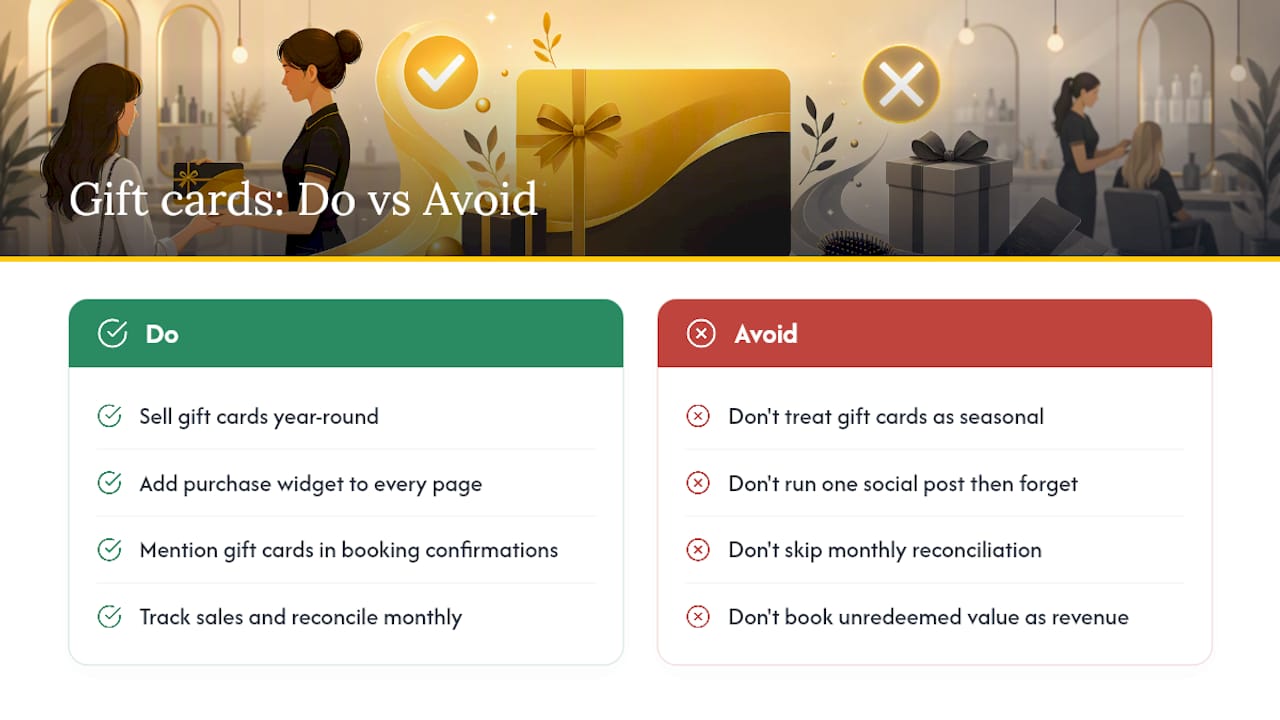
Gift cards are often treated as a Christmas campaign: set up in November, mentioned in one social post and forgotten until next year. That leaves money on the table for the other eleven months.
Businesses that sell gift cards steadily treat them as a permanent product. The purchase link is on their website and in their appointment confirmations, they run a bonus-value offer for several occasions a year, and they compare campaigns by gift card type instead of guessing which one worked.
The technical setup is the easy part. The harder work is promoting consistently and reviewing the outstanding balance every month. If unspent card value is booked as income too early, the accounts at year-end show income that hasn’t been earned yet, and VAT may sit in the wrong period. When your appointments, payments and gift card report are in one system, you read the balance off the report instead of rebuilding it in a spreadsheet, and you spend your time promoting rather than reconciling.
If you want to go further with loyalty, our overview of loyalty program models and the guide to cross-selling in a salon are good next steps.
Read next
- Gift card management – issue, track and report across locations
- Altegio loyalty architecture: programs, cards, memberships and reporting
- A salon loyalty card: paper, digital or in the app
- Altegio vs Reservio: an honest comparison for service businesses in Czechia
This article is general information, not legal or tax advice. Rules differ between EU countries, so check your national rules or ask an accountant before acting.