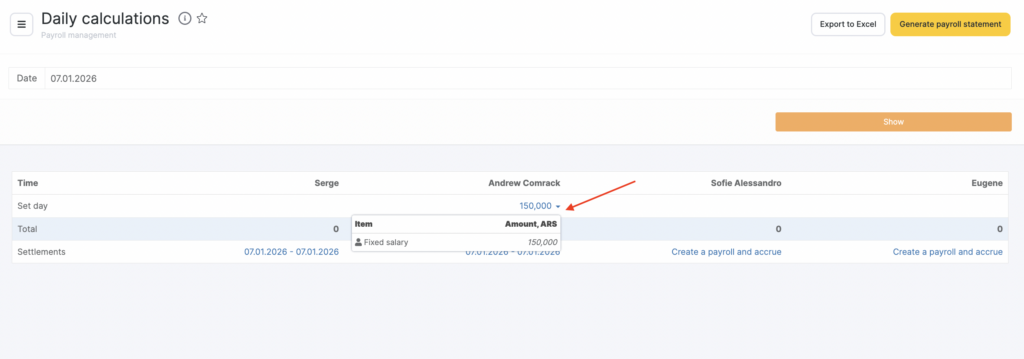
Altegio allows you to perform daily settlements and accrue payroll for each team member separately or for all team members at once.
Why is this section needed?
In Payroll > Daily Payroll (Administration mode), you can track all calculations and view detailed information for all appointments made during the day.
You can use Daily Payroll if there are disputes with a team member about how much they earned for the day. Altegio will show accurate data for that team member and the amount they are entitled to for providing services and/or selling products on that day.
You can also use this calculation when team member are paid for each worked shift.
How to calculate for a day?
Go to Administration mode Payroll > Daily Payroll. Here you can see data for all accruals for all team members who worked that day.
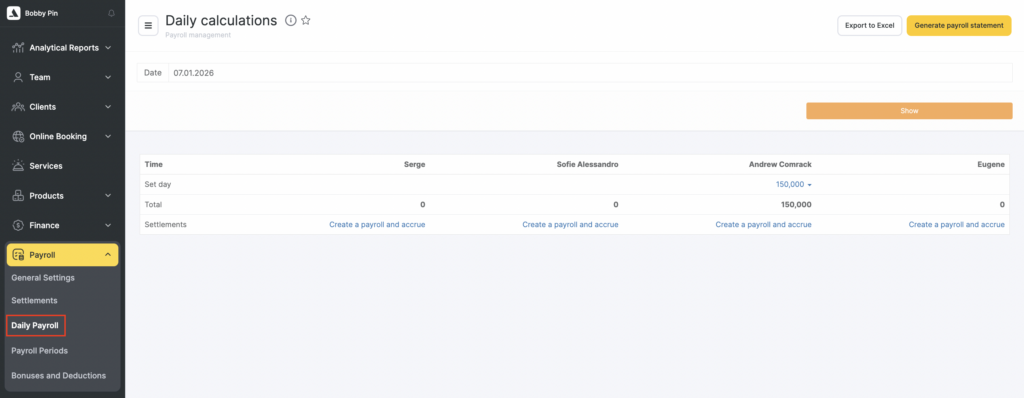
Section capabilities
- Accrual amounts are displayed as clickable links. If you click the link, Altegio will automatically show a list of all provided services and sold products.
- Create payroll statements and accrue payroll for all team members at once.
- Create a payroll statement and accrue payroll for individual team members.
- After statements are created, a clickable link with the accrual date will appear in the Settlements row. If you click the link, Altegio will automatically take you to the payroll statement page in Payroll > Settlements (more details about working with statements are available here).