
Returning clients
The Returning clients indicator takes into account the entire previous period and does not depend on the client loss period you set. The client’s visit could have been a week or a month ago, or a year ago. The Returning clients indicator is not used in calculating the Client retention rate.
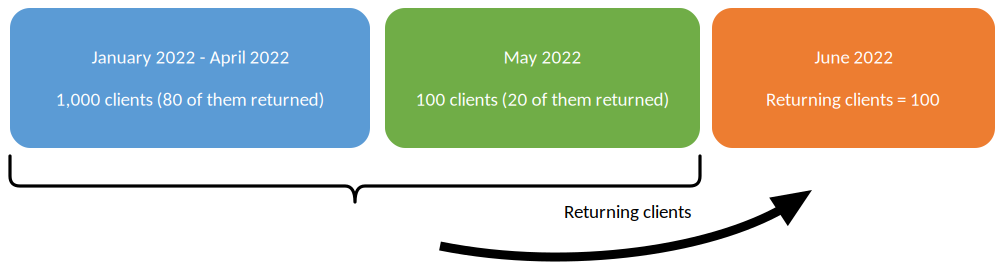
Client retention
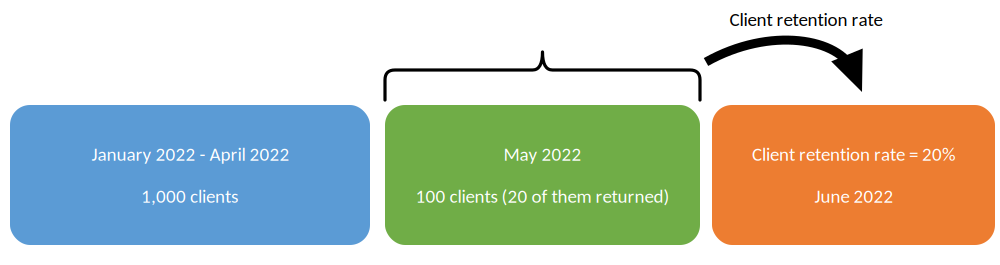
The Client retention rate shows the percentage of clients who made a visit during the specified previous period (the loss period, which is set in Administration mode > Settings > Analytics > Client Churn) and returned during the current one. The previous period always adjoins the start date of the current period.
In chain analytics, the loss period is set in the chain interface, in Analytics > Settings.
Note
Lost and returning clients are counted by the same rule for a chain and for a single location, but different visits are checked: a location counts only the visits to that location, while a chain counts the visits to all of its locations.
- For the chain, a client counts as lost if they have not visited any location of the chain within the loss period you set.
- For a single location, a client can count as lost even while they keep visiting other locations of the chain. For the chain, that client is not lost.
- A client who has an earlier visit counts as returning no matter how much time has passed, even if the previous visit was a year ago.
Example: a client visited location 1 and came to location 2 a year later. At location 2 they are not counted as returning, because they have no earlier visits there. In the chain reports they are counted as returning, because the visit to location 1 is included.
Example of calculating the Client retention rate
If there were 100 clients during the previous period and 20 of them came during the current period, the Client retention rate is 20%.
Important details
- Statistics are generated only for bookings with the Arrived status within the selected period.
- The Client retention rate values are always rounded (discrepancies by tenths of a percent). For example, if 53 out of 110 clients returned, the percentage is rounded from 48.18% to 48%.
- To find out how many clients returned after they became lost, multiply the Client retention rate by the number of clients in the previous period and round the value.
- The Client retention rate differs from the Repeated visits indicator.
- The Client retention rate differs from the Returning clients indicator.