
Altegio allows you to perform settlements for a specified period and accrue payroll for each team member individually or for all team members at once.
How to calculate for a period? #
- In Administration mode go to Payroll > Payroll Periods.
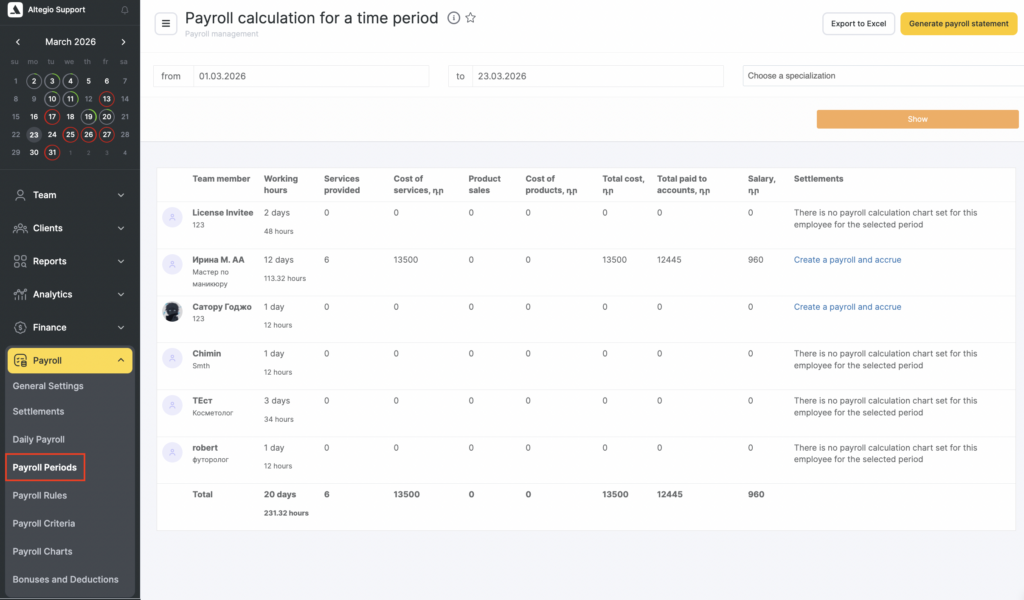
- Select the dates for which you want to accrue payroll, and the team member position (if you are not accruing payroll for everyone who worked during this period), then click Show.
The table will display the following data:
- Team member and their working hours.
- Number and cost of services they provided.
- Number of sales and the cost of goods they sold.
- Total cost of provided services and sold products.
- Payroll (calculated according to the configured scheme; more details are available in the article).
- Settlements (accrual information).
Section capabilities #
- Create payroll statements and accrue payroll for all team member at once.
- Create a payroll statement and accrue payroll for individual team member.
- After statements are created, a clickable link with the accrual dates will appear in the Settlements row. If you click the link, Altegio will automatically take you to the payroll statement page in Payroll > Settlements (more details about working with statements are available here).
Notes
Dismissed and deleted team members are not shown in the period calculation.
Payroll statements for dismissed team members can be viewed in Payroll > Settlements (if the statements were created before dismissal). More details about working with statements are available here.
For deleted team members, statements cannot be viewed.

