
At the end of August, Search Engine Roundtable reported that Google had started showing Book buttons in Search and Performance Max ads. Before that, an ad could carry the button only in Local Services Ads and Maps ads. Michel van Luijtelaar, who spotted the change, summed it up in one line: “Reserve with Google has moved from organic Local Search and Maps onto paid surfaces”.
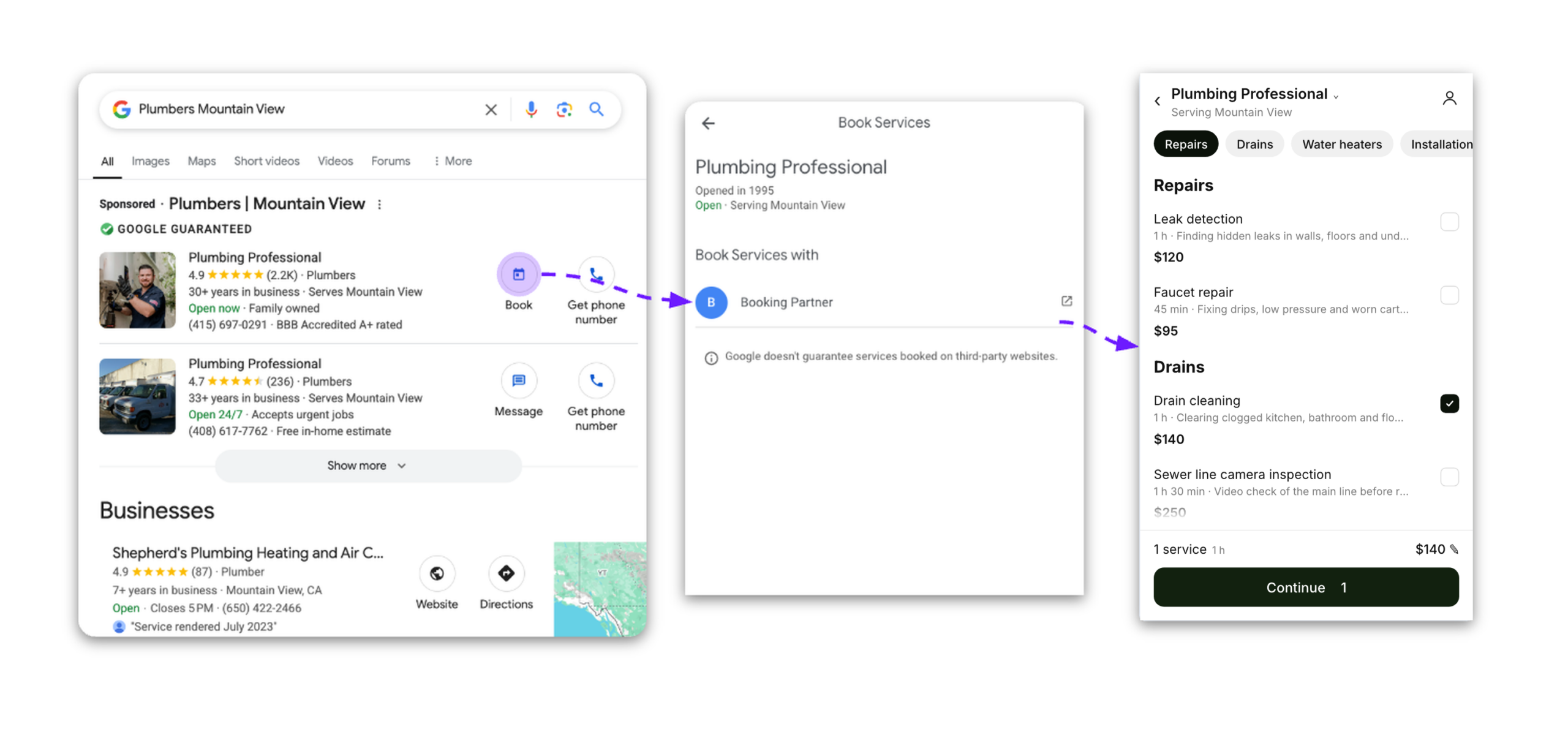
In October, Google confirmed to Altegio that the button is now switched on for eligible businesses that use Altegio, and it needs nothing from you. A person who sees your ad taps Book, lands on your Altegio online booking, picks a service, a team member and a time, and the appointment appears in your calendar.
Google switched it on by itself: no new settings in Altegio, no new tags in Google Ads. Below is what exactly changes, who gets the button, what it costs, how the appointments are counted in Google Ads, and what to check so that more paid clicks end in an appointment.
What changes
Until now, for businesses on Altegio the Book button lived in the free part of Google: in your Business Profile on Google Maps and in Google Search. Google calls this program Reserve with Google, and Altegio is one of its booking partners. Businesses that connected the Google integration in Altegio got the button there, and it led to their Altegio online booking.
Now the same button appears in paid ads too, and Google says the flow is identical to the one on Maps:
- A person searches for something like “gel manicure near me” or “car detailing in Prague” and sees your ad.
- Next to the ad there’s a Book button.
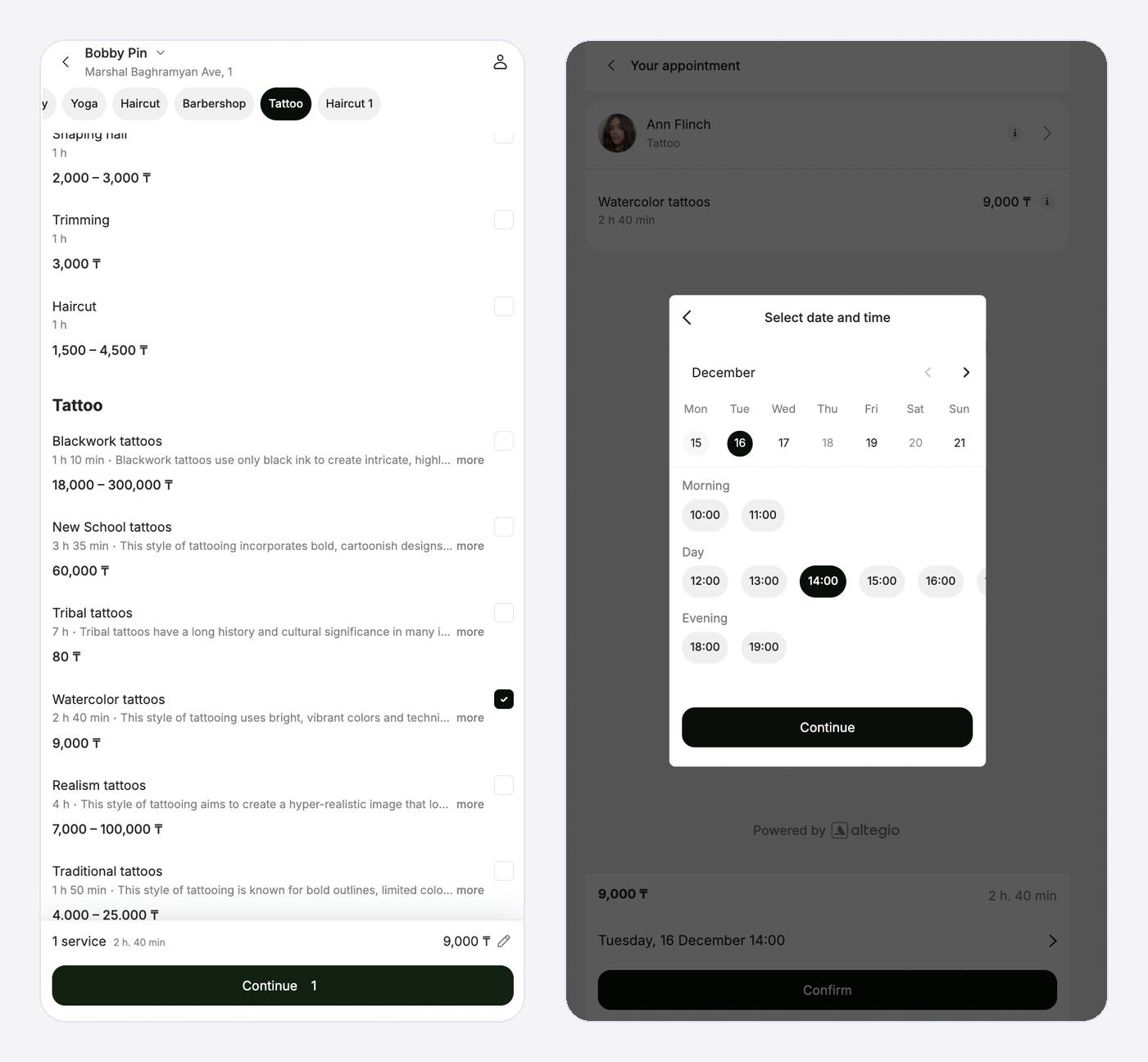
- The tap opens your Altegio online booking for that location: your services, your prices, the free time of your team members.
- The person picks a time and confirms. The appointment lands in Altegio like any other online appointment, with the client card, reminders and everything else you’ve set up.
- Altegio’s online booking tells Google that the appointment went through, and Google Ads counts it as a conversion.
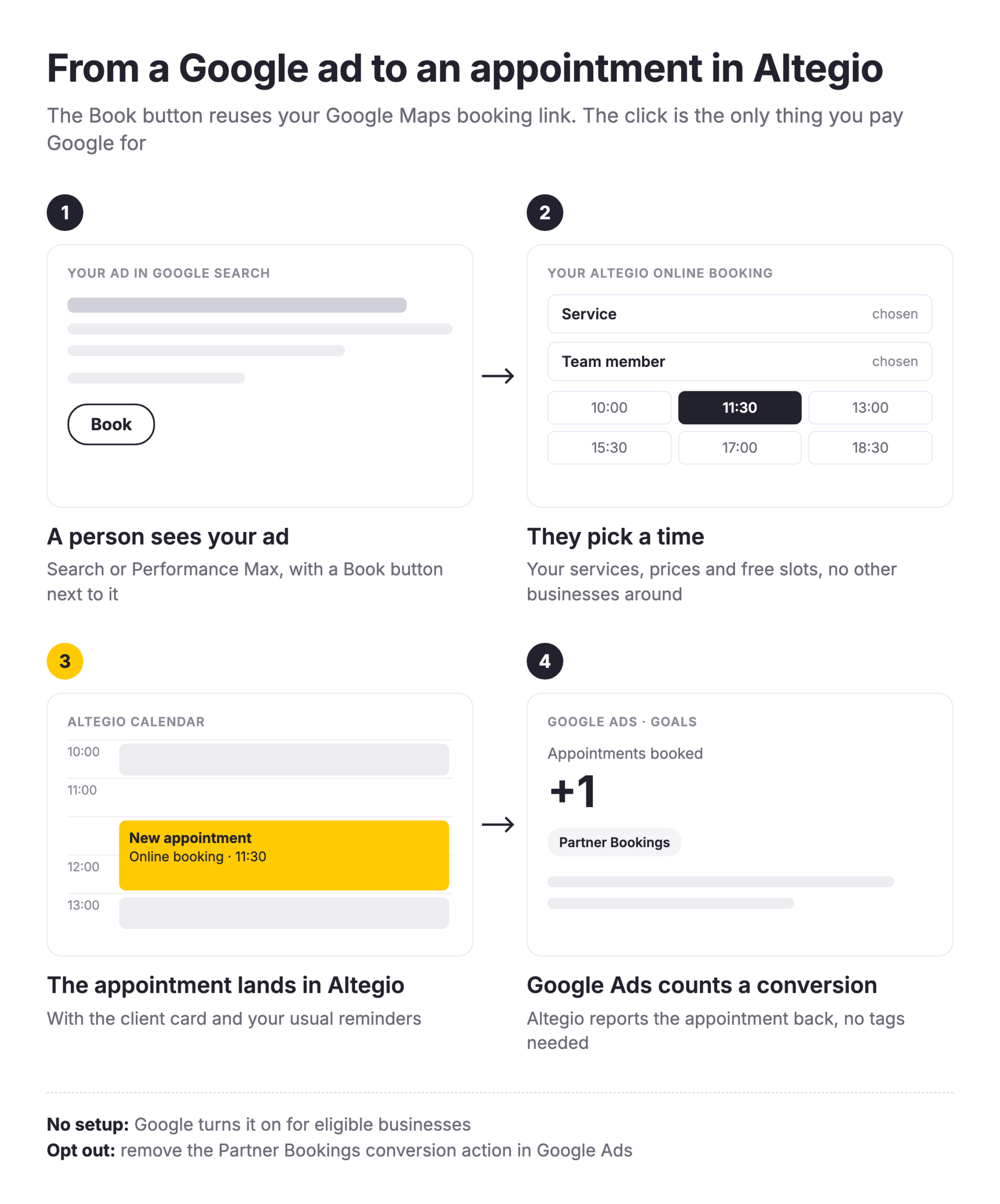
What’s the difference from a regular ad click? A regular click opens your website. From there the person still has to find the booking button or the phone number, and at 11 pm nobody picks up the phone. The Book button skips that middle part: one tap from the ad to choosing a time.
Who gets the button
Google decides which businesses and which ads show the button, but the conditions are known:
- The Google integration is connected in Altegio, and your location already shows the Book button on Google Maps. The ads reuse that button and its link.
- You run Search or Performance Max campaigns. Google rolled the button out to these two campaign types.
- Your Google Business Profile is linked to your Google Ads account, so that your ads can show your location. That’s how Google connects the ad to your booking link.
- Your business category is eligible. Google chooses which categories get the button. According to Altegio’s help center, these are beauty, sport and auto businesses. Healthcare is out: Google Ads doesn’t allow booking links or booking goals in healthcare campaigns.
- Your country is on Google’s list. Google publishes the countries where the button works: among them the USA, the UK, Canada, Australia, Brazil, the UAE and most of the EU, including Germany, France, Italy, Spain, Poland, Czechia and Hungary.
Even when all of this is in place, the button won’t appear on every impression. Google picks the ad format for each search, as it does with any other ad asset.
What it costs
You pay Google for the click, as before. A tap on Book is billed like any other click on your ad, and Google charges nothing extra for the appointment itself.
Altegio doesn’t take anything either. The Google integration is free, and there’s no commission per appointment. The client books with you, in your own online booking, and doesn’t see a list of other businesses next to yours: only your services and your team.
Here’s how the maths can look. Say a click on your ad costs €1.50 and one in four people who tap Book completes an appointment. One appointment then costs you €6 in ad spend. If the same click went to your homepage and only one in ten people booked, one appointment would cost €15. These numbers are an illustration, not a benchmark, so check them against your own account in a few weeks. The mechanism behind them is real, though: the fewer steps between the ad and a free time slot, the fewer people drop off on the way.
How the appointments show up in Google Ads
Counting real appointments rather than clicks is usually the hardest part of running ads for a service business. Here it works without any tags on your side.
In your Google Ads account, open Goals → Summary. There you’ll find a conversion action called Appointments booked, in the Partner Bookings category. It counts the appointments that clients made after tapping Book in your ad.
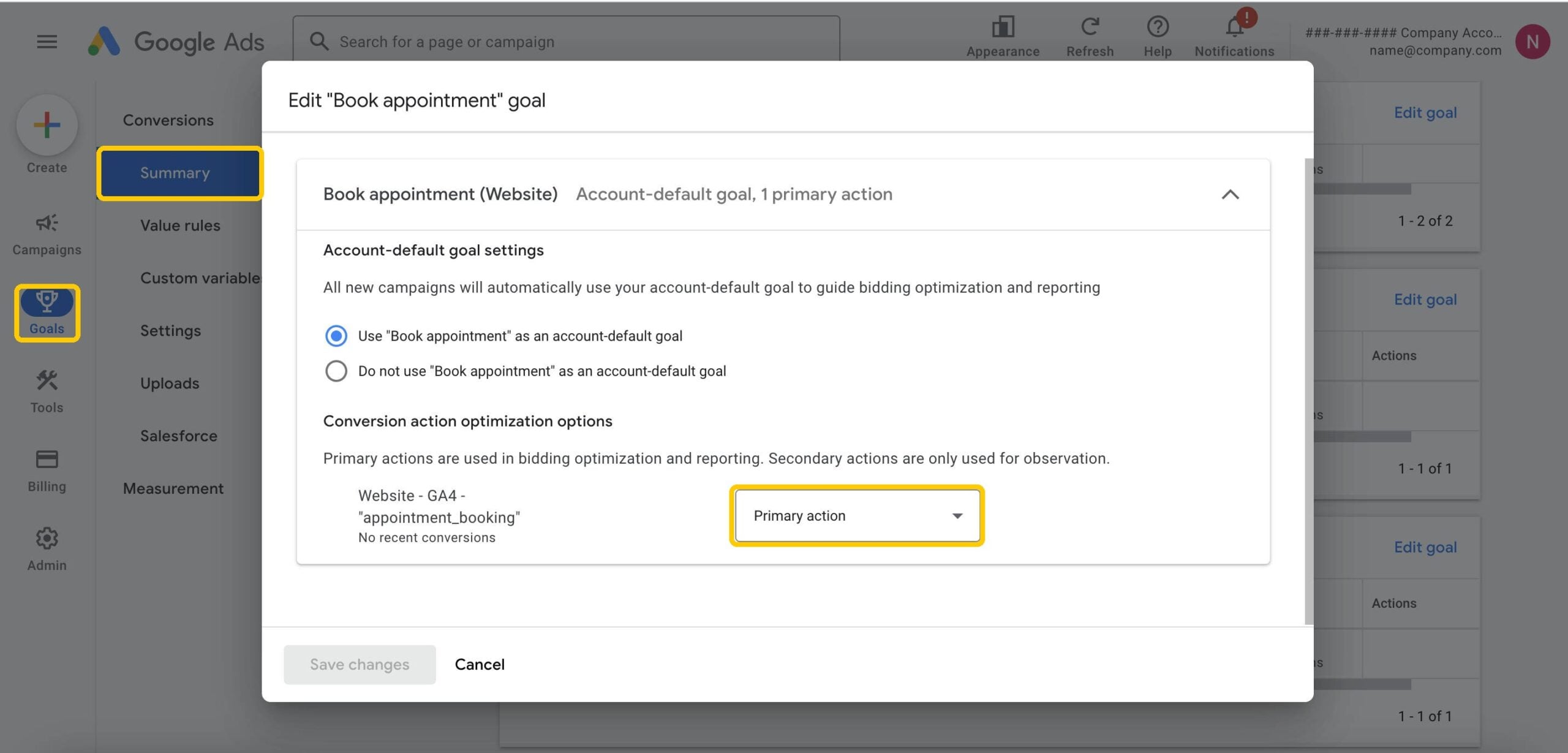
Two things are worth deciding now:
- Should bidding use it? Google makes Appointments booked available in your account but doesn’t add it to your campaigns automatically. As van Luijtelaar pointed out, available doesn’t mean active. If you want Google to optimize bids for real appointments rather than clicks, add it to the conversion goals of your Search and Performance Max campaigns.
- Is the same appointment counted twice? If you already track appointments from your Altegio online booking with Google Tag Manager or a Google Ads tag, one appointment made through the Book button can now be counted by both. Keep one of them as the primary action and set the other one as secondary, so that bidding sees each appointment once.
How to make each click count
The button brings people to your online booking. Whether they book depends on what they find there. This matters even more with Performance Max: according to Search Engine Roundtable, it will send budget to booking links even when the booking page behind them is poorly set up. These checks take a few minutes:
- Services have prices and descriptions. Google needs them to list your services. The description must be filled in and differ from the service name, the price must be at least $1 or the local equivalent, and service names shouldn’t start with a number, like “1. Manicure”.
- Team members have schedules open far enough ahead. If someone taps Book on Friday evening and finds no free time until next month, the click is lost.
- Online booking works well on a phone. Many people tap ads on their phone, often on the go. Open your booking link on your own phone and go through it the way a client would.
- Changes need a day to reach Google. Altegio sends services, prices and schedules to Google once a day, so an edit you make today will show up there after the next update.
How to connect the Google integration
The ads reuse the button from your Google Maps listing. If your location doesn’t have it yet:
- In Altegio, open Integrations and select Google Maps in the Client acquisition section.
- Click Connect and confirm the location you want to connect.
- Check that your business details match your Google Business Profile. If they don’t, sync them.
- Add schedules for team members who don’t have one, and fill in prices and descriptions for your services.
- Refresh the data and activate the integration.
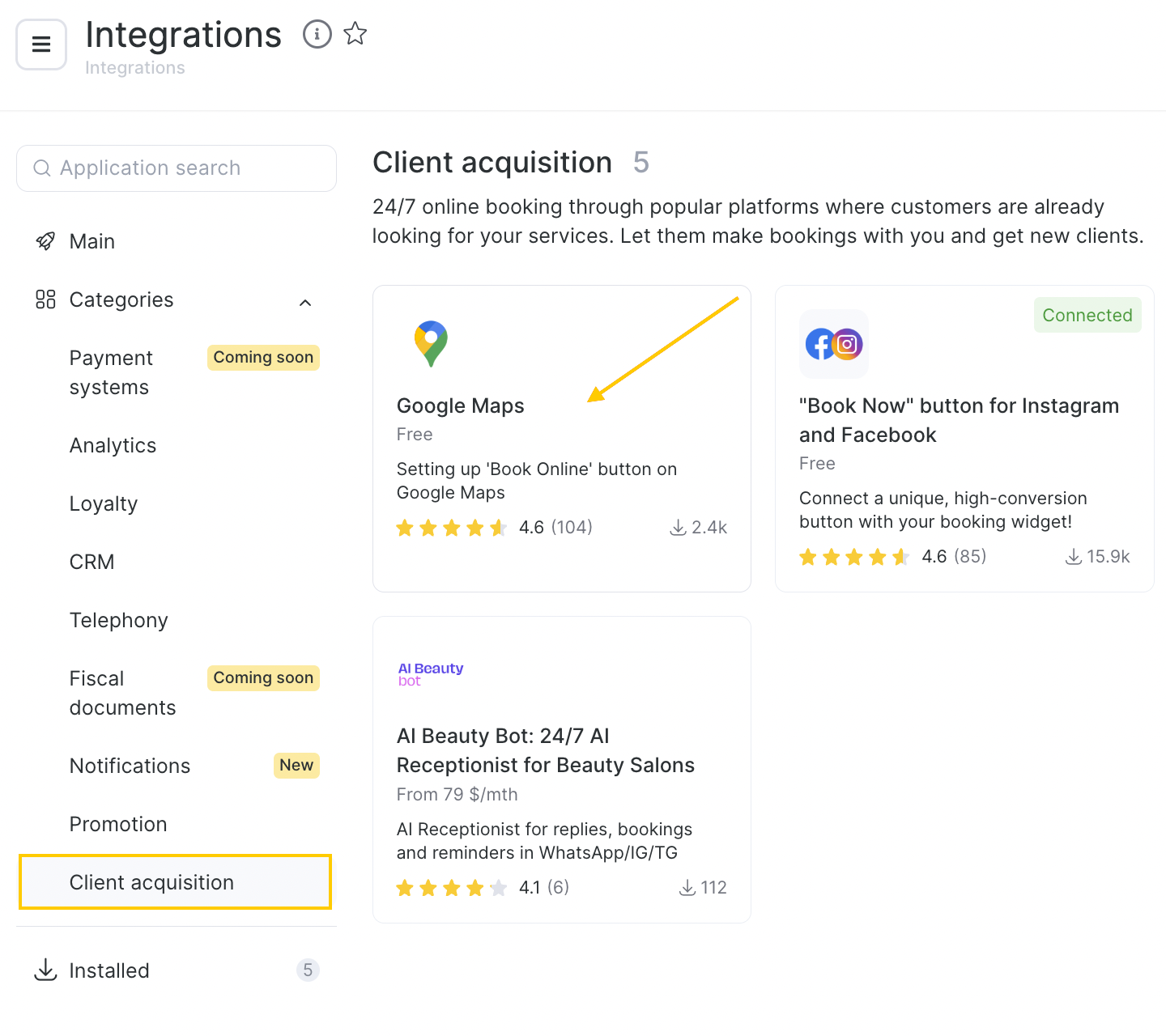
The button appears after the next daily update, not straight away.
If you don’t want the button in your ads
Some businesses prefer to send all ad traffic to their own website, and that’s fine. You can switch the button off in Google Ads: remove the Partner Bookings conversion action (Appointments booked) from your campaigns or from the whole account. Nothing needs to change in Altegio, and the Book button on your Google Maps listing keeps working.
Quick answers
Do I need to do anything?
No. If your business is eligible, Google adds the button by itself. It’s still worth checking the conversion settings in Google Ads, as described above.
Does the button replace the link to my website?
No. The ad keeps its usual link. Book is an extra way to act on it.
Where do these appointments appear in Altegio?
In the calendar, like any appointment made through online booking. Reminders, payment policies and the client card all work as usual.
I run a clinic. Will my ads get the button?
No. Google Ads doesn’t allow booking links or booking goals in healthcare campaigns.
I don’t advertise on Google. Does this change anything for me?
Not directly. The Book button on Google Maps and in Google Search works as before.
What to do today
If you already advertise on Google and your location has the Book button on Maps, open Google Ads, find Appointments booked under Goals and decide whether your campaigns should bid for it. If your location doesn’t have the button yet, connect the Google integration in Altegio first: it’s free and takes a few minutes.
And if you don’t use Altegio yet, try it free for 7 days and connect your online booking to Google from the start.
Source: Google Ads Help, About Partner bookings.