What is it and why is it needed? #
Sometimes you may need to accrue additional payments to an team member without creating a payroll statement. For this, the system provides Priority payments. These accruals are displayed in the team member settlements table and are added to the total together with other accruals when salary is paid out.
What types of priority payments are there? #
- Bonuses and penalties. They can be accrued based on various metrics that you set yourself. For example, a bonus for returning clients, no late arrivals, good performance, etc. Deductions — for being late, poor-quality work, damaged equipment, etc.
For the most common cases, you can create bonus and penalty templates so that later you can select a specific bonus type. More details on creating bonuses and penalties are available here. - Any accruals not provided by payroll calculation schemes. This may include vacation pay, rewards for outstanding achievements that are not covered by templates, etc.
How to create a priority payment? #
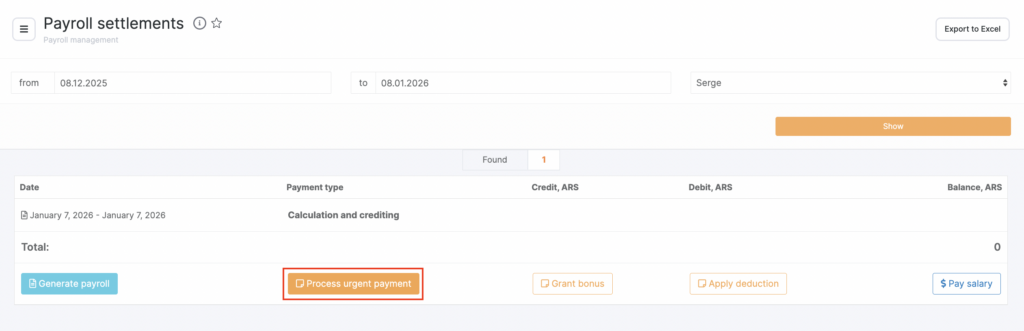
In Administration mode, go to Payroll > Settlements, select the period and the employee to whom you need to accrue the payment, and click Process urgent payment.
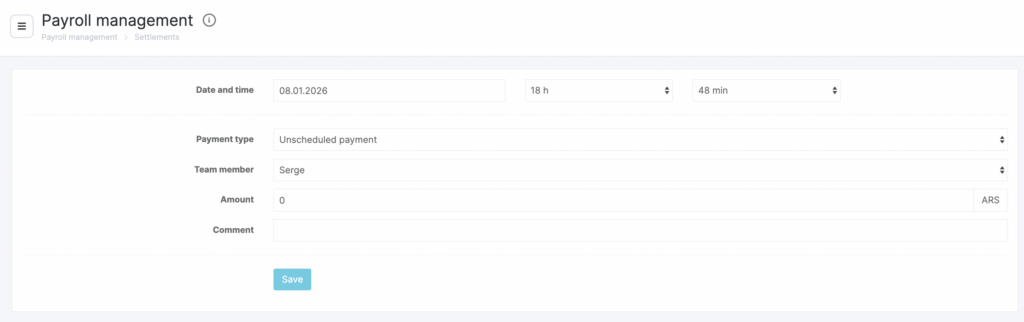
- Click Save.
- Specify the Date and time the accrual is created.
- Select the Payment type: urgent payment, bonus, or penalty. If you choose bonus or penalty, also specify the Bonus/Deduction type.
- Select the Team member who will receive the accrual.
- Enter the Payment amount (for the Priority payment type). If you choose a bonus or deduction, the amount from the template will be filled in automatically. If needed, you can change this amount.
- Add a Comment.