What is it and what is it for? #
In order not to configure the same team member in each location, you can configure them once in the chain interface or in one of the locations, and then make the team member chain or combine the same team member.
How to make a team member chain #
Option 1
Create a team member in the chain interface in the Team > Team section. In the Locations tab, check the boxes next to all locations where the team member works. For more information read the article: Setting chain team.
Option 2
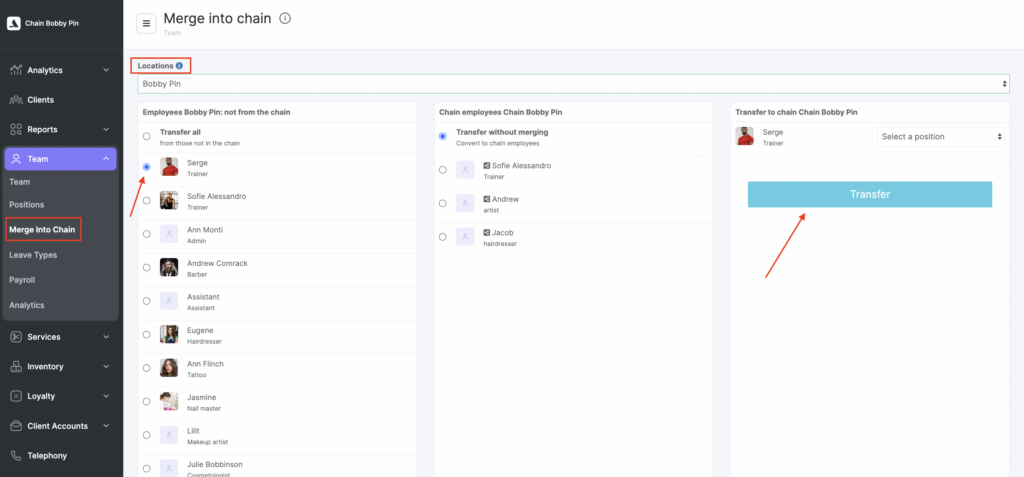
To transfer a team member from a location to the chain, go to the Team > Merge Into Chain section.
- Select the location where you want to transfer the team member from.
- Select the team member (you can also transfer all team members that are not in chain at once, to do this, select Transfer all).
- Select Transfer without merging.
- Select the position of the team member.
- Click the Transfer button.
Team members unification #
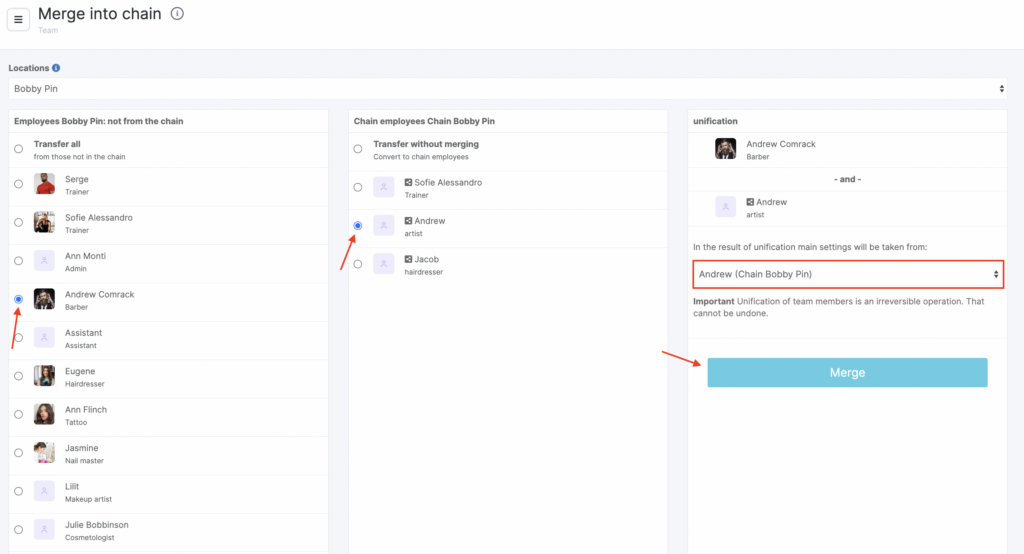
There may be a situation when the same team member from different locations appear in the chain interface. Such team members can be combined into one using the Merge button.
- Select a team member from one location, make it the chain one.
- From another location select the team member you want to merge. Select the chain team member you want to merge.
- Specify where the team member main settings are taken from: from the team member settings in the chain or from the team member settings in the location.
- Click the Merge button.
Note
Unification of team members is an irreversible operation. It can not be canceled!