What is it and why is it needed? #
With each cashless payment, the bank charges a fee as a fixed percentage, and this percentage is deducted from the company’s revenue. For more detailed expense tracking, you can set up automatic write-off of the fee when funds are credited to the cash desk for cashless payments.
Acquiring fee is a system expense payment item.
Expenses under the Acquiring fee item will be shown in Finance > Financial transactions, in the financial report for a period, and in the P&L report.
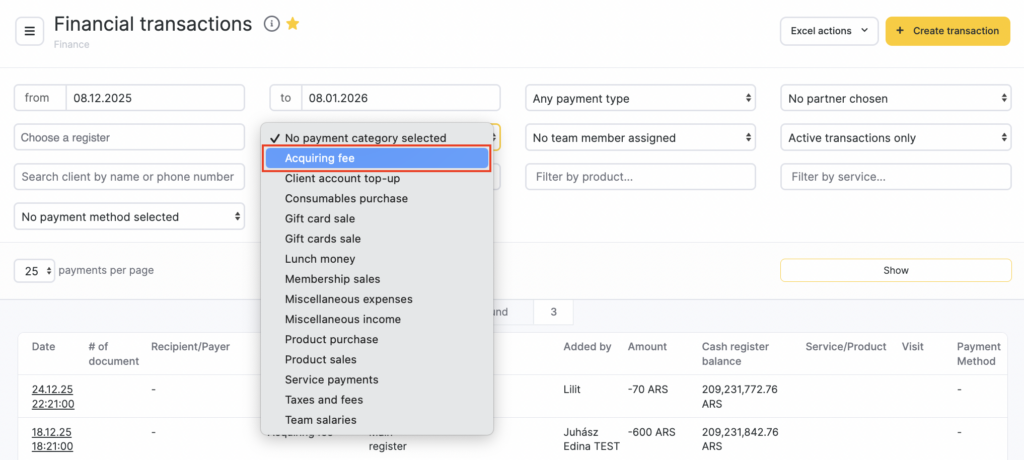
After a successful transaction, a corresponding operation appears in the list of financial transactions.

On the financial transaction page for the acquiring fee write-off, you can navigate to the main service/purchase transaction by clicking Funds receipt transaction, and back by clicking Write-off transaction.
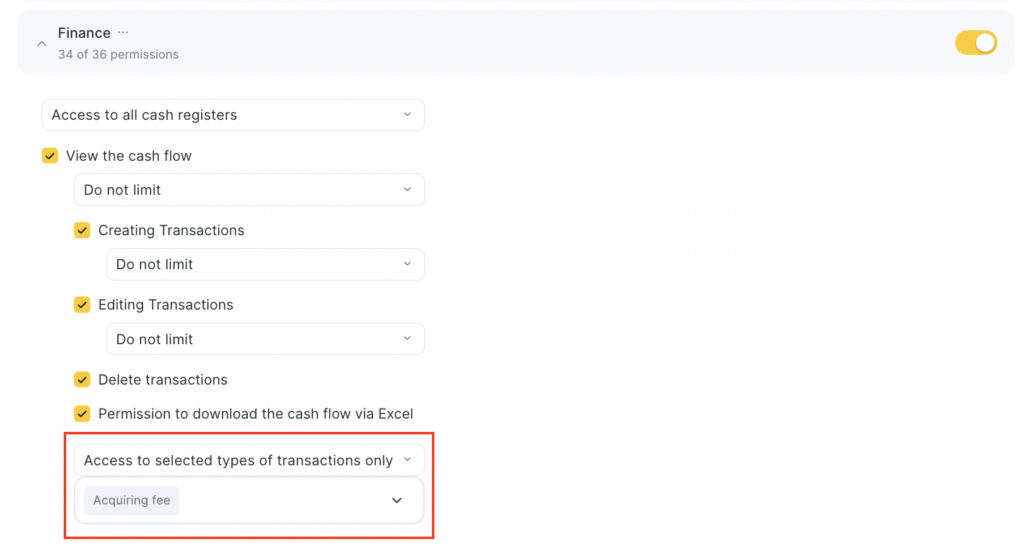
To view the acquiring fee write-off transaction, configure the user’s access rights to transaction types in the Finance section. Grant the employee access to all transaction types, or, if only to selected ones, check Acquiring fee.
For more details on configuring access rights to the Finance section, see the article.
Setup #
To configure fees, go to Finance > Payment Methods and Fees. For more details on setup, see the article.
Important
If the amount of the original transaction changes, the amount in the fee transaction changes automatically.If you change the fee percentage in Finance > Payment methods and fees, the new fee is applied only to new transactions.
If you change the cash desk in the original financial transaction:
— if you change from a cash desk with a fee to a cash desk without a fee, the fee write-off transaction is deleted;
— if you change from one cash desk with a fee to another cash desk with a fee, the cash desk is updated in the fee write-off transaction;
— if you change from one cash desk without a fee to another cash desk without a fee, no changes occur;
— if you change from a cash desk without a fee to a cash desk with a fee, a fee write-off transaction linked to the original transaction is created.
— if you change the date/time of the original transaction, the date of the linked fee write-off transaction changes.
— if you change the date/time of the original transaction, the date of the linked fee write-off transaction changes.
— if you change the payment item in the original transaction from an income item to an expense item, the linked fee write-off transaction is deleted.