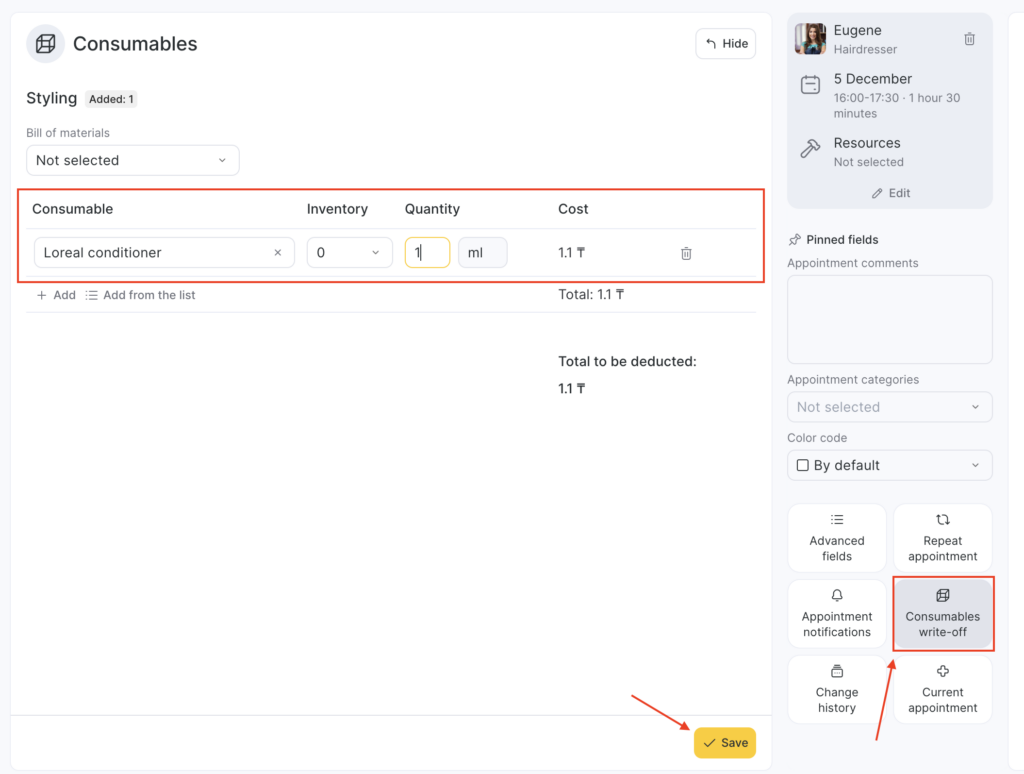
With this tab, managing consumables is a breeze. Here’s what you can do:
- Edit information about consumables by adding them using the Add a consumable button or adding multiple consumables at once using the Add from the list button.
- Change the quantity of consumables as needed.
- Manage the inventory from which the write-off happens as necessary.
- Delete consumables easily by clicking the bin button.
- Manually modify the bill of materials.
By using this tab, you can streamline your inventory management process and ensure that you have the necessary consumables on hand when you need them.
Note
If an appointment includes multiple identical services (for example, not “haircut and manicure,” but two haircuts), then in the Consumables write-off section you must specify the quantity of consumables for one service.
When you process an inventory operation, the system will automatically deduct the product in proportion to the number of services in the appointment. For example, if 2 identical services are added, the consumables will be deducted in double the amount.