
Altegio is improving how VAT numbers are collected and validated for EU-based businesses. This update helps ensure your subscription price is calculated correctly and your VAT invoice is issued accurately.
If your business is registered in the EU and you pay for an Altegio subscription or top up your balance, you may be asked to enter or confirm your VAT number more often than before.
This functionality applies to EU businesses only.
Why we’re introducing VAT validation #
VAT rules in the EU depend on your business location, the country of the payment recipient, and whether you have a valid registered VAT number. To calculate your final price correctly, Altegio must confirm that the VAT number is valid and belongs to your company.
This update helps make VAT pricing more transparent and reliable for both your payments and billing documents.
Altegio will:
- validate the VAT number you enter using a more reliable check than basic format validation
- request VAT confirmation before key payments to ensure your VAT data is up to date
- calculate subscription pricing based on validated VAT data and country rules on Altegio’s side
- add a confirmation checkbox so the responsibility for the entered VAT number is clearly tied to the account owner
- automatically fill your VAT number if you entered it previously
When you will be asked to enter or confirm VAT #
You may be asked to enter or re-confirm your VAT number:
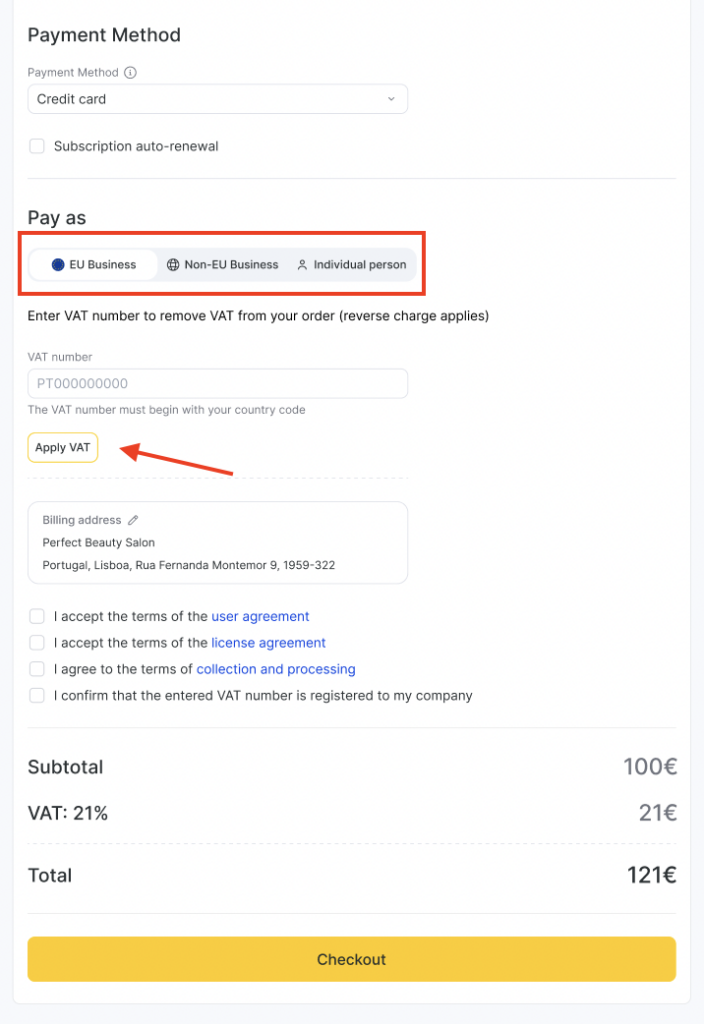
- before each subscription payment
- before each balance top-up
This is because VAT registration details can change over time, and the correct price depends on current VAT status.
How VAT validation works #
Altegio performs a basic validation to confirm:
- the VAT number exists and is valid
- the VAT number matches the location’s country
If a more advanced external VAT verification service becomes available, we may enhance validation further.
How the subscription price is calculated #
The final price depends on your VAT status and country setup.
If you enter a valid VAT number and your country is different from the country receiving the payment, the subscription price may be shown without VAT.
In all other cases, the price remains with VAT, including when:
- you do not enter a VAT number
- the VAT number is invalid
- your country matches the country receiving the payment
Note
The VAT calculation also depends on where Altegio’s payment system is currently connected. If the payment recipient country matches your country, VAT is applied according to local rules.
Confirmation checkbox #
To complete VAT-based pricing, you will need to confirm:
“I confirm that the entered VAT number is registered to my company.”
This helps ensure only correct VAT numbers are used for pricing and invoicing.
Notifications if your VAT number is incorrect #
If your account already has an invalid VAT number, you may see an informational banner prompting you to update it.
You may also see reminders encouraging you to enter a correct VAT number if you want VAT-based pricing to apply.
What you should do #
If you are an EU business:
- enter your company’s registered VAT number carefully
- make sure the country code and number match your legal registration
- confirm ownership of the VAT number using the checkbox
- update your VAT when your company details change

