In the Reports > Events section, you can view information on all events (group appointments) created in Altegio. This includes events created by any users who have permission to create appointments, events with any status, and deleted events.
The section contains the following information:
- Bookings for the period — this metric shows the ratio of the total number of bookings for group events to the total capacity of all group-event sessions for the selected period;
- Attended for the period — the share of clients who attended a group event out of the total capacity of group events for the period;
- Paid for the period — this metric shows the ratio of fully paid bookings for group events to the total capacity of all group events for the selected period;
- Average group occupancy — this metric shows the ratio of the average group attendance (i.e., clients who attended the group event) to the average group capacity;
- the team member who provided the service;
- the service the booking was made for;
- the event date;
- capacity information;
- the number of bookings for the event;
- the number of clients who attended the event;
- information about fully paid bookings within the event;
- the total amount paid;
- which team member created the event;
- the event duration.
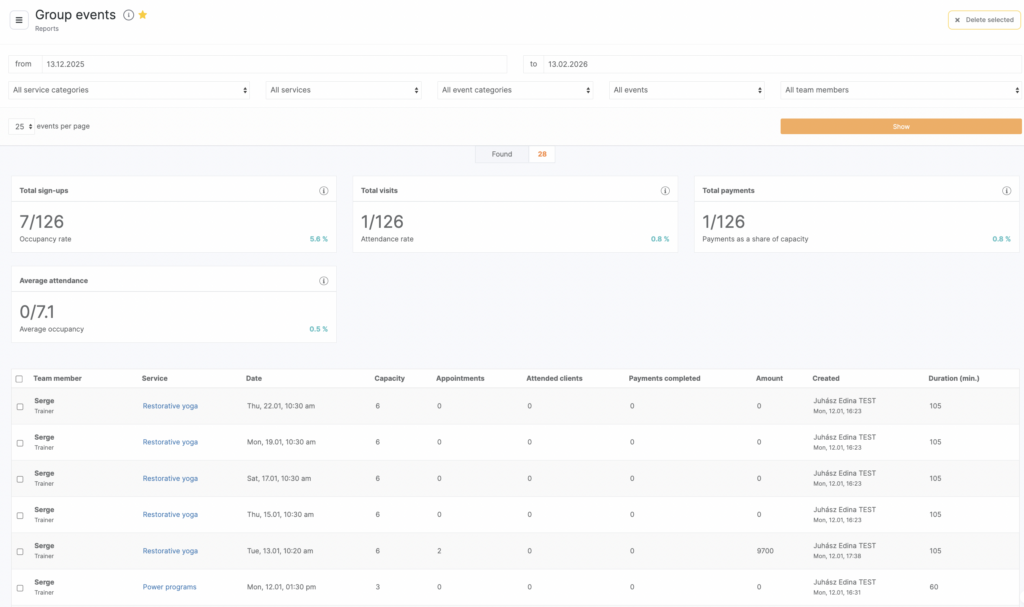
All appointment data can be revised separately due to the convenient filter options:
- Period
- Team member
- Services
- Service categories
- All events/canceled/not canceled
Filter the list by the required items and click Show.
The data in the Service column is presented as clickable links. Click the link with the name of the service to go to the event card. Each event can be edited and/or deleted. Select the required events for deleting (check boxes), the Delete selected button will be active, click it. The events will be deleted from the appointment calendar, and in the Reports > Events section the row with the event data will change color to pink.