
Altegio offers the convenience of performing financial operations automatically or manually. For instance, payment for services (if you’re using the Appointment Calendar) and payment for products (when selling products) are processed automatically. However, some operations need to be done manually, and you’ll need to enter payment information by hand.
One of the essential steps to create a transaction manually is selecting the Payment item.
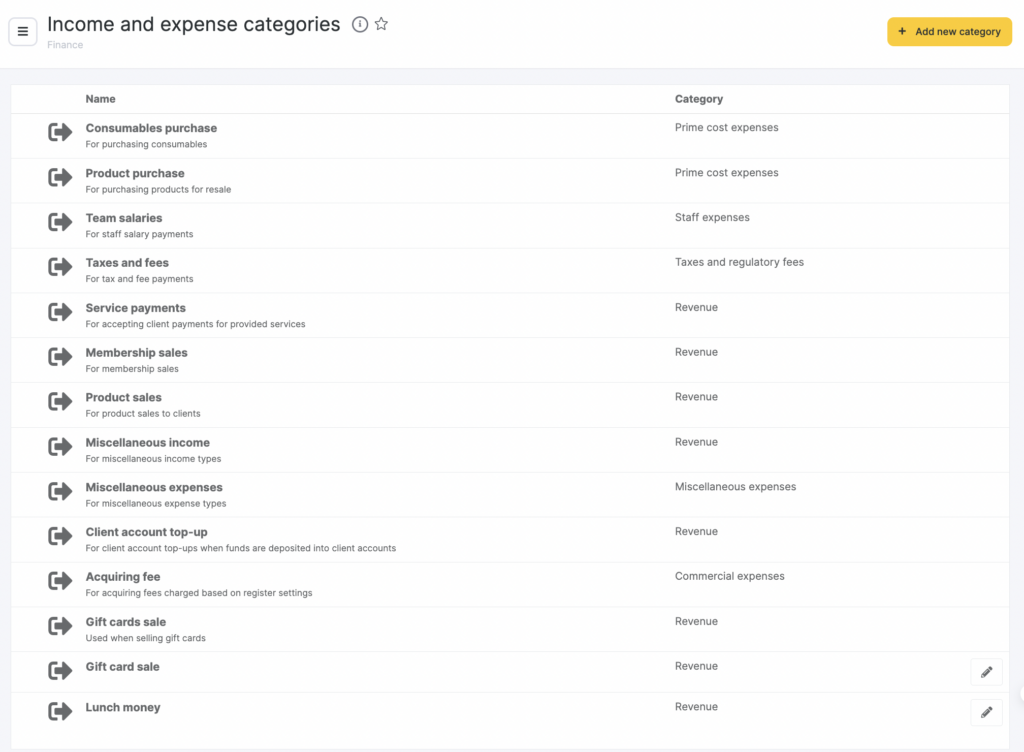
By default, there are 12 payment items in Altegio:
- Consumables purchase. This item shows funds spent on purchases of consumables for work.
- Product purchase. Shows the sum spent on purchases of products. You can learn in more detail about the arrival of products here.
- Team salary. With this item you will indicate the sum paid to the team members as paycheck. Read about payroll payments in detail here.
- Taxes and fees. This item indicates transactions made to pay for taxes and other state charges.
- Service fees. This item is indicated for income from provision of services that was put into the cash register.
Example
In a beauty salon, a receptionst can manually create a payment with the purpose “Service provided” if a client paid for a consultation, a master class / training session, or an individual service that isn’t listed in the price list.
- If you need to you can add new items. You can learn about creation of new items here in more detail.
- Membership sales. Indicates sums received for sale of memberships for services of the business.
- Product sales. Shows income received from sale of products in addition to services provided.
- Miscellaneous income. Shows other income that wasn’t indicated in other items.
- Miscellaneous expenses. Assigned to payments that weren’t indicated in other items.
- Client account top-up. Used when the client is depositing funds into their personal account.
- Acquiring fee. Used when an acquiring fee is charged (if it’s specified in the cash register’s settings).
- Gift cards sale. Used for the sale of gift cards.
If needed, you can add new payment categories. For more details on how to create new categories, see here.

