
If your team runs group events (for example, workouts, master classes), enable the compensation setting for group events.
After you have configured the General payroll calculation settings and set up reward accrual rules for services and base salary, move on to configuring compensation rules for group events.
Configure how payment will be calculated:
- For hosting an event regardless of the number of participants.
- For each attending client.
- Only after reaching a minimum number of participants.
Setup #
In Administration mode, go to Team > Team members list, click the required team member’s name, and open the Payroll tab.
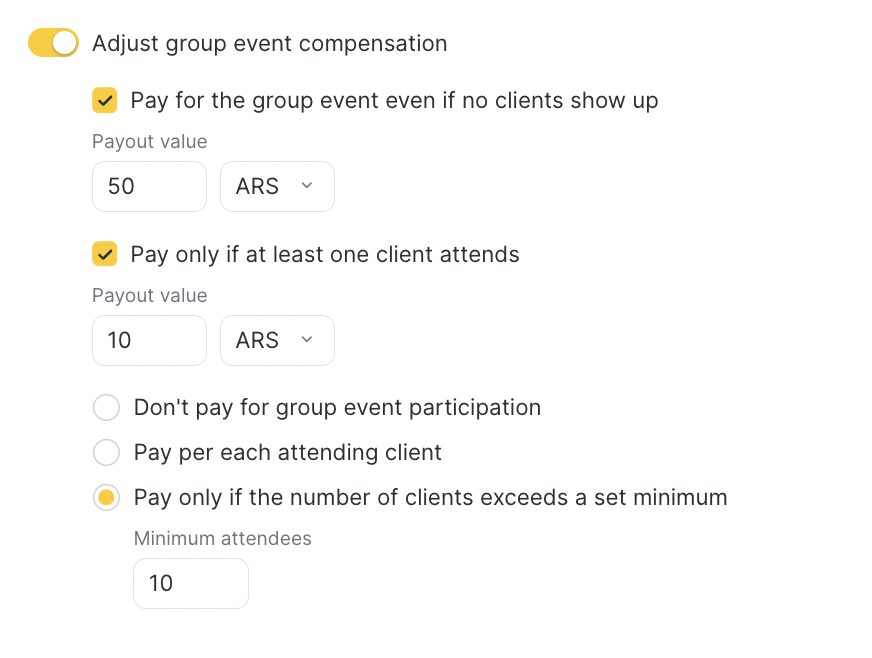
- Enable the Pay for group events toggle.
- Select Minimum compensation (no clients attended).
- Enter the payout amount to be used if no clients attended the class. You can set it as a fixed amount or as a percentage. If you choose a percentage, the system will calculate the employee’s payout as a percentage of the service price.
- Select Compensation if at least one client attended (the service price is taken from the service settings, without discounts or admin changes).
- Enter the payout amount to be used if at least one participant attended. This value can also be set as a fixed amount or as a percentage — if you choose a percentage, the system will начислить the employee a percentage of the service price.
- Configure additional compensation settings:
- Do not pay extra for participation in a group booking. No additional compensation is начисляется per client. The employee will receive only the minimum compensation or the compensation for at least one client (if specified).
- Additional compensation for each client who attended. For each client, payroll is calculated according to the payroll calculation rules for services. For example, if an event includes 5 clients, the employee will receive compensation for each of the 5 clients who attended.
- Additional compensation for each client who attended, if the number of clients who attended exceeded N clients.
If the number of clients exceeds the specified threshold, compensation is paid for each additional client (the service price is taken from the appointment card).
Example: If the Minimum participants field is set to 5 clients, and 7 clients attended the event, then the compensation will be calculated separately for each of the two clients — both the 6th and the 7th.
Configuration examples #
- Payment only if clients attended
Setting: Pay only if at least one client attended.
Example: If no one attended, the team member gets 0. If at least 1 client attended, the team member gets a fixed 20 R$.
- Percentage payment for the event (not per client)
Setting: Pay only if at least one client attended + percentage payout.
Example: The team member gets 50% of the service price if at least 1 client attended (the percentage is not multiplied by the number of participants).
- Extra pay per participant
Setting: Additional compensation for each client + “If the number of clients exceeds = 0”.
Example: The team member gets 60% of the service price for each client.
If 7 clients attended → payout: 7 × 60% of the visit price.
- Base payout even if there are no clients
Setting: Base compensation (client attendance not required).
Example: 0 participants → the team member still gets 5% of the service price.
Each participant additionally adds 60% of the visit price.
- Threshold + extra pay per client above the threshold
Setting: Pay if at least one client attended + extra pay for clients above the defined threshold.
Example: 1–10 participants → the team member gets 60% of the service price.
11+ participants → the team member additionally gets 15% for each client above 10.
How to set up payroll accrual for product sales and for clocking in / starting a shift is explained in detail in the article Simplified payroll calculation setup for team members (individual appointments).

